Start with the platform where you need a changed layout to work. Conventional controllers such as DualSense Edge and Xbox Elite Series 2 can suit players who need remaps, saved profiles and rear controls, while PlayStation Access and Xbox Adaptive Controller offer documented options when orientation, external inputs or physical button placement matter; PC players should also check game support and the connection required for configuration.
Who these controllers suit
PS5 players needing a changed layout
For players who want to move frequent actions to back buttons, save game-specific profiles, adjust stick or trigger settings, or move beyond a standard PS5 layout with an Access controller. PlayStation Support and PlayStation documentation describe these options for the relevant controllers.
Xbox and Windows players needing extra inputs
For players choosing between a conventional controller with paddles and profiles, or an adaptive setup that can use external switches, buttons or joysticks. Xbox Support documents both routes for their stated platforms.
PC or Switch-and-PC players using configuration software
For players who need configurable mapping on Windows or a Switch-and-Windows setup and should check the game, operating system and connection method before depending on a saved profile. PlayStation Support, 8BitDo and Steam describe configuration features under their stated conditions.
Buying priorities
Work from the physical change you need, then confirm the exact platform, game and connection method before choosing a controller.
| Priority |
What to check |
Your needs |
| Remaps and profiles |
Check which buttons can be reassigned, whether rear buttons or paddles are included, and how profiles are created and switched. |
I want important commands within easier reach and separate layouts for different games. |
| Physical layout change |
Check for orientation settings, interchangeable caps, large buttons, external-input ports and whether compatible switches or joysticks are needed separately. |
I need more than a conventional grip with extra rear controls; the position, size or type of input may need to change. |
| Platform and setup |
Confirm the exact console or operating system, the game’s controller support, and whether configuration requires USB or a manufacturer wireless adapter rather than Bluetooth. |
I need the altered layout to work on my main device and in the games I actually play. |
Common buying pitfalls
-
Treating remapping as a physically different layout
Paddles and reassigned buttons can move commands, but they do not move the main controls. If orientation, input size or physical placement is the issue, an adaptive route may be more appropriate.
List the actions required in your main game, then decide whether a conventional remap is enough or whether you need external inputs, orientation adjustment or alternative caps.
Adaptive setups can require separately selected external switches, buttons or joysticks.
-
Assuming Bluetooth enables every PC configuration feature
Xbox Support says the Xbox Accessories app does not detect Elite Series 2 over Bluetooth on PC, and many app features are not supported through that connection. Xbox Adaptive Controller profile creation on PC is documented for USB-C.
Before buying, confirm that you have a suitable USB data cable or, where supported, an Xbox Wireless Adapter for the configuration method you need.
-
Choosing by controller name instead of supported platform
Documented platform scope differs by model: PlayStation Access is documented for PS5, Xbox Adaptive Controller for Xbox and Windows, and the 8BitDo Ultimate 2 Bluetooth Controller for Switch and Windows.
Match the exact model to every device where you need the changed layout. Do not infer console compatibility from generic Bluetooth, USB-C or PC support.
-
Changing trigger travel without checking the trade-off
PlayStation states that DualSense Edge trigger effects do not work when its stop sliders are set to medium or shallow strokes.
Use shorter trigger travel only when faster actuation matters more to you than trigger effects, and keep a separate profile where different games need different settings.
Relevant controller brand references
PlayStation
PlayStation offers the conventional DualSense Edge controller and the Access controller kit for substantially different PS5 input arrangements.
- PlayStation Support documents button assignments, profile storage and PC profile editing for DualSense Edge.
- Access supports configurable orientation, button caps, external controls through four 3.5 mm ports and up to 30 profiles on PS5, according to PlayStation.
- The researched UK Access documentation is PS5-specific and does not establish PC compatibility for Access.
Xbox
Xbox provides a conventional Elite Series 2 route with paddles and profiles, alongside Xbox Adaptive Controller for externalised and programmable inputs.
- Microsoft documents Elite Series 2 remapping, up to three stored profiles and compatibility with Xbox consoles and Windows PC.
- Xbox Adaptive Controller has large programmable buttons and ports for external controls.
- For Windows configuration, Microsoft documents USB or an Xbox Wireless Adapter requirement for Elite detection, and USB-only profile creation for Adaptive Controller.
8BitDo
8BitDo provides a configurable controller route for players documented to use Switch 1/2 and Windows rather than PS5 or Xbox consoles.
- For Ultimate 2 Bluetooth Controller, 8BitDo states that R4/L4 buttons can be remapped and that three profiles are available.
- The manufacturer describes Ultimate Software V2 controls for mapping, stick and trigger settings, vibration and macros.
- 8BitDo specifies Switch 1/2 and Windows compatibility for this model; its software connection uses wired USB or 2.4G on Windows or macOS.
Joybuy product options
Joybuy product options for players seeking remappable controls, altered conventional layouts or modular controller arrangements on Xbox, PlayStation and Windows-compatible setups.
 No image available
Microsoft Official Xbox Elite Wireless Controller Series 2
For Xbox or Windows play where saved remaps and rear controls can keep frequent actions closer to your grip.
This model states three onboard profiles, button mapping, four remappable back paddles, interchangeable stick caps, adjustable stick tension and trigger stops. On Windows, use USB or a compatible Xbox Wireless Adapter for Xbox Accessories configuration rather than Bluetooth. It retains a conventional Xbox-shaped layout.
Joybuy
 No image available
Sony DualSense Edge PS5 Wireless Controller – White
For PS5 or Windows players who want configurable back-button inputs and different saved layouts by game.
It has interchangeable back-button sets, profile switching, adjustable stick settings and trigger travel controls. PlayStation states that medium or shallow trigger-stop settings disable trigger effects. It remains a conventional controller rather than a repositionable adaptive input kit.
Joybuy
 No image available
Turtle Beach Victrix Pro BFG Reloaded Modular Controller – White
For PS5, PS4 or Windows players who want to change their control arrangement between fighting, FPS and general play.
The stated configuration includes interchangeable FPS, Fightpad and general-purpose modules, a six-button Fightpad option, mappable controls, stick dead-zone settings and trigger settings. Check Control Hub support for your intended platform and connection before relying on a particular configuration.
Joybuy
 No image available
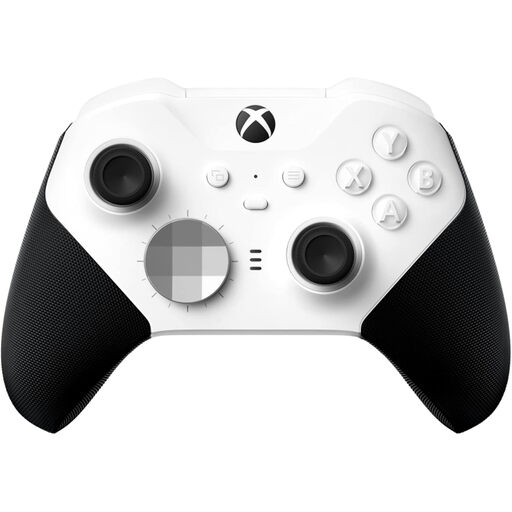
Xbox Elite Wireless Controller Series 2 Core – White
For Xbox and Windows players who want remapped controls and adjustable inputs while keeping a conventional controller shape.
The stated features include Xbox Accessories button remapping, custom profiles, adjustable-tension sticks and hair-trigger locks. Microsoft says most Xbox Accessories app features are not supported through Bluetooth on Windows. Confirm final package contents, including any optional Series 2 accessories, before buying.
Joybuy
 No image available
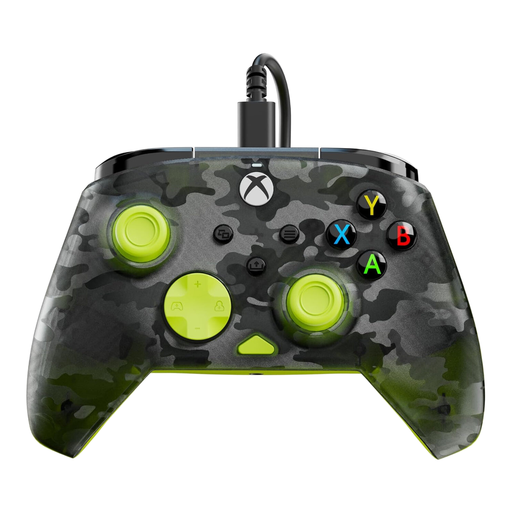
Turtle Beach Rematch Core Controller for Xbox and PC – Ghost Camo
For Xbox and Windows players who want selected actions assigned to rear controls in a wired conventional controller.
The listed 8 ft USB-C connection supports Xbox and Windows PC use, and the controller has mappable back buttons configured through Turtle Beach control software. It is wired only and does not provide stated external-input ports, orientation changes or alternative physical button positions.
Joybuy
Frequently asked questions
Can I create and switch DualSense Edge button profiles on a Windows PC?
Yes. PlayStation Support states that the PlayStation Accessories app can create, edit and switch DualSense Edge custom profiles on PC, with profiles saved to the controller. Check that the game or application itself supports controller use.
Can I configure an Xbox Elite Series 2 controller through Bluetooth on Windows?
Do not rely on Bluetooth for configuration. Xbox Support says the Xbox Accessories app does not detect Elite Series 2 when it is connected to a PC by Bluetooth; use a USB cable or, where compatible, an Xbox Wireless Adapter to configure it.
Does the PlayStation Access controller have documented PC compatibility?
The available UK PlayStation documentation covers Access controller configuration for PS5 consoles. Choose it for PS5 unless current documentation for your particular PC setup confirms compatibility.
Will an Xbox Adaptive Controller work without additional controls?
It has large programmable buttons, but its main advantage is connecting separately selected external switches, buttons and joysticks. List every action required by your game and check that the physical controls you plan to use can cover them.


