For Xbox and Windows players who need paddles and stored layouts, the Xbox Elite Wireless Controller Series 2 is a documented option; for PS5 players who want rear controls and profile switching, consider DualSense Edge. The 8BitDo Ultimate 2 Wireless offers a software-configured route for Windows play, while the Xbox Adaptive Controller offers a different input arrangement if a conventional handheld layout does not suit you. Check your platform, games and setup connection before choosing: Microsoft says Xbox Accessories on Windows cannot configure the Elite Series 2 over Bluetooth.
Who needs a different control layout?
Xbox and Windows players who use several layouts
If you want actions on paddles rather than face buttons, or change layouts between games, look at both remapping and profile switching. Xbox Support documents up to three stored profiles for the Elite Series 2.
PS5 players who want rear controls
DualSense Edge is relevant if you want to reassign button inputs, use back buttons or switch profiles during play. PlayStation also documents profile configuration through its Windows app.
PC-first players considering software remapping
If you mainly play on Windows, check whether the controller’s configuration software provides the assignments you need. 8BitDo documents key configuration through Ultimate Software V2; game and device support still need to match your setup.
What should you check before choosing?
Start with the platform you play on, then check how you will create, save and use the layout—not just whether a controller has extra buttons.
| Priority | What to check | Your needs |
|---|
| Button placement |
Check which inputs can be reassigned and whether rear controls send the button inputs your games need. PlayStation Direct documents configurable back buttons on DualSense Edge; Xbox documents remapping for its controller range. |
I want frequently used actions within reach without relying on the default face-button layout. |
| Platform and setup |
Confirm support for the exact console or PC operating system, the configuration app and its connection method. Microsoft says Xbox Accessories on Windows needs USB or a compatible Xbox Wireless Adapter to configure Elite Series 2, rather than Bluetooth. |
My controller needs to work where I play, and I need a practical way to set up the layout there. |
| Changing layouts |
Check where profiles are stored and how they are selected. Xbox Support documents up to three stored Elite Series 2 profiles; PlayStation documents DualSense Edge profile setup and switching. |
For different games, I would rather switch layouts than rebuild the same button assignments each time. |
| Physical controls |
Check whether a conventional handheld gamepad suits the arrangement you need. Xbox Support documents remapping for the Xbox Adaptive Controller through Xbox Accessories; confirm the compatible inputs needed for your intended arrangement. |
A different arrangement of controls matters more to me than adding buttons to a standard gamepad. |
| Replaceable parts |
Check the replacement route for the particular component, plus current part availability and warranty terms. PlayStation Support documents replaceable DualSense Edge stick modules; that does not establish the same route for other models. |
If a stick module fails, I want to know whether that part can be replaced before choosing the controller. |
Which assumptions can cause problems?
-
Assuming PC compatibility means Bluetooth configuration
Microsoft says Xbox Accessories on Windows cannot detect an Elite Series 2 over Bluetooth for configuration, even though the controller supports Windows play.
Check the setup connection as well as the play connection; for this controller’s Windows configuration, Microsoft specifies USB or a compatible Xbox Wireless Adapter.
-
Assuming rear buttons can perform any game action
PlayStation Direct describes DualSense Edge back buttons as assignable to other button inputs. That does not establish support for every game-specific action or macro.
List the actions you want to move, then check the exact controller’s mapping options and your games’ controller support.
-
Assuming trigger adjustments have no trade-off
PlayStation Support says medium or shallow trigger-stop settings on DualSense Edge disable the trigger-effect function.
Decide whether shorter trigger travel or game-supported trigger effects matter more in the titles you play.
-
Assuming every premium controller has replaceable controls
PlayStation Support documents replacement of DualSense Edge stick modules. A replaceable stick module does not mean every component has the same replacement route.
If repairability affects your choice, check the exact part, its availability and the applicable warranty terms before ordering.
Relevant controller brands
Xbox
Xbox offers distinct routes here: the conventional Elite Series 2 for mapped controls and stored profiles, and the Adaptive Controller for a different input arrangement.
- Xbox Support documents up to three stored profiles for Elite Series 2 and button remapping through Xbox Accessories.
- On Windows, Microsoft says Bluetooth does not provide the required Xbox Accessories configuration connection for these controllers; check the USB or compatible-adapter setup.
PlayStation
DualSense Edge provides a PS5-focused route with configurable back buttons, profile controls and replaceable stick modules.
- PlayStation documents Windows profile configuration through PlayStation Accessories and a replacement process for DualSense Edge stick modules.
- PlayStation Support says medium or shallow trigger stops disable trigger effects; replacement stick modules are separate accessories.
8BitDo
The Ultimate 2 Wireless is a PC-oriented option for players considering software-configured controls.
- 8BitDo lists Windows and Android compatibility for the Ultimate 2 Wireless and describes key configuration and macros in Ultimate Software V2.
- Check support for the exact device, connection and game rather than assuming its software features apply on Xbox or PS5 consoles.
Joybuy controller options
These options cover Xbox and PlayStation gamepads with different control-layout approaches, plus a mobile controller with a PC-use route. Compare each model with the platform and controls you actually need.
 No image available
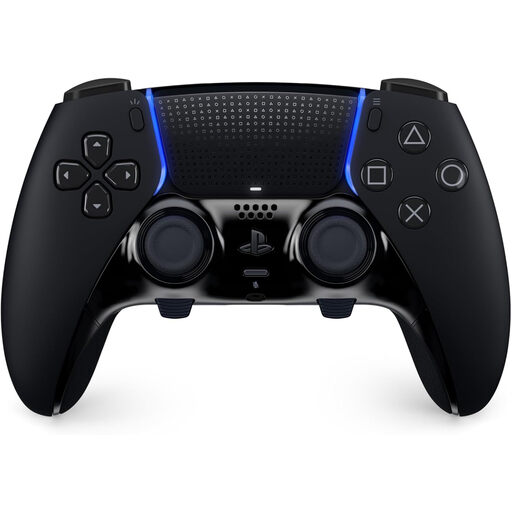
Sony DualSense Edge PS5 Wireless Controller — Midnight Black
For PS5 layouts that need reassigned inputs, PlayStation documents configurable back buttons and profile controls for DualSense Edge. Its stick modules can be replaced separately; medium or shallow trigger stops disable trigger effects.
View on Joybuy
 No image available
Microsoft Xbox Elite Wireless Controller Series 2 (Xbox One, Series X|S, PC)
For Xbox or Windows play with layouts you can change, Xbox Support documents up to three profiles stored on the Elite Series 2. To configure it through Xbox Accessories on Windows, use USB or a compatible Xbox Wireless Adapter rather than Bluetooth.
View on Joybuy
 No image available
Turtle Beach Victrix Pro BFG Reloaded Wireless Modular PlayStation Controller — White
Consider this modular controller if changing the physical control arrangement matters to your PlayStation or PC setup. Before relying on it for several game layouts, confirm the exact mapping options and how profiles are saved or switched.
View on Joybuy
 No image available
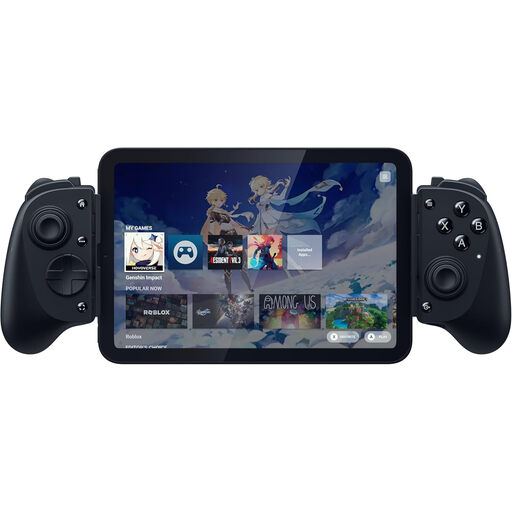
Razer Kishi V3 Pro Full-Size Mobile Controller for Smartphones (8'')
This is a mobile-first choice to examine if you also plan to play on PC. Check that your device fits and that its control assignments suit your games; direct PC use requires a separately sold USB-C cable.
View on Joybuy
 No image available
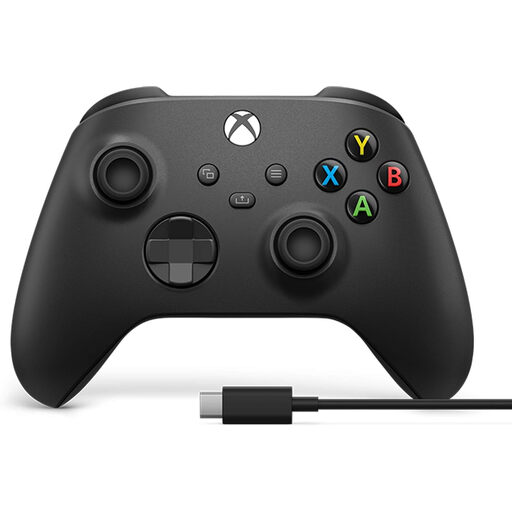
Xbox Wireless Controller + USB-C Cable (Series X|S, One, Windows)
For Xbox or Windows play, this bundle includes a controller and USB-C cable. If your choice depends on several saved layouts or extra physical controls, confirm those features and the Xbox Accessories setup workflow for this exact controller.
View on Joybuy
Common questions
Can I set up controller layouts on a Windows PC over Bluetooth?
Not for Xbox Elite Series 2 configuration through Xbox Accessories: Microsoft says the Windows app will not detect it over Bluetooth for that task. Use USB or a compatible Xbox Wireless Adapter. PlayStation separately documents DualSense Edge profile setup through PlayStation Accessories on Windows; check its connection instructions for your setup.
Can I replace a DualSense Edge stick module?
Yes. PlayStation Support documents how to remove and replace a DualSense Edge stick module and says its left and right modules are interchangeable. A replacement module is a separate accessory, so check that you can obtain one if this affects your decision.


