Choose a controller for the device you play on and the particular action you struggle to reach. On PS5, DualSense Edge offers a conventional shape with mappable back buttons, while PlayStation Access allows a more adaptable physical setup; Xbox and PC players can consider compatible controllers with remapping or additional controls. Check how settings are configured and whether the game supports any features you need.
Who needs a different controller layout?
PS5 players who need a different button layout
If familiar PS5 inputs are hard to reach, consider whether remapping on a conventional pad is enough or whether the position and form of the controls need to change. PlayStation describes those different options for DualSense Edge and Access.
Xbox or Windows players who need reachable extra inputs
Rear controls may let you move frequently used inputs away from the face buttons. Check the exact Xbox or Windows compatibility and the number of controls you can remap.
PC players willing to configure software profiles
Software-led remapping can suit players who use different layouts, provided the controller, configuration app and connection mode work together on their PC.
What matters when choosing a controller?
Check device compatibility and the method for changing the layout before counting extra buttons. Then decide whether you need easier reach, profiles for different games or a different physical arrangement altogether.
| Concern | What to check | Who this matters to |
|---|
| Device compatibility and setup |
Confirm the exact console or PC, configuration app and required connection method. Xbox Support says Elite Series 2 configuration on Windows needs USB or a compatible Xbox Wireless Adapter rather than Bluetooth. |
I need to change the layout on the device I actually use, not merely connect the controller to it. Roughly 36% of consumers put compatible setup first. |
| Reachable additional controls |
Count the available rear or upper-finger controls and confirm which existing inputs they can reproduce on your platform. |
When a face-button action interrupts my grip, moving it to a finger I can reach is the priority; around 29% of consumers put control reach first. |
| Profiles and remapping |
Check where profiles are saved, how you switch them and which connection modes permit editing. Xbox Support says Elite Series 2 stores up to three profiles on the controller. |
I change layouts between games and do not want to rebuild them each time. For about 21% of consumers, profile handling is the primary need. |
| Physical arrangement |
If moving inputs is not enough, check positioning, mounting and compatible external controls. PlayStation Access is a PS5-specific option with four 3.5 mm expansion ports. |
A standard pad shape still puts controls in the wrong place for me, even after remapping; approximately 14% of consumers prioritise a more adaptable physical setup. |
Mistakes that can complicate your setup
-
Assuming remapping works over every connection
A controller may connect for play without allowing configuration in the same mode. Xbox Support says its Windows app does not detect Elite Series 2 over Bluetooth; 8BitDo Support specifies wired or 2.4 GHz PC configuration for its cited Ultimate Bluetooth controller.
Check the exact model, app, operating system and connection needed to edit settings before ordering.
-
Expecting rear buttons to create new game commands
PlayStation describes DualSense Edge back buttons as mappable to other button inputs. Extra controls can make an existing action easier to reach, but they do not establish that a game offers a new command.
Identify the actions you want to move, then check the game’s controls and the controller’s mapping options.
-
Choosing a new controller shape for a remapping problem
PlayStation Access supports a broader PS5 arrangement, including positioning and external inputs. If only one or two actions are difficult to reach, a conventional controller with mappable rear buttons may address the narrower requirement.
Work out whether the difficulty is reaching an existing button or arranging the controls physically before choosing a setup.
An expanded Access arrangement may also require compatible switches or a mount for the layout you intend to use.
-
Checking only the manufacturer’s warranty
A warranty and your rights if goods are faulty are separate matters. GOV.UK describes legal protection for consumer purchases, while Xbox Support says its service terms depend on where the device was bought.
Keep your order confirmation and check the retailer’s fault-support process as well as the manufacturer’s warranty terms.
Controller brands for reference
PlayStation
PlayStation offers two distinct PS5 approaches: DualSense Edge retains a conventional controller shape, while Access supports a configurable physical arrangement.
- DualSense Edge has mappable back buttons; Access has configurable inputs and expansion ports, according to PlayStation.
- Access is PS5-specific, and DualSense Edge haptic-feedback and adaptive-trigger features depend on game support.
Xbox
Xbox Elite Wireless Controller Series 2 Core is an official option for Xbox consoles and Windows PC, with mapping through Xbox Accessories.
- Xbox Support says up to three profiles can be saved to the Elite Series 2 controller.
- On Windows, the configuration app requires USB or a compatible Xbox Wireless Adapter rather than Bluetooth for this model.
Razer
The Xbox-licensed Wolverine V3 Tournament Edition is a wired Xbox and PC option for players considering rear and upper-finger controls.
- Razer specifies four back buttons and two claw bumpers as remappable controls on this model.
- Its wired design does not suit a requirement for wireless play.
8BitDo
Selected 8BitDo controllers use companion software for changing layouts and managing profiles; supported devices and methods vary by model.
- 8BitDo lists Windows and Android compatibility for Ultimate 2 Wireless.
- For the separate Ultimate Bluetooth controller, 8BitDo Support specifies wired or 2.4 GHz PC configuration rather than Bluetooth. Check the instructions for the exact model you choose.
Joybuy controllers for layout changes
These PlayStation-oriented controllers are relevant if you want to change the position of familiar game inputs. Check the setup method for your chosen device, especially if you also intend to play on PC.
 No image available
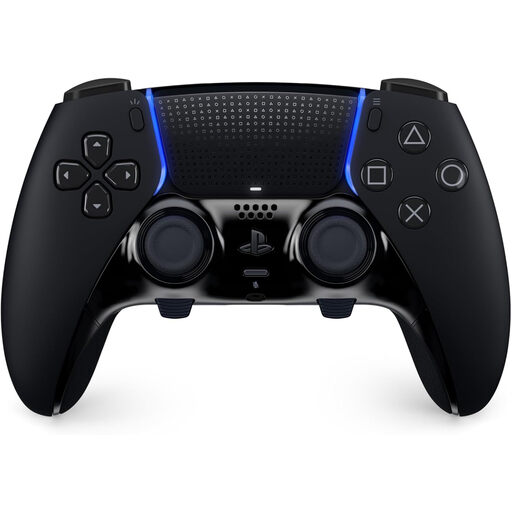
Sony DualSense Edge PS5 Wireless Controller – Midnight Black
Consider this conventional PS5 controller if moving an existing input to a back button would make it easier to reach.
PlayStation says DualSense Edge back buttons can be mapped to other button inputs. Check the game’s control options for the action you need; haptic feedback and adaptive triggers depend on game support.
If you plan to use it with Windows, confirm compatibility and the configuration method for your setup before buying.
View on Joybuy
 No image available
Turtle Beach Victrix Pro BFG Reloaded Wireless Modular PlayStation Controller – White
Consider this PlayStation-oriented model if you want to assess a modular controller for a difficult layout.
Confirm that its mapping options cover the actions you need. Check the supported wired and wireless modes and how configuration works on your intended platform before buying.
View on Joybuy
Questions about controller remapping
Can remapping add a command that a game does not offer?
No: mapping an existing controller input to another button does not establish a new game command. Check the game’s control options to see whether the difficult action can be assigned to an input your controller can move.
Will my controller profiles travel with the controller?
That depends on the model. Xbox Support says Elite Series 2 saves up to three profiles on the controller, while PlayStation Access profiles are created in PS5 settings. Check where your chosen model stores layouts and how you switch between them.
Can PlayStation Access handle every PS5 game on its own?
Do not assume it can. PlayStation says Access can be combined with another Access controller or a DualSense or DualSense Edge, and that certain games may require a DualSense or PlayStation VR2 Sense controller for their full set of functions. Check the controls required by the games you intend to play.
Does a manufacturer’s warranty replace my rights if a controller is faulty?
No. A manufacturer’s warranty is separate from UK statutory consumer rights for faulty goods. Keep proof of purchase and contact the retailer about a fault; check the manufacturer’s terms separately if you also want to use its warranty service.


