What should you check before choosing?
Start with the playing platform, then decide whether you need different commands on familiar buttons or a different physical arrangement.
| Priority | What to check | Your needs |
|---|
| Platform and setup |
Confirm support for your exact console or operating system, the configuration app and the connection used during setup. Xbox Support says Xbox Accessories is available on Xbox consoles and Windows, but most app features are not supported over Bluetooth on Windows. |
I need to change the controls on the device where I actually play, not just pair the controller with it. |
| Physical layout |
Identify whether rear buttons or trigger adjustments are enough, or whether you need movable controls and compatible external inputs. PlayStation describes DualSense Edge back-button mapping and a separate modular Access controller route for PS5. |
If a button is difficult to reach or the controller position is the issue, simply assigning that action to another face button may not address it. |
| Saved layouts |
Check whether the exact model stores profiles and how you switch them. Xbox says Elite Series 2 holds up to three custom profiles and a default profile; PlayStation describes profiles for its PS5 Access controller. |
Different games call for different command positions, so I want to know whether changing layouts means setting them up again. |
| Game controls |
Inspect each game’s own remapping and input options. For PC play, check whether Steam Input supports your controller session and offers the bindings you need; Steam describes custom bindings for supported controllers. |
A reassigned controller button helps only if the resulting actions and interactions suit the games I play. |
Joybuy controller options
These options cover conventional controllers for Xbox, PS5 and Nintendo Switch play, plus a modular PS5 controller. Match each model’s platform and controls to the layout change you need.
 No image available
Microsoft Xbox Elite Wireless Controller Series 2
Consider this conventional controller if you play on Xbox or Windows and want to switch between prepared control layouts. Xbox says this model stores up to three custom profiles plus a default profile. For configuration on Windows, check access to USB or a compatible Xbox Wireless Adapter rather than relying on Bluetooth.
View on Joybuy
 No image available
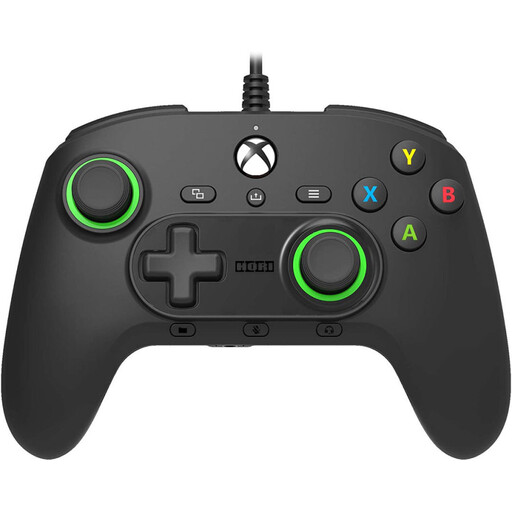
HORI HORIPAD Pro for Xbox Series X / Xbox One S
This is an Xbox-labelled option to investigate if reassignment of controls matters to you. Confirm the exact model’s connection type and configuration steps before buying, particularly if you intend to set it up on Windows.
View on Joybuy
 No image available
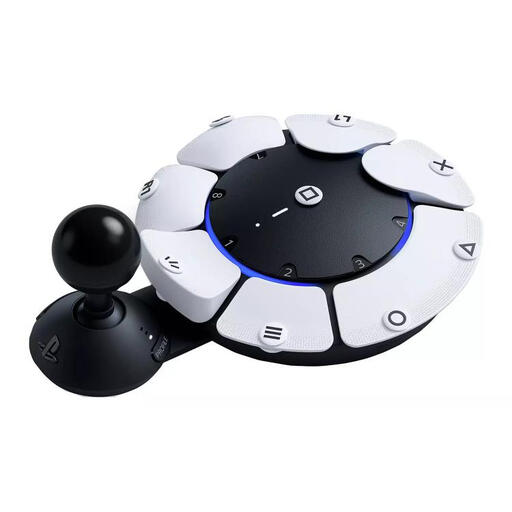
PlayStation Access Controller Kit for PS5
Consider this PS5 kit when a different physical arrangement matters more than adding buttons to a conventional controller. PlayStation describes alternate button caps, adjustable orientation, four 3.5 mm expansion ports and up to 30 control profiles. Check which compatible external inputs your intended setup would require; do not assume the PS5 configuration route applies to PC games.
View on Joybuy
 No image available
Sony DualSense Edge for PS5, White
This PS5 controller suits a choice centred on moving selected actions while keeping a conventional handheld shape. PlayStation describes mappable back buttons, trigger adjustments and switchable control profiles for DualSense Edge. If PC remapping is essential, check the exact configuration route before choosing it.
View on Joybuy
 No image available
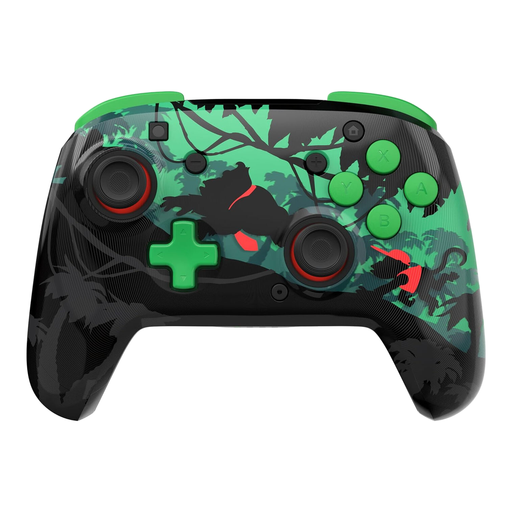
Turtle Beach Rematch Wireless for Nintendo Switch, Donkey Kong Reveal
This Nintendo Switch variant is worth checking if you want to move a small number of actions rather than change the controller’s physical arrangement. Confirm that its mapping controls cover the actions you need, and check profile switching if you use different layouts between games.
View on Joybuy
Questions about remapping
Can I configure an Xbox controller on Windows over Bluetooth?
Do not rely on Bluetooth for Xbox Accessories configuration on Windows. Xbox Support says most app features are not supported over that connection and advises using USB or a compatible Xbox Wireless Adapter for configuration. Check the connection required by your exact model.
Can I save different control layouts for different games?
Some models support saved layouts, but check the exact controller. Xbox says Elite Wireless Controller Series 2 stores up to three custom profiles plus a default profile; PlayStation describes control profiles for its PS5 Access controller. Profile support on one model does not establish it for every controller from the same brand.
When does a PS5 Access controller make more sense than DualSense Edge?
Consider the Access controller when you need a modular physical arrangement, alternate caps or compatible external inputs. PlayStation’s DualSense Edge is the conventional-shape option when mappable back buttons and other adjustments meet your needs. Check the controls required by your games before choosing either PS5 route.
Will controller remapping cover every PC game interaction?
No controller-level mapping guarantees that every interaction will suit your layout. Check the particular game’s input settings as well as the controller’s options. Steam describes custom bindings through Steam Input for supported controller sessions, so check support for the controller and game you plan to use.


