PS5 local-match host
You host basketball matches on PS5 and need enough controllers for everyone playing in the same room, with a workable plan for identifying players and charging between sessions.


Choose a controller that works with your console and basketball game, then make sure you have enough compatible controllers for the local mode you intend to play. In a dark room, consider how you will recognise controls and identify players, alongside charging or cable arrangements; controller-body RGB lighting does not necessarily illuminate button labels.
You host basketball matches on PS5 and need enough controllers for everyone playing in the same room, with a workable plan for identifying players and charging between sessions.
You use a Nintendo Switch setup and would like to share a Joy-Con pair between two people when your basketball game and its chosen mode accept individual Joy-Con.
You play on Xbox or Windows PC and are weighing wireless use against controller-body lighting, tactile controls or a fixed wired connection.
Start with the console, game edition and local-player mode. Once those fit, decide how you want to recognise the controls in low light and keep every controller ready for the match.
| Concern | What to check | Who this matters to |
|---|---|---|
| Game and player compatibility | Check the console generation, game edition, local-player limit and controller required for each player. PlayStation Store UK lists 1–4 players for NBA 2K26 on PS5; Nintendo says its Switch 2 edition needs one compatible controller per multiplayer player. | If I am hosting a local match, everyone needs a controller that works with the game and mode we have chosen. Around 36% of consumers put that compatibility first. |
| Finding controls in the dark | Distinguish player indicators and controller-body RGB from explicitly backlit button markings. PowerA specifies lighting zones on its Lumectra controller, but that alone does not establish illuminated labels. | In a dim room, I want to recognise my controls without interrupting play to look closely at them. Around 29% of consumers prioritise low-light orientation. |
| Charging and cable reach | Check the charging or battery method for each controller, and whether a wired controller’s cable reaches the seating position without obstructing the room. | When several people play again later, I do not want a flat controller or an awkward cable to hold up the match. Around 21% of consumers put session management first. |
| Customisable inputs | Look for documented button mapping or trigger settings on a controller compatible with your platform; confirm whether the intended game supports the features you want. | For closely contested matches, I care most about a control layout I can adjust and use consistently. Around 14% of consumers make customisable inputs their primary concern. |
A controller intended for another console may not work with your game or local mode. Nintendo specifies one compatible controller per multiplayer player for NBA 2K26 on Switch 2.
Confirm the console generation, basketball game edition and supported controller arrangement before choosing a colour or extra controls.
Lighting on a controller’s body does not, by itself, tell you whether its face-button labels are illuminated. PowerA describes lighting zones on its Lumectra model.
If visible button markings matter to you, look for an explicit description of them. Otherwise, consider how familiar the layout feels and whether modest room lighting would help.
A shared match depends on having a compatible controller ready for each player, as well as a practical way to power or connect them.
Count players and check charging methods, available connections and seating distance before settling on a setup.
Depending on the setup, additional controllers, a charging accessory or a different cable arrangement may be needed.
GOV.UK advises that electrical products and batteries bearing the crossed-out wheelie-bin symbol should go to an appropriate recycling collection point.
Check the marking on the item and use an appropriate electrical-waste or battery collection point when disposing of it.
The Xbox Wireless Controller is a conventional wireless option for Xbox console and Windows PC players.
DualSense controllers are relevant when you need more controllers for local play on PS5.
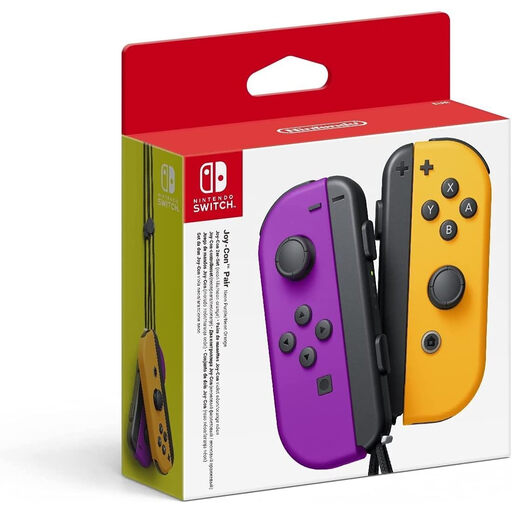
Joy-Con suit Switch players considering a shared-controller arrangement for a supported game.
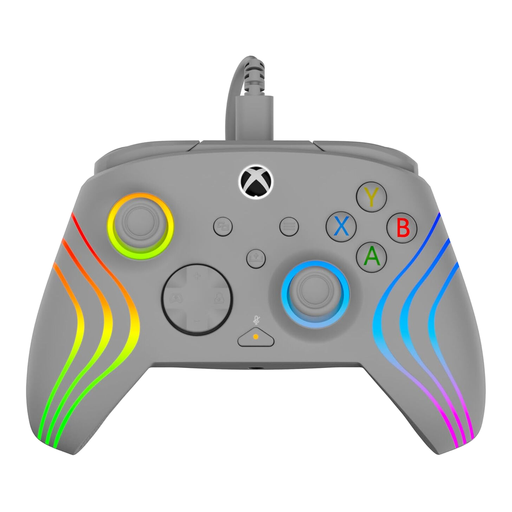
Its cited Lumectra wired controller is an Xbox-focused option for players interested in controller-body lighting.
The Wolverine V3 Tournament Edition is a wired Xbox and PC option for players considering configurable controls.
These options cover wired Xbox controllers, a PS5 controller and a Nintendo Switch Joy-Con pair. Choose within your console’s compatible range, then check the basketball game’s local-control requirements and whether each player can use the arrangement you plan.
 No image available
Consider this for an Xbox setup where a fixed wired connection suits your seating position. Check the cable route, your basketball game’s controller requirements and any lighting features you need for recognising buttons.
 No image available
This wired Xbox and PC option suits a fixed playing position if RGB controller lighting interests you. Confirm the cable route and game compatibility, and check separately for illuminated button markings if you need them.
 No image available
Consider this PS5 wireless controller when adding a player to a local setup. Check your game’s supported player count and controller features, and plan how you will charge every controller between matches.
 No image available
This pair is worth considering for a Nintendo Switch game that accepts individual Joy-Con for separate players. Check your exact console generation and basketball game mode before relying on the pair for a two-person match.
 No image available
This is another wired choice for a fixed Xbox or Windows PC setup. Before buying for a shared basketball match, check your game’s controller support and whether the cable can be routed safely to your seat.
Have a compatible controller for each player your game and chosen mode support. For NBA 2K26 on PS5, PlayStation Store UK lists 1–4 players and PlayStation says a PS5 can use up to four controllers simultaneously; Nintendo says NBA 2K26 multiplayer on Switch 2 needs one compatible controller per player.
Not necessarily: controller-body lighting is different from illuminated button labels. PowerA specifies lighting zones on its Lumectra controller; if backlit markings matter to you, check for an explicit description of that feature rather than relying on an RGB label.
No, support for those controller features can vary by game. Check the basketball game’s feature listing for the controller and platform you intend to use, rather than choosing on those features alone.
Take electrical products and batteries bearing the crossed-out wheelie-bin symbol to an appropriate recycling collection point rather than putting them in household rubbish, as GOV.UK advises.