For detective series in a dark room, start with the image detail you want to see in shadowed scenes, rather than choosing by brightness alone. Consider a 4K/HDR home-cinema model if large-screen detail is your priority; a Full HD projector is a proportionate alternative if straightforward series viewing matters more. Whichever route you take, check that the image fits your room and that your streaming and audio devices can connect.
Who is this for?
Dark-scene detail seekers
If clues, faces and objects in shadowed scenes are your priority, compare the exact model’s resolution and HDR handling. BenQ describes dark-detail processing on its W2710, but that model-specific claim does not establish how other projectors will look in your room.
Fixed-room home-cinema planners
If you have a particular wall or screen in mind, work out where the projector can sit before choosing a model. Epson lists zoom and lens shift on the EH-TW7000; check the adjustment range and throw distance against your own layout.
Big-screen series streamers
If you want a simple way to watch series on a large image, Full HD may meet your needs without making 4K the deciding feature. Check how your services will reach the projector, whether through its built-in platform or an HDMI device.
What matters when choosing?
Decide what you most want from dark-room viewing, then check whether the projector fits your screen position and connects to your sources. Brightness is worth considering in the context of the room, not as a substitute for those checks.
| Concern |
What to check |
Who this matters to |
| Detail in dark scenes |
Check native resolution and supported HDR formats for the exact model and source device. Assess dark-scene handling separately from a stated contrast ratio. |
If I watch for clues and facial expressions in shadowed scenes, I want those details to remain distinguishable. Roughly 36% of consumers put dark-scene detail first. |
| Room and screen fit |
Measure the intended image size and projector-to-screen distance; compare them with the model’s throw ratio, zoom and lens-shift range. |
With a particular screen and projector position already in mind, I need an image that fits without an awkward setup. Around 22% of consumers make room fit their primary concern. |
| Streaming and audio |
Confirm your route to the services you use, the available HDMI inputs and how you will connect your chosen audio equipment. |
For regular series viewing, I need dependable access to programmes and a workable sound connection. About 21% of consumers prioritise streaming and audio. |
| A proportionate setup |
Compare Full HD and 4K against your intended image size, then check light-source information, warranty and any accessories your setup requires. |
If a straightforward large picture matters more to me than extra pixel detail, I do not want to choose features I have little use for. Roughly 21% of consumers put a proportionate setup first. |
What should you avoid?
-
Choosing by the largest lumen figure alone
A dark room does not have the same ambient-light demands as a lit living room. A brightness figure alone cannot tell you how clearly a projector will show a shadowed face or object.
Compare brightness in the context of your intended image size, then examine resolution and the exact model’s dark-scene and HDR handling. Epson’s dark-home-theatre brightness guidance is a starting point, not a guarantee for every room.
-
Buying before checking where the image will land
A projector may not produce your chosen image size from the shelf, table or ceiling position available. Digital keystone correction does not replace checking the physical fit.
Measure the screen width, projection distance and mounting height, then consult the exact model’s throw and adjustment specifications.
-
Assuming a built-in platform has every service you use
App availability and support can change, while some viewing setups rely on an HDMI-connected streaming device instead.
Check your preferred services on the exact projector version and plan an HDMI source route if you do not intend to rely solely on built-in apps.
-
Assuming the projector changes TV-licensing rules
The viewing activity, rather than the type of screen, determines whether a TV Licence is needed. TV Licensing says BBC iPlayer viewing requires one.
Check the rules for the live or on-demand services you actually use before watching through a projector.
Brands to consider
BenQ
The W2710 is a model to investigate if HDR handling and detail in dark scenes are central to your choice.
- BenQ says the W2710 uses local contrast enhancement and Dynamic Black technology to preserve dark-area detail.
- These are claims about the W2710, not evidence that every BenQ model will perform the same way in your room.
Epson
Epson’s CO-FH02 and EH-TW7000 illustrate different routes: Full HD viewing with a built-in smart platform, or a 4K PRO-UHD model with more placement controls.
- Epson lists Android TV and HDMI for the CO-FH02, and zoom, lens shift and two HDMI inputs for the EH-TW7000.
- The features differ by model; check app availability and the intended room fit for the one you choose.
Optoma
Optoma’s home-cinema range includes laser 4K models to investigate if the viewing room may also have ambient light.
- Optoma describes high-brightness models with HDR-format support and installation adjustments in its home-cinema range.
- For dark-room detective series, a brightness claim alone does not establish dark-scene detail or whether a model fits your projection distance.
Sony
Sony’s BRAVIA Projector 8 and 9 are native-4K laser models for readers considering a dedicated home-cinema installation.
- In its September 2024 launch announcement, Sony described HDR tone mapping and laser dimming intended to improve dark scenes on these models.
- The announcement is a manufacturer account, not an independent comparison of their appearance in your room.
Projectors on Joybuy
These portable projectors offer Full HD or 720p routes to a dark-room series setup. Compare their native resolution, placement features and source connections, then check the image size and dark-scene appearance you need; the listed features alone do not establish shadow detail.
 No image available
XBJ 360° Portable Projector, Full HD 1080P, European Version
Consider this model if you want Full HD series viewing with a projector that can rotate for different positions. The title lists 360° rotation, auto keystone correction and HDMI; check the throw distance for your intended image and assess dark-scene detail before choosing it.
View on Joybuy
 No image available
XBJ A5Pro Grey Projector, Native 1080P
This is a Full HD option if flexible positioning and a built-in Android system appeal to you. The title lists auto focus and keystone correction, but its brightness figures conflict across the supplied product information. Confirm the supplied model’s rating, streaming-service support and image size at your planned distance.
View on Joybuy
 No image available
Magcubic HY350Max Projector, Native 1080P
Consider this Full HD model if you want automatic setup features and an HDMI source option. Its title lists auto keystone correction, Android 14 and 8K decoding support; 8K support does not make its native image resolution 8K. Check app support, screen fit and dark-scene appearance for your intended setup.
View on Joybuy
 No image available
Magcubic HY300 Pro Mini Projector, Native 720p, Grey
This compact route suits viewers who can accept native 720p rather than Full HD detail. The title lists 1080p support, a 180° rotating stand and auto keystone correction; 1080p support does not change the native resolution. Check the image size and your preferred streaming apps before relying on it for series viewing.
View on Joybuy
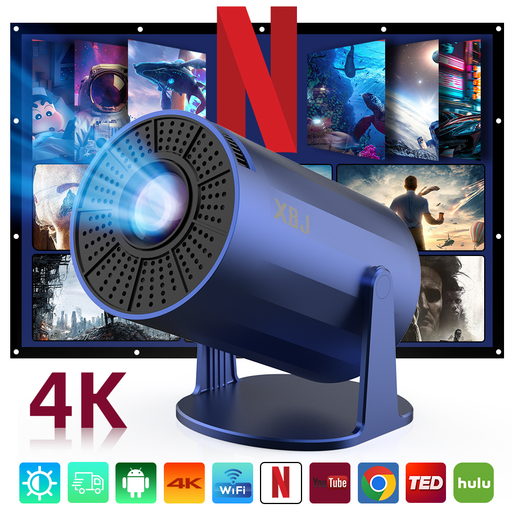 No image available
XBJ Portable Blue Projector with 180° Rotating Base
Consider this portable option if you can accept its native 720p resolution and intend to connect a separate streaming source. The title lists HDMI and auto keystone correction, while the product description recommends a TV stick for protected streaming services and says it is not included. Its 1080P wording and 4K decoding claim do not mean native 1080p or 4K projection; check the required image size and manual focus arrangement.
View on Joybuy
Common questions
How bright does a projector need to be in a dark room?
There is no single brightness figure that determines the result in every dark room. Epson’s UK buying guide suggests 1,500–2,500 lumens for a dark, dedicated home theatre; use that guidance alongside your image size, projection surface and assessment of the exact model.
Is Full HD enough for detective series, or should I choose 4K?
Full HD is a reasonable route if straightforward large-screen viewing matters more to you than extra pixel detail. Consider 4K when fine detail on a large image is a priority, while checking that your content and source device support the resolution you intend to use. Neither resolution alone establishes how well shadows will look.
Does watching through a projector change whether I need a TV Licence?
No: the projector does not change the rules for what you watch. TV Licensing says a licence is required for live TV and for BBC iPlayer; check the current rules against the services and programmes you use.
What safety check matters when buying a projector for Great Britain?
Check that the product supplied is identifiable and comes with the safety information you need to use it. The Office for Product Safety & Standards’ guidance on the Electrical Equipment (Safety) Regulations 2016 concerns equipment placed on the Great Britain market; if the product is supplied in Northern Ireland, check the applicable arrangements separately.


