
24/7 Customer Support

Free returns

Same-day & Next-day Delivery

Quality Guaranteed

Unlock Your Welcome Offers: FREE Delivery | Up to 80% OFF | Free 30-day JoyPlus trial
Download the APP
From the Joybuy Product Recommendation Officer
A dash cam can provide useful video evidence after a collision, during a disputed manoeuvre or when your parked vehicle is damaged. However, comparing models by headline resolution alone can lead to an unsuitable purchase. A camera may advertise 4K recording but lack rear coverage, require a separate hardwire kit for parking mode or use a storage system that becomes difficult to manage.
Before choosing a car camera, check how its specifications match your vehicle, driving routine and installation preferences.
A 4K dash cam records more pixels than a Full HD model, but resolution is only one part of the picture. Lens quality, exposure control, compression, lighting and the camera’s viewing angle also affect usable footage. A very wide-angle dash cam may cover more of the road, but objects at the edges can appear smaller.
Also check whether the advertised resolution applies to the front camera only. A front and rear dash cam may record in 4K at the front and a lower resolution at the back.
A 24-hour parking mode generally needs a hardwire kit connected to switched and constant vehicle power. A standard cigarette-lighter adapter normally powers the camera only when the ignition is on. Hardwiring also needs correct fuse selection and cable routing to avoid interfering with airbags or trim.
Parking monitoring can place a load on the vehicle battery. Read the instructions carefully and consider professional installation if you are unfamiliar with automotive wiring.
A G-Sensor can detect sudden movement and lock a video file, but it does not guarantee that every incident will be recorded. GPS adds route, speed and location information; it does not improve image clarity. Wi-Fi or dash cam with app control makes it easier to view and download clips, but the camera still needs a suitable memory card and regular file management.
A single-channel camera records the road ahead. A dual-channel dash cam adds a rear camera, which can be useful for rear-end collisions and incidents behind the vehicle. A triple-channel dash cam usually records the front, rear and cabin, making it more relevant to taxi drivers, private-hire drivers or people who want interior footage.
Check the rear camera cable length and whether the camera suits your vehicle. Estate cars, vans and larger SUVs may need more routing distance. Heavily tinted rear glass can also affect rear-camera image quality.
Full HD, 2K and 4K describe the video resolution. Higher resolution can help retain detail, but it usually creates larger files and may require a faster, higher-capacity microSD card. For regular night driving, look for stated features such as HDR, a wide aperture or a night vision dash cam sensor. These are specifications rather than guarantees of a particular result in every weather or lighting condition.
For high-resolution recording, choose a compatible card and format it according to the manufacturer’s instructions. A card that becomes full or develops errors can interrupt recording.
Most listed models are designed for standard 12V vehicles, while heavy-duty vehicles may use 24V systems. Confirm the power arrangement before ordering. Some cameras use an included 12V adapter; others require hardwiring.
A discreet mounting position behind the rear-view mirror can reduce obstruction, but the camera must not block the driver’s view. Route cables away from airbag deployment areas. A GPS dash cam needs a reasonably clear signal, while a Wi-Fi dash cam may require a phone app to transfer footage.
For UK use, avoid placing the camera where it obstructs vision. When recording conversations or people, consider privacy responsibilities and use the device only for a legitimate purpose.
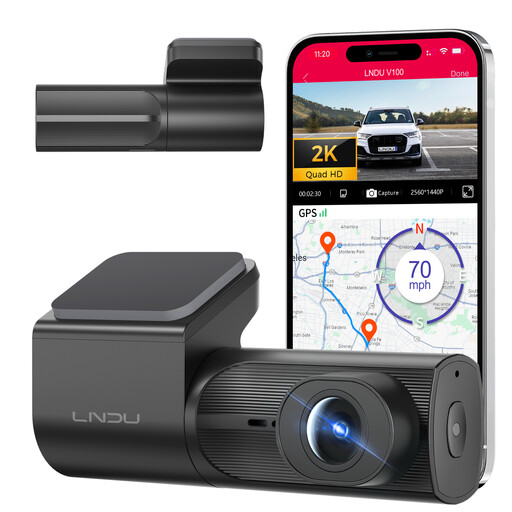
Why This Fits Their Persona: A compact front-facing option for commuters who want 2K footage, app access and straightforward daily recording without adding a rear camera.
Its specifications state that 24-hour parking monitoring requires a separate hardwire kit, making the power requirement clear before purchase.
2K recording, Wi-Fi, app control, loop recording, G-Sensor and night vision support.
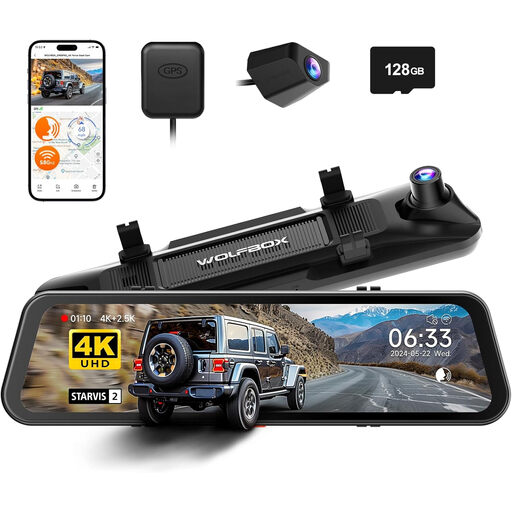
Why This Fits Their Persona: Suitable for motorists who want front and rear coverage, higher-resolution footage and wireless file access from a phone.
The listed specification separates front 4K and rear 2.5K recording, and confirms that a 128GB card is included.
4K front and 2.5K rear cameras, 5GHz Wi-Fi, GPS, voice control, loop recording and G-Sensor.
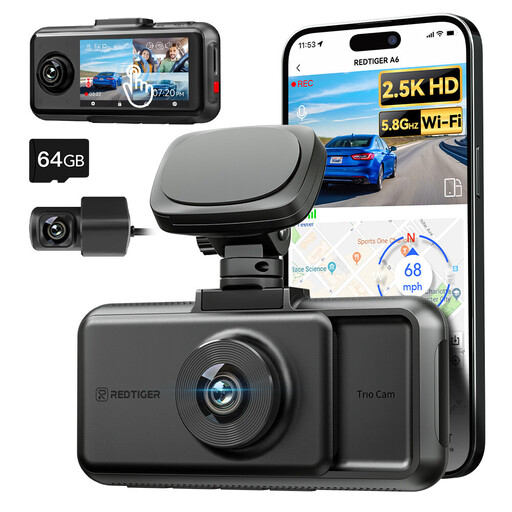
Why This Fits Their Persona: A practical match for professional drivers, taxi users or families wanting front, rear and interior coverage.
The product supports 2.5K front plus 1080P interior and rear recording, rather than implying that all three channels record at 4K.
Three-channel coverage, adjustable front and rear cameras, Wi-Fi, GPS, night vision and a 64GB card.
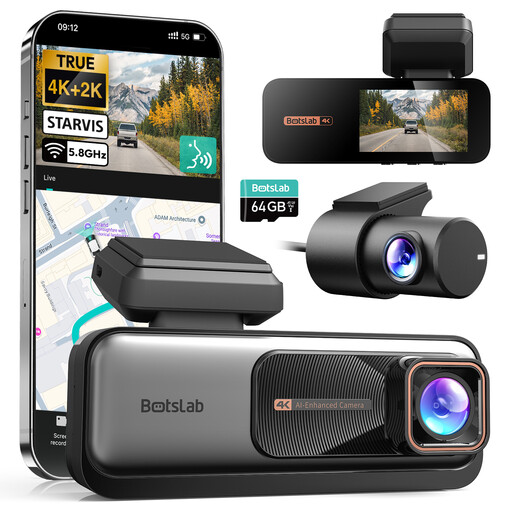
Why This Fits Their Persona: A front-and-rear system for regular motorway users, company vehicles and motorists prioritising broad coverage.
Its listing states that the 24/7 parking monitor requires a separate hardwire kit, while the front and rear resolutions are clearly identified as 4K and 2K.
170° front and 150° rear lenses, GPS, 5.8GHz Wi-Fi, loop recording, G-Sensor and a 64GB card.
We have compiled a complete, real-time list of products that fully satisfy these strict selection criteria and UK safety regulations.
A basic front dash cam can often be powered from the vehicle’s 12V socket, making it suitable for self-installation. A front and rear dash cam takes longer because the cable must be routed to the rear window. Keep wiring clear of curtain airbags and avoid loose cables near pedals or steering controls.
Parking mode is the main additional installation consideration. If a hardwire kit is not included, budget for a compatible kit and, where necessary, fitting. High-resolution footage also uses more storage, so check the maximum supported microSD capacity and format the card regularly. Loop recording overwrites older unlocked clips when storage is full, while G-Sensor events are normally marked to reduce accidental overwriting.
Using a dash cam is generally permitted, but it must not obstruct your view or distract you while driving. Camera placement should be discreet, and footage involving other people should be handled responsibly. Check current guidance if you use recordings for business, passenger transport or fleet operations.
A camera powered only while the ignition is on has limited effect when parked. 24-hour parking mode can draw power after the engine is switched off, particularly when hardwired. Use the manufacturer’s recommended wiring method and battery protection settings, and avoid leaving a vehicle unused for long periods without checking its battery condition.
Keep clips for as long as they are needed for a legitimate purpose, such as reporting an incident or contacting an insurer, then remove unnecessary files. Regularly back up important footage, format the memory card through the camera and replace cards showing errors or recording interruptions.