Choose a front-and-rear dash cam if journey recording comes first, but check for a live, reverse-triggered display before relying on it for manoeuvring. A dedicated reversing camera is more directly suited to that view, while parking sensors provide warnings rather than video. If you need both recording and reversing help, check that a combined system provides both functions and can be fitted to your car.
Who needs which type of aid?
Drivers needing a live reversing view
If seeing the area behind the car as you select reverse matters most, look for a reversing camera with a compatible display and reverse trigger. Continue checking mirrors and all around the car while manoeuvring, as UK Government driver-training guidance advises.
Drivers wanting footage from both directions
If incident recording is the priority, consider a front-and-rear dash cam. Check its reversing-display function separately: Nextbase describes its cited rear-view module as a road-recording accessory, not a close-range parking display.
Drivers wanting a proximity warning
If a warning during a tight manoeuvre matters more than an image, aftermarket parking sensors are another option. Halfords UK describes beeps or dashboard warnings; sensors do not provide journey footage.
What should you check before buying?
Front-and-rear dash cam
Choose it when: recording journeys in both directions is the main aim; a combined mirror system may also offer a reversing view if its display and reverse trigger are specified.
Bear in mind: a rear recording accessory alone does not establish that the system will show a useful image when reverse is selected.
Dedicated reversing camera
Choose it when: an automatically available live rear image is the priority.
Bear in mind: it needs a suitable display and installation, and does not by itself record journeys from the front and rear.
Parking sensors
Choose them when: audible or dashboard proximity warnings are more useful to you than watching a screen.
Bear in mind: a warning cannot show what is behind the car or provide dash-cam footage.
| Concern |
What to check |
Who this matters to |
| Live rear view |
Confirm a live display, reverse trigger, compatible screen and suitable rear mounting position. |
If I need to see directly behind the car while reversing, rear footage that I can review later will not meet that need. Around 27% of consumers put a live reversing view first. |
| Front-and-rear recording |
Check rear-camera compatibility, whether the rear unit also supports a reversing display, and the required memory card. |
I want a record of journeys in both directions, even if parking help calls for another function. Continuous recording comes first for around 33% of consumers. |
| Distance warnings |
Check the sensor kit’s warning format and whether its mounting method suits the vehicle. |
In tight spaces, I would rather hear an obstacle warning than judge a video image. Around 20% of consumers primarily want proximity alerts. |
| Installation and power |
Confirm cable routing, vehicle fit and whether the chosen functions need switched or permanent-live power. |
Before adding functions, I need to know the equipment can be fitted neatly and powered as intended. For around 13% of consumers, installation is the primary concern. |
| Monitoring while parked |
Check the exact model’s parking mode and its hardwire and power-management requirements. |
I want recording to continue when the car is unattended, not just during a journey. That is the first priority for around 7% of consumers. |
Mistakes to avoid
-
Assuming every rear camera helps with reversing
Nextbase describes its cited rear-view module as recording the road behind the car. That does not establish a live, reverse-triggered parking view.
Check the exact system’s reverse trigger, display function and screen compatibility before buying.
If it only records, obtaining a reversing view may require a separate camera, display or installation.
-
Planning parking mode around a 12V socket
Road Angel says reliable parking mode for its cited dash cams needs constant fuse-box power through a hardwire kit. Nextbase also distinguishes permanent-live power for parked monitoring from switched-live power for standard use.
Check the chosen camera’s hardwire requirements and arrange suitable fitting if you want monitoring while parked.
-
Overlooking the card needed for rear recording
Nextbase manuals for the cited 322GW and 622GW require a U3 card when a rear camera is attached.
Check the card requirements for your exact camera combination and save any footage you need before formatting the card.
-
Watching the aid instead of checking around the car
A display or warning supplies additional information, not a complete view of every hazard. UK Government driver-training guidance says to keep checking all around while reversing.
Use the aid alongside mirrors, blind-spot checks and observation throughout the manoeuvre.
Brands to consider
Nextbase
Relevant if journey recording is the priority and you are considering a compatible rear-view module.
- Nextbase lists its Rear View Camera for the 322GW, 422GW, 522GW and 622GW dash cams and describes it as recording through the rear window.
- Its rearward road-recording view should not be assumed to provide a reverse-triggered close-range display; check model and memory-card compatibility.
Garmin
Relevant if you are considering a dedicated wireless reversing-camera system rather than a dash-cam accessory.
- Garmin identifies the BC 50 as a wireless reversing camera.
- Check the display or navigation-unit compatibility and fitting requirements of the exact package.
Road Angel
Relevant to front-and-rear recording and mirror-style dash-cam options.
- Its range includes front-and-rear and mirror dash cams.
- Road Angel says its cited parking-mode setup needs constant fuse-box power through a hardwire kit; check reversing-display functions by model.
Mirror dash cams for recording and reversing
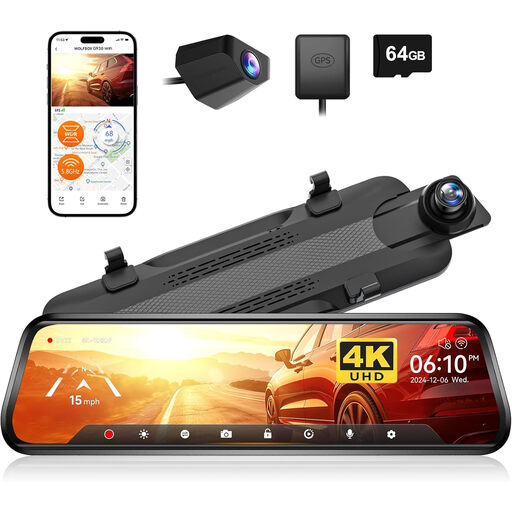
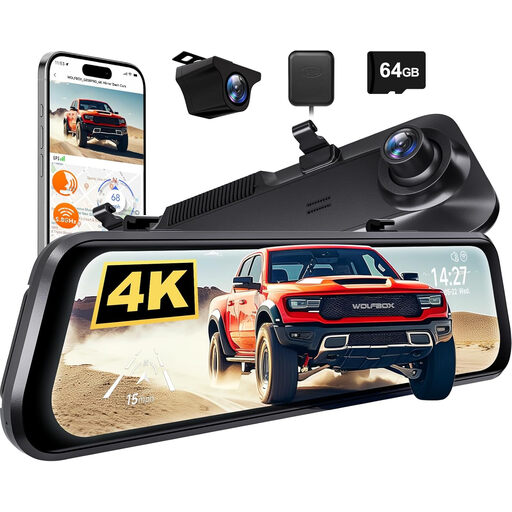
These mirror-mounted WOLFBOX dash cams are listed for front-and-rear recording with reversing assistance that depends on a reverse-light connection. Check mirror fit, rear-camera mounting and wiring for your car before choosing either model.
 No image available
WOLFBOX G930 10-inch mirror dash cam with 64GB card and GPS
Consider this mirror-display model if you want front-and-rear journey recording alongside reversing assistance. Its title specifies a 10-inch touchscreen, 4K dash cam, 5.8GHz WiFi and an included 64GB card.
Reverse assistance requires a connection to the vehicle’s reverse light and an unobstructed rear-camera installation. Parking monitoring requires a separately sold hardwire kit; check mirror fit and wiring before buying.
View on Joybuy
 No image available
WOLFBOX G850 PRO 4K 12-inch mirror dash cam with 64GB card
Consider this model if you want a mirror display for front-and-rear recording and can arrange the connection needed for automatic reverse-view assistance. Its title specifies a 12-inch display, 4K dash cam, 5.8GHz WiFi, GPS and an included 64GB card.
Automatic reverse-view assistance requires connecting the rear-camera cable to the reversing light. The stated mirror fit is for existing mirrors no higher than 3.5 inches; measure yours and check vehicle-specific wiring. Parking monitoring requires a hardwire kit.
View on Joybuy
Common questions
Can a rear-facing dash cam replace a reversing camera?
Only if the exact system provides a suitable live display while you reverse. Nextbase describes its cited rear module as recording the road behind the car, so check for a reverse trigger and display function rather than relying on the words “rear camera”.
Does a dash cam have to be hardwired?
Not for ordinary ignition-on recording in every case; the cited Nextbase manual describes recording from a powered 12V socket. Hardwiring becomes more relevant for concealed cables or parking-mode power, so check whether your chosen setup needs switched or permanent-live power.
Can I rely on a reversing camera or sensors instead of looking around?
No. UK Government driver-training guidance says to use cameras and sensors as aids while continuing to check all around the car during a manoeuvre.
What memory card should I check for a front-and-rear dash cam?
Check the requirement for the exact camera with its rear unit attached. Nextbase manuals for the cited 322GW and 622GW require a U3 card with a rear camera; save footage you need before formatting a card.


