Spreadsheet-heavy data cleaners
If you scroll through long tables, check records and repeatedly apply filters, controllable scrolling and configurable buttons may matter more to you than portability.


For long survey spreadsheets, start with a mouse whose scrolling and configurable controls suit the actions you repeat most. If hand position or limited desk space matters more, consider a vertical mouse or stationary trackball, but check hand fit, connection method and desk layout before choosing; the Health and Safety Executive advises keeping a mouse in line with your elbow.
If you scroll through long tables, check records and repeatedly apply filters, controllable scrolling and configurable buttons may matter more to you than portability.
If hand position is your priority, consider whether a conventional mouse, vertical shape or thumb trackball fits your hand and desk. The Health and Safety Executive also advises a comfortable workstation setup, rather than relying on the mouse alone.
If you move between computers or work away from a fixed desk, check connection compatibility, device switching and whether the mouse is practical to carry.
Decide which task creates the greatest difficulty in your survey-data workflow, then check hand fit and compatibility before settling on a mouse shape.
| Concern | What to check | Who this matters to |
|---|---|---|
| Dataset navigation | Check the wheel’s scrolling modes and whether configurable controls work with your software. | When I move between long worksheets and repeat the same actions, I want to reach the right record without losing control of the pointer. Roughly 36% of consumers could put navigation and shortcuts first. |
| Hand position | Check hand-size and handedness guidance, then whether the mouse can sit in line with your elbow. | For sustained desk work, I need a shape that fits my hand without forcing an awkward position. Hand comfort could be the main concern for around 29% of consumers. |
| Devices and desk space | Confirm connection and operating-system support, available ports and the space needed to move the mouse. | If I switch computers or have little clear desk space, the mouse must work with my setup. About 21% of consumers could prioritise device or space fit. |
| Click noise | Look for a quiet-click specification on the exact model, while keeping fit and compatibility in view. | In a shared or quiet room, I would rather not distract someone nearby with repeated clicks. Quiet operation could come first for roughly 14% of consumers. |
Vertical designs still need to fit the user. Logitech positions Lift for small to medium hands and offers a separate left-handed version; neither detail establishes that another vertical mouse will fit you.
Check the exact model’s size and handedness guidance, and whether you can position it in line with your elbow.
A new shape cannot compensate for every problem with desk position or work routine. The Health and Safety Executive advises a comfortable, sustainable posture when working with display screen equipment at home.
Review screen and keyboard placement, keep the mouse within comfortable reach, and change activity or take breaks during prolonged work.
Connection and system requirements vary by model. HP specifies Bluetooth 5.3 or a 2.4 GHz dongle for its 715 mouse, while Microsoft specifies Windows 10 or 11 and Bluetooth 4.0 or later for Surface Arc Mouse.
Check the requirements of the exact mouse against each computer and its available ports before ordering.
A receiver occupies a compatible USB port; a computer without that port may need an adapter.
Whether a listed mouse can be ordered may change with the product and delivery location.
Check availability and delivery options on the product page when you are ready to order.
Its productivity range includes conventional mice, vertical mice and stationary thumb trackballs relevant to different home-office layouts.
The HP 715 is a compact, ambidextrous option for people who switch between compatible devices.
The Pro Click V2 range offers conventional and vertical productivity-mouse designs.
These mice cover different ways to tackle home-office data work: a conventional productivity shape, ergonomic designs and wireless connection options. Match the controls, fit and connection method to your own workstation rather than treating the models as interchangeable.
 No image available
Consider this conventional productivity model if long worksheets make scrolling and repeat actions central to your choice. Logitech specifies quiet clicks and an 8,000 DPI sensor for MX Master 3S; check that its shape fits your hand and confirm the package contents if you need a receiver.
 No image available
Consider this model if an ergonomic shape and a detachable wrist rest are priorities for desk work. Check its hand fit and the connection requirements of each computer you intend to use.
 No image available
This dual-mode option is relevant if you need to check how a mouse will connect to different devices. Its title specifies five adjustable DPI levels and an 800mAh battery; confirm its scroll behaviour, button functions and hand fit if you spend long periods editing spreadsheets.
 No image available
Consider its vertical shape if you want to assess a different grip for sustained desk work. The title specifies six buttons and an adjustable sensor rated up to 1600 DPI; check hand fit, handedness and device-switching behaviour before choosing it for your setup.
 No image available
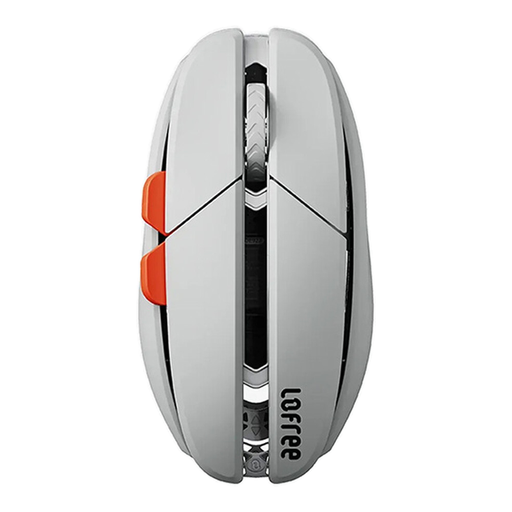
Consider this model if choosing among Bluetooth, 2.4G wireless and wired connections matters to your setup. Its title identifies a magnesium-alloy frame and PC shell; check its scrolling and button functions, as well as hand fit, for sustained survey-data work.
No: mouse shape is only one part of a comfortable workstation. The Health and Safety Executive advises keeping the mouse in line with your elbow and arranging the screen and keyboard to avoid awkward positioning.
Compare the exact model’s connection and operating-system requirements with each computer and its available ports. For instance, HP specifies Bluetooth 5.3 or a 2.4 GHz dongle for the 715, while Microsoft specifies Windows 10 or 11 with Bluetooth 4.0 or later for Surface Arc Mouse.
Check your local authority’s or retailer’s current instructions for collecting unwanted electrical equipment. The UK Waste Electrical and Electronic Equipment Regulations 2013 provide a regulatory framework, but the collection route you can use depends on the arrangements available to you.