What to check before buying
Start with your course’s software requirements, then establish whether you need CUDA on your own laptop. Compare the exact memory and storage configuration once you know which platform fits.
| Concern |
What to check |
Who this matters to |
| Coursework and multitasking |
Check the course software list and the exact laptop’s memory and SSD capacity. |
If my work centres on notebooks, datasets and documents, I want those everyday tasks to fit the machine I buy. Around 50% of consumers put a reliable coursework setup first. |
| Platform and developer tools |
Confirm the required operating system and processor architecture; check any virtual-machine or Linux-tool requirements. |
When a course depends on particular packages or development tools, I need a platform that can run them. For around 30% of consumers, that compatibility is the primary concern. |
| Local CUDA work |
Ask whether local CUDA is required; if so, check the exact GPU, its memory and the required Windows development tools. |
If I must run accelerated work on my own laptop, access to a remote GPU will not cover that need. Local CUDA capability comes first for around 20% of consumers. |
Joybuy laptops for different study needs
These choices cover general study laptops, an Apple-silicon option and Windows laptops with NVIDIA graphics to investigate for local accelerated work. Choose by your course requirements rather than treating a listed GPU as confirmation that a particular CUDA toolchain will run.
 No image available
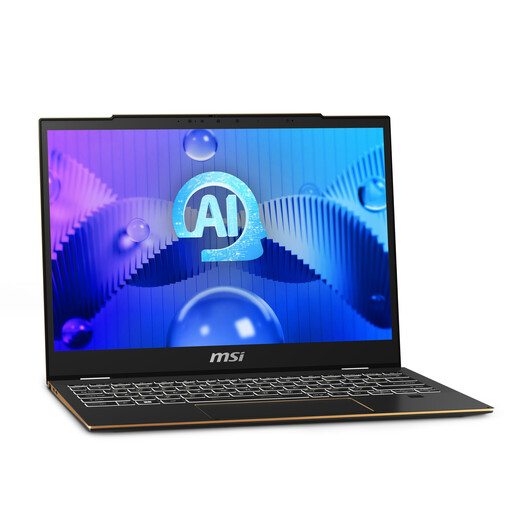
MSI Summit E13 AI Evo, Intel Core Ultra 7 155H
Consider this configuration for general study if its operating system and applications match your course requirements.
The product name specifies a 13-inch FHD+ 60 Hz touch display, Intel Arc graphics, 32 GB LPDDR5 RAM and a 1 TB SSD. Check the exact display size on the listing, and do not assume Intel Arc graphics meet a local NVIDIA CUDA requirement.
View on Joybuy
 No image available
ASUS Vivobook 15 X1504VA, Cool Silver
Consider this for notebook-based coursework after confirming that the exact configuration runs your course software.
Its product name specifies a 15.6-inch display, Intel Core 5 120U, 24 GB memory and a 1 TB SSD. Check graphics requirements separately if your course calls for local CUDA.
View on Joybuy
 No image available
MSI Stealth 18 AI Studio A1VGG-001UK
Investigate this large-screen NVIDIA option if you have a defined local graphics workload and are comfortable carrying an 18-inch laptop.
The product name specifies an Intel Core Ultra 9 processor, 32 GB RAM, a 2 TB SSD and NVIDIA GeForce RTX 4070 graphics. Check the GPU and software requirements for your particular CUDA work before ordering.
View on Joybuy
 No image available
Apple 13-inch MacBook Air (2026), M5, Sky Blue
Consider this Apple-silicon configuration when your course confirms support for its required macOS applications and packages.
The product name specifies a 10-core CPU, 10-core GPU, 16GB memory and a 1TB SSD. Check any Windows-only or CUDA-dependent requirements before choosing it.
View on Joybuy
 No image available
Lenovo LOQ Essential 15ARP11, Ryzen 7 170, RTX 5050
Investigate this NVIDIA-equipped laptop if your studies call for local graphics work, but confirm the precise course toolchain first.
The product name specifies 16GB RAM, a 1TB SSD, GeForce RTX 5050 graphics and a 15.6-inch 144Hz FHD display. Check whether its memory configuration and exact GPU suit your planned work.
View on Joybuy
Frequently asked questions
Do I need a Windows laptop to study data science?
Not necessarily: the University of Bath’s Data Science MSc accepts recent Windows, Mac or Linux systems. Your own course’s applications and assessment setup decide which platform is appropriate; Anaconda also lists distinct requirements for Windows x86 and Apple-silicon macOS.
When do I need an NVIDIA GPU?
Choose a configured NVIDIA GPU when you must run CUDA work locally or your course specifically requires one. NVIDIA’s Windows CUDA guidance calls for a CUDA-capable GPU and compatible software; ask your institution about shared or remote computing before deciding that the work must run on your laptop.
Can I use Linux tools on a Windows laptop?
Yes, if the laptop meets Microsoft’s requirements for Windows Subsystem for Linux (WSL). Microsoft says its main installation route supports Windows 11 or Windows 10 version 2004, build 19041, or later, allowing Linux applications and command-line tools to run alongside Windows.
Can I cancel an online laptop order if I change my mind?
For a qualifying UK distance purchase, GOV.UK says you can tell the seller you wish to cancel within 14 days of receiving the item. Check the applicable return steps and any product exceptions separately; remedies for faulty or misdescribed goods are distinct from a change-of-mind cancellation.
What should I do with an old laptop?
Check a local authority or retailer collection route for electrical equipment rather than treating an old laptop as ordinary waste. GOV.UK describes the UK waste electrical and electronic equipment framework as encouraging recovery, reuse and recycling.


