Choose the operating system and graphics route your course or local machine-learning work requires before comparing larger hardware configurations. Microsoft Learn documents NVIDIA CUDA in Windows Subsystem for Linux (WSL), while PyTorch supports compatible work through Apple’s MPS backend; neither route suits every course. For a shared office, check the exact laptop’s memory, storage, desk connections and privacy features as well as its software compatibility.
Who each route suits
Notebook-first data science learners
If your study centres on Python, Jupyter notebooks, SQL and university or cloud computing, start with the memory and storage of the exact laptop you would buy. Also consider its keyboard, display and desk connections for work alongside browser research and video calls.
Local CUDA and WSL learners
If your course calls for NVIDIA CUDA or Linux-based tools on your own laptop, confirm the required graphics hardware, drivers and software environment. Microsoft Learn documents CUDA in WSL as a specific setup route, not a requirement for every data-science course.
Mac-based portable ML learners
If you prefer macOS for notebooks and compatible local PyTorch work, check the course’s packages and numeric requirements first. PyTorch says its MPS backend does not support float64 or complex128, and a CUDA-specific course needs a different route.
What matters when buying
Start with the software you must run locally. Once that determines whether CUDA, macOS or a general-study Windows laptop is appropriate, compare the exact configuration and how it fits your shared desk.
| Concern |
What to check |
Who this matters to |
| Notebook and project headroom |
Check the exact RAM and SSD configuration against your concurrent applications, files and course projects. |
If I mainly work in notebooks, code and local project files, I want a configuration that fits those tasks rather than a GPU chosen for a different workload. Roughly 36% of consumers put that everyday study headroom first. |
| Local CUDA and Linux tools |
Ask which frameworks and environments the course requires; if it specifies local CUDA, check the NVIDIA GPU, drivers and WSL setup. |
When coursework depends on CUDA tools running locally, I need to know that the required environment will work on the laptop I buy. For around 29% of consumers, that compatibility is the primary concern. |
| Shared-office use |
Check the exact model’s camera privacy feature, desk ports and display support; assess cooling behaviour for your workspace. |
Working beside other people makes camera privacy, connections and noise important to my daily setup. Shared-office practicality comes first for roughly 21% of consumers. |
| macOS and MPS compatibility |
Check course packages and whether local work requires CUDA or numeric types unsupported by PyTorch MPS. |
If I prefer macOS, I want my course work to fit the supported MPS workflow without assuming it can replace CUDA. Around 14% of consumers prioritise that macOS route. |
Buying pitfalls
-
Choosing an NVIDIA GPU before checking the course
Microsoft Learn distinguishes NVIDIA CUDA in WSL from other GPU routes. Local CUDA hardware may matter for specified coursework, but notebook-led study or remote computing does not establish the same requirement.
Get the course software list and ask whether local CUDA, WSL, containers or remote notebooks are expected before choosing a graphics configuration.
A local WSL workflow also takes time to set up with the required drivers and Linux tools.
-
Assuming Apple MPS runs every PyTorch calculation
PyTorch says MPS does not support float64 or complex128. A workload that genuinely needs double-precision computation must use the CPU instead of MPS.
Check course notebooks, packages and numeric types before choosing a Mac for local GPU work.
-
Comparing laptop families instead of configurations
Options within one family can differ. Dell UK notes that changing selections on its Precision listing can change the resulting specifications.
Compare the processor, graphics, RAM, SSD, operating system, ports and warranty for the exact configuration you intend to order.
-
Putting off compatibility checks after delivery
Discovering a software or desk-connection mismatch late makes it harder to decide promptly what to do. A change-of-mind cancellation and a remedy for faulty or misdescribed goods are separate matters under UK consumer guidance from GOV.UK.
Check the delivered configuration, install required tools and connect your monitor or dock promptly. Review the applicable cancellation terms separately from your rights if the laptop is faulty or misdescribed.
Relevant brands to consider
Apple
MacBook Air is a macOS option for notebook-led study and PyTorch workloads supported by MPS. Apple UK lists distinct memory configurations, so compare the configuration you would actually order.
- Apple UK lists a 16GB starting unified-memory configuration and higher-memory options for the MacBook Air.
- PyTorch says MPS does not support float64 or complex128; a Mac is not a substitute for a course requiring NVIDIA CUDA.
Lenovo
ThinkPad is worth examining if camera privacy and cooling behaviour matter at a shared desk.
- Lenovo describes privacy shutters on ThinkPad devices and says its Intelligent Cooling is intended to provide a quieter experience.
- Those are family-level descriptions. Confirm the features on the exact ThinkPad model and configuration.
Dell
Dell Pro Precision is a Windows workstation line to examine when substantial local work makes a specific graphics configuration relevant.
- Dell UK lists processor and NVIDIA graphics options for its Precision 7 Series 16.
- Dell notes that changing selections can change specifications. Check the precise configuration rather than treating the family name as a fixed set of features.
Joybuy laptops for these study routes
These laptops include Windows configurations for notebook-led study, models listing NVIDIA graphics for courses that call for local GPU work, and a MacBook Air for macOS-based study. Match any choice to your course software and the exact configuration before ordering.
 No image available
MSI Stealth 18 AI Studio A1VGG-001UK
Consider this configuration if your course calls for local NVIDIA-based work; confirm its required drivers and software environment before relying on CUDA in WSL.
18-inch display, Intel Core Ultra 9, 32GB RAM, 2TB SSD and NVIDIA GeForce RTX 4070. Check whether an 18-inch laptop fits the space and carrying routine you have in mind.
View on Joybuy
 No image available
Lenovo Legion Pro 7 16IAX10H 83F5000UUK
This is a configuration to compare if substantial local projects and NVIDIA-based coursework are confirmed needs, rather than reasons to choose a GPU by default.
16-inch display, Intel Core Ultra 9, 64GB RAM, 2TB SSD, NVIDIA GeForce RTX 5090 and Windows 11 Home. Confirm the course’s driver and WSL requirements for this exact setup.
View on Joybuy
 No image available
MSI Summit 16 AI Evo
Consider it for Windows-based notebooks and local study projects if your course does not require an NVIDIA CUDA setup. Check its desk connections and shared-office features against your own workspace.
16-inch QHD+ 165Hz display, Intel Core Ultra 7 255H, Intel Arc graphics, 32GB LPDDR5 RAM and 1TB SSD.
View on Joybuy
 No image available
Apple 13-inch MacBook Air (2026) M5, 24GB, 1TB SSD, Midnight
Consider this Mac for macOS-based notebooks and PyTorch work supported by MPS, provided your course does not require NVIDIA CUDA. PyTorch says float64 and complex128 are unsupported on MPS.
M5 chip with 10-core CPU and 10-core GPU, 24GB unified memory and 1TB SSD.
View on Joybuy
 No image available
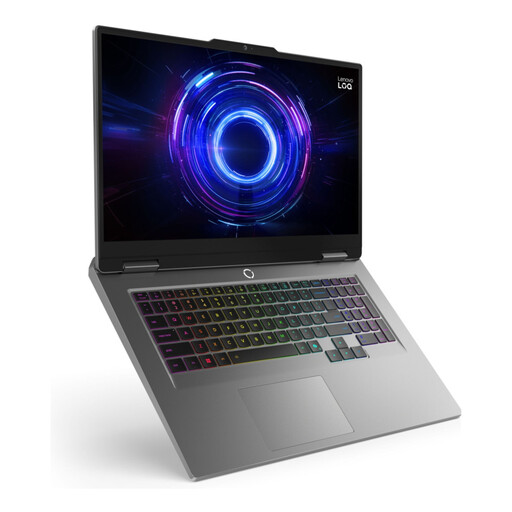
LOQ 17IRX10 i7-13650H, 24GB, 1TB, W11H
If your course calls for local CUDA work, check this exact model’s graphics, drivers and WSL compatibility before choosing it. Confirm its camera privacy and cooling features if those matter at your shared desk.
i7-13650H, 24GB RAM and 1TB storage.
View on Joybuy
Common questions
Do I need an NVIDIA GPU to study data science?
Not unless your course or local projects require an NVIDIA CUDA workflow. Microsoft Learn documents CUDA in WSL as one route; for notebooks, SQL and study using remote computing, check the course requirements before prioritising a local GPU.
Can I use a Mac for PyTorch coursework?
Yes, if the coursework runs on your Mac and its PyTorch operations are supported by MPS. PyTorch says MPS does not support float64 or complex128, so check the required packages and numeric types as well as any CUDA-specific instructions.
What should I check when an online laptop order arrives?
Check that the delivered configuration matches the listing and run the tools you need for your course. Test your monitor or dock and video-call setup promptly, then check the seller’s change-of-mind terms if the laptop does not suit you. GOV.UK treats remedies for faulty or misdescribed goods separately.
What should I do with an old laptop in the UK?
Look for an appropriate electrical-equipment collection or recycling route rather than putting it in ordinary waste. GOV.UK explains that the UK’s waste electrical and electronic equipment rules aim to reduce electrical waste sent to landfill or incineration.


