Choose around the most demanding work your course requires you to do locally, rather than assuming every data-science student needs a GPU workstation. A laptop with 16GB of memory and at least 512GB of storage is a starting point for coding and general study; if local NVIDIA CUDA work is required, check the exact GPU and software workflow instead. For regular standing-desk use, check how the screen, connections and separate input devices will work together.
Who this choice affects
Notebook-and-cloud data-science students
If most of your work involves coding, notebooks and course datasets, with university or cloud resources available for heavier jobs, prioritise software compatibility, memory for multitasking and a laptop you can carry between study locations.
Local CUDA and machine-learning learners
If a module or project requires CUDA-accelerated work on your own laptop, the exact NVIDIA GPU and operating-system workflow matter. NVIDIA documents CUDA use for data science and machine learning through Windows Subsystem for Linux 2; confirm that this is the workflow your course expects.
Standing-desk regulars
If you expect long coding or reading sessions at a standing desk, consider where the screen, keyboard and pointing device will sit, as well as how a monitor or dock will connect. The Health and Safety Executive advises arranging desk space, screens and lighting to suit display-screen work.
What to check before buying
Start with your course software and any requirement for local GPU work. Then check whether the laptop fits your standing-desk arrangement and how often you need to carry it.
| Concern |
What to check |
Who this matters to |
| Local compute and CUDA |
Ask whether your course requires local CUDA. If it does, check the exact NVIDIA GPU and memory, plus the required software and operating-system workflow. |
If I must run CUDA-based projects on my own laptop, a model chosen only for everyday coding could miss that requirement. Roughly 42% of consumers put confirmed local CUDA capability first. |
| Standing-desk fit |
Check display and charging connections against your intended monitor or dock, and plan where a separate keyboard and pointing device will sit. |
When I spend long sessions at the standing desk, I need to position the screen and input devices without letting the laptop's built-in keyboard dictate the whole setup. Around 33% of consumers make workstation fit their primary concern. |
| Portable everyday study |
Confirm course-software compatibility, then compare memory and storage for the coding and multitasking you expect. Treat 16GB and 512GB as starting checks, not a course requirement. |
If I carry my laptop between study locations and use remote resources for heavier work, I want everyday coursework to run on a machine I can take with me. About 25% of consumers prioritise portable study capability. |
Buying pitfalls
-
Assuming data science always calls for an NVIDIA GPU
An NVIDIA GPU becomes a decisive check when your own coursework requires local CUDA acceleration. Coding and cloud-based work do not, by themselves, establish that requirement; University College London also notes that specialist courses may have requirements beyond general student guidance.
Get the module software list and find out where compute-intensive work must run before choosing a GPU configuration.
-
Choosing a workstation by its family name
Configurations within a family can have different graphics hardware. Lenovo lists integrated Intel Arc graphics for the ThinkPad P14s Gen 6 part number 21QT007EUK, so the family name alone does not establish NVIDIA GPU capability.
Check the exact part number and its GPU, memory, storage and operating system before ordering.
-
Expecting the standing desk to solve laptop positioning
A height-adjustable desk does not decide where the screen and keyboard sit relative to each other. The Health and Safety Executive links poorly arranged display-screen workstations or improper use with fatigue and discomfort.
Plan screen height, separate input devices, charging and monitor connections as one arrangement.
A stand, separate keyboard, pointing device or dock may also take up desk space and become part of the setup you need to carry or maintain.
Relevant brands to consider
Apple
MacBook Air is a macOS option for portable, notebook-based study if your course software supports it and you do not need local NVIDIA CUDA.
- Apple lists 16GB unified memory and 512GB SSD storage as starting specifications for its current MacBook Air range, alongside support for up to two external displays.
- Check the required macOS software and the connection conditions for your intended display. MacBook Air is not a substitute for an NVIDIA GPU where local CUDA is compulsory.
Lenovo
The ThinkPad P14s range offers Windows mobile-workstation configurations, but its graphics hardware must be checked by part number.
- Lenovo lists 16GB memory, a 512GB SSD and a 14.5-inch anti-glare display for the P14s Gen 6 Intel part number 21QT007EUK.
- That particular configuration lists integrated Intel Arc graphics; it should not be mistaken for a configuration with an NVIDIA GPU.
HP
ZBook Power provides a configuration reference for students whose confirmed local workloads call for a discrete NVIDIA GPU and more memory and storage.
- HP lists a ZBook Power 16 G11 A Data Science configuration with 32GB RAM, a 1TB SSD and NVIDIA RTX 2000 Ada graphics with 8GB memory.
- Those specifications describe the checked configuration, not every ZBook Power laptop. Confirm the exact model and current availability when shopping.
Joybuy product choices
These laptops cover portable general study and Windows options with discrete NVIDIA graphics. Choose between those needs using your course requirements, then check how the particular laptop will connect to your standing-desk setup.
 No image available
Lenovo LOQ Essential 15ARP11, Ryzen 7 170, RTX 5050
Consider this configuration if your course calls for local NVIDIA GPU work, but confirm the required CUDA software workflow first.
The title lists 16GB RAM, a 1TB SSD, GeForce RTX 5050 graphics and a 15.6-inch FHD 144Hz display. Check that its memory capacity meets your programme's needs.
View on Joybuy
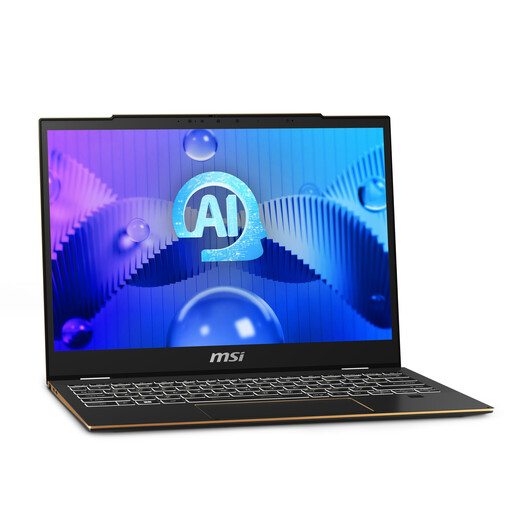 No image available
MSI Summit E13 AI Evo, Core Ultra 7 155H, 32GB, 1TB
This is a general-study option to consider when local NVIDIA CUDA is not a course requirement; confirm that your required software runs on the chosen laptop.
The title lists a touch display, 32GB LPDDR5 RAM, a 1TB SSD and integrated Intel Arc graphics. Confirm the exact screen size if it affects how you will use the laptop at your desk.
View on Joybuy
 No image available
MSI Stealth 18 AI Studio A1VGG-001UK, RTX 4070
Consider this 18-inch laptop if you have a confirmed need for local NVIDIA GPU work and room for a larger machine at your desk; check the course software before deciding.
The title lists an Intel Core Ultra 9 processor, 32GB RAM, a 2TB SSD and GeForce RTX 4070 graphics. Consider whether the 18-inch format suits journeys between study locations.
View on Joybuy
 No image available
Apple 15-inch MacBook Air M5, 16GB, 1TB, Silver
This macOS option suits notebook-based study when your course software is compatible and local NVIDIA CUDA is not required.
The product title lists 16GB unified memory and a 1TB SSD. Apple states that the MacBook Air range supports up to two external displays; confirm your monitor's connection requirements and the exact CPU specification of this configuration before buying.
View on Joybuy
 No image available
HP OmniBook X Flip 16-as0004na, Core Ultra 5 226V
Consider this convertible for general coding and study if a larger touch display appeals and your course does not require a local NVIDIA GPU.
The title lists 16GB RAM, a 512GB SSD, Windows 11 Home and a 16-inch touchscreen. Check the exact display specification and connections for any monitor or dock you plan to use.
View on Joybuy
Questions about the choice
Do I need an NVIDIA GPU to study data science?
You need to check for one if your course or projects require CUDA-accelerated work on your own laptop; it is not a requirement established by the subject name alone. NVIDIA documents CUDA for data science and machine learning through Windows Subsystem for Linux 2, while University College London warns that specialist software requirements vary by course. Ask your teaching provider where the required work must run.
Is 8GB of RAM enough for a data-science course?
It meets University College London's stated general Windows minimum, but that guidance says some courses need specialist equipment or software. For this choice, 16GB of memory and at least 512GB of storage are more useful starting checks for coding and multitasking, not a guarantee that a laptop will meet your programme's requirements.
How should I set up a laptop at a standing desk?
Plan the screen and input-device positions together rather than relying on desk height or laptop screen size alone. A stand or external monitor may call for a separate keyboard and pointing device; check the laptop's display and charging connections before choosing a dock. The Health and Safety Executive advises arranging screens, lighting and desk space for display-screen work.
Can a MacBook Air connect to an external monitor?
Yes: Apple lists external-display support for its current MacBook Air range, including support for up to two external displays. Check the connection method, supported resolution and any adapter or dock needed for your particular monitor before buying.


