
24/7 Customer Support

Free returns

Same-day & Next-day Delivery

Quality Guaranteed

Unlock Your Welcome Offers: FREE Delivery | Up to 80% OFF | Free 30-day JoyPlus trial
Download the APP
Modern laptops are wonderfully sleek and portable, but this often comes at the cost of connectivity. If you're a mobile professional, hybrid worker or business traveller in the UK, you've likely faced the frustration of having only a couple of USB-C ports. This forces you to carry a collection of dongles just to connect a monitor, a mouse or a wired network. A USB-C multiport adapter seems like the obvious solution, but the market is flooded with options that often fail to deliver on their promises.
Before you make a purchase, it's crucial to understand the common pitfalls that lead to wasted money and frustration. Many adapters suffer from a few key flaws that aren't immediately obvious from the product description.
To avoid these issues, you need to look beyond the marketing hype and focus on a few core technical parameters. Getting these right ensures your adapter will be a reliable tool rather than a source of annoyance.
For connecting to external monitors, the video output specifications are non-negotiable.
USB-C hub with HDMI and Ethernet is a solid baseline.Power Delivery allows you to charge your laptop through the adapter itself, using just one USB-C port. However, the wattage is critical.
The quality of the USB and network ports determines how well your peripherals work.
laptop docking station for professionals.We've analysed the market to find adapters that address the common pitfalls and meet the essential criteria for different user needs.
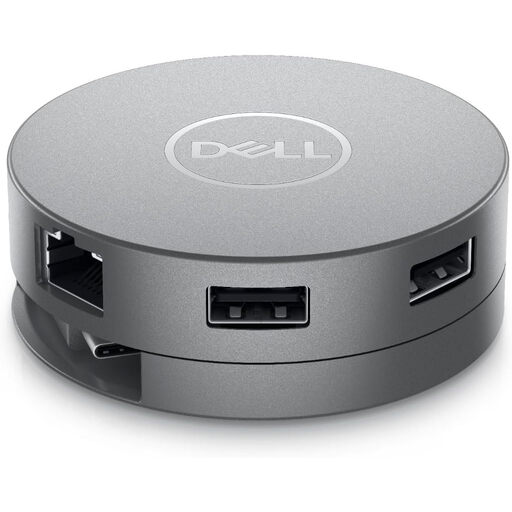
Why This Fits Their Persona: This is the quintessential tool for someone constantly moving between a home office, the company office and client sites. Its compact, puck-like design with integrated cable management makes it an excellent portable USB-C adapter for MacBook or Dell users who need reliability above all else.
It delivers true 4K@60Hz via HDMI or DisplayPort and offers up to 90W power delivery, avoiding the underpowered performance of cheaper models. The build quality is designed for business use, ensuring it won't overheat or fail during a critical presentation.
Wide port selection including HDMI, DisplayPort and VGA for maximum display compatibility. Fast USB 3.1 Gen2 ports and a stable Gigabit Ethernet connection.
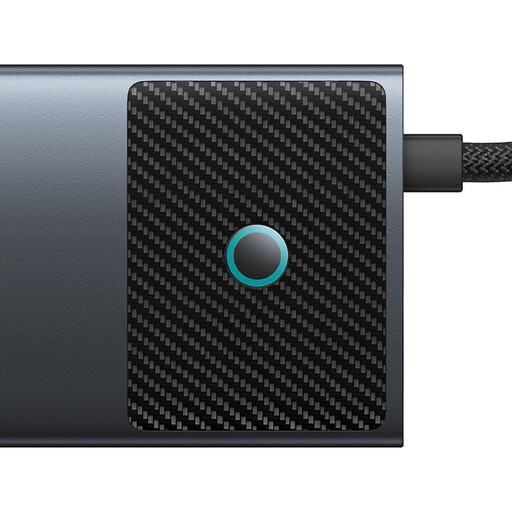
Why This Fits Their Persona: For video editors, designers or developers who need a powerful desk setup. This user requires more than the basics: dual monitor support, ultra-fast data transfer and robust power for demanding applications.
It sidesteps the "phantom port" trap by offering true dual display functionality (4K@120Hz + 4K@60Hz) and dedicated 10Gbps USB-A and USB-C data ports that don't compromise on speed. The 100W PD input ensures even the most power-hungry laptops stay charged.
High-performance dual HDMI outputs and exceptionally fast 10Gbps data ports. The metal casing aids in heat dissipation, improving longevity under heavy use.
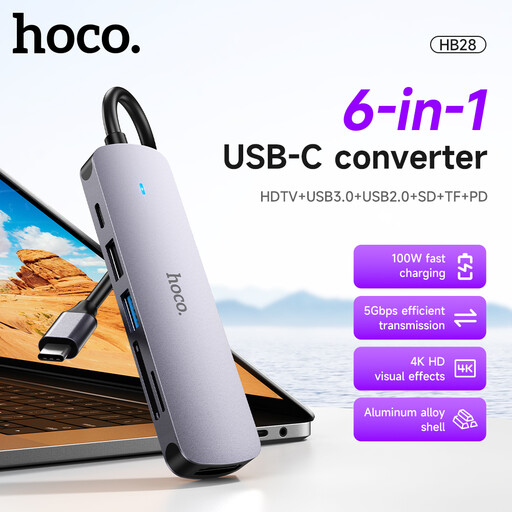
Why This Fits Their Persona: This is for the user who primarily works from one location but occasionally needs to connect to a hotel TV, use a USB stick or offload photos from an SD card. They don't need top-tier performance, but value having a simple, all-in-one tool in their bag for when the need arises.
By focusing on essential ports (HDMI, USB 3.0, SD/TF card readers) without over-promising, it avoids the trap of paying for high-end features you won't use. It provides a reliable baseline of connectivity for common travel scenarios at an accessible price point.
Includes built-in SD and TF card readers, which are often omitted from other adapters. Its lightweight, compact form factor makes it easy to pack for any trip.
We have compiled a complete, real-time list of products that fully satisfy these strict selection criteria and UK safety regulations.
Generally, yes. Most modern USB-C multiport adapters use universal standards like USB-C DisplayPort Alternate Mode (DP Alt Mode) and Thunderbolt 3/4 compatibility. This means an adapter like the Dell DA310 will work seamlessly with a portable USB-C adapter for MacBook as well as with Windows laptops from Dell, HP and others that have a full-featured USB-C or Thunderbolt port. Always check that your laptop's USB-C port supports video output.
A well-made adapter from a reputable brand should last for several years of regular use. Longevity depends on build quality, particularly heat management. Adapters with metal casings tend to dissipate heat better than all-plastic models. Signs that an adapter may be failing include frequent disconnects, overheating to the point of being hot to the touch or certain ports ceasing to function.
For most operating systems, including Windows 10/11 and macOS, the Dell DA310 is plug-and-play. All essential functions like video output, USB data and networking should work immediately without any manual driver installation. The system's built-in drivers handle the setup automatically, making it incredibly convenient for use with multiple devices.