Window-side cash-flow planners
If you enter monthly income, outgoings and alternative totals at a fixed desk, a physical keypad and a display you can read from your usual seat may matter more than extra calculation functions.


For monthly cash-flow figures at a window-side desk, start with a 12-digit calculator whose angled or adjustable display is comfortable to read from your seat; solar power with battery backup gives you an alternative when indoor light changes. Choose tax, margin and rounding controls if you repeatedly work through financial scenarios, or prioritise check-and-correct functions if you enter long sequences by hand. A tax key performs arithmetic using a selected rate; it cannot decide which VAT treatment applies.
If you enter monthly income, outgoings and alternative totals at a fixed desk, a physical keypad and a display you can read from your usual seat may matter more than extra calculation functions.
If your forecasts repeatedly involve tax-inclusive figures, margins, percentage changes or running totals, check that the calculator has the specific controls your method requires.
If you key in long sequences of figures, review and correction functions let you inspect entries before accepting a total. They do not check whether your source figures are right.
Check how the display sits on your desk, then decide whether recurring finance calculations or reviewing long entries is your stronger reason to move beyond a straightforward calculator.
| Concern | What to check | Who this matters to |
|---|---|---|
| Readable entry | Check the display angle, digit capacity and dimensions from your seated viewing position. | I enter figures beside a bright window and need to see each entry clearly without moving the calculator. Around 40% of consumers put readable entry first. |
| Finance controls | Look for the tax, margin, memory, grand-total or rounding controls you actually use; confirm VAT treatment separately. | My monthly scenarios repeatedly change tax-inclusive figures, margins and totals, so dedicated controls matter to my workflow. Roughly 30% of consumers prioritise these calculations. |
| Entry review | Look for stated review and check-and-correct functions; a memory key alone is not an input history. | When I key in a long sequence, I want to inspect an earlier entry before trusting the final total. For around 20% of consumers, entry review is the primary need. |
| Desk fit | Compare width and depth, then check that a smaller model retains your required keys. | With a laptop and papers alongside the calculator, I need it to fit without giving up the controls I use. Desk fit comes first for roughly 10% of consumers. |
Light at a window-side desk changes with the time of day and the calculator’s position.
Check the exact model for battery backup as well as solar power.
A tax key calculates with a selected rate; it cannot determine which treatment applies to particular goods or services.
Check the applicable treatment and current rate in GOV.UK guidance before setting or using the key.
Memory and grand-total keys store values, but do not necessarily let you inspect and correct earlier steps.
If long manual sequences are your concern, look for explicitly stated review or check-and-correct functions.
Desk and semi-desktop calculators can differ in footprint and display position, which affects where they sit beside papers or a laptop.
Compare published dimensions and check whether the display is angled, adjustable or fixed.
Casio UK lists desk calculators ranging from straightforward angled-display models to models with calculation-review controls.
Canon UK lists semi-desktop calculators for general and business arithmetic.
Aurora Europe describes desk and semi-desk models with different display arrangements and business controls.
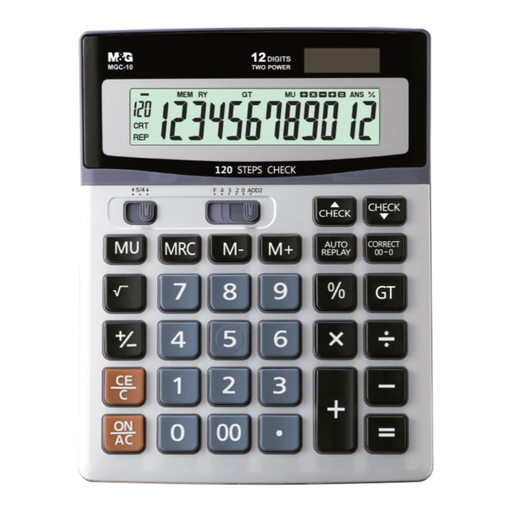
This check-and-correct calculator is relevant if reviewing a long sequence of manually entered cash-flow figures matters most. For a window-side desk, also check its viewing position and keep it out of direct sunlight.
 No image available
Consider this model if checking manually entered steps is more important to you than dedicated finance keys. Its name specifies a 12-digit display and 120-step check-and-correct function.
Keep it out of direct sunlight. Before ordering, check the display angle, power arrangement and any tax or margin keys your forecasts require.
Choose solar power with battery backup if you do not want operation to depend on the light reaching your desk. Check the exact model’s power specification rather than assuming that every solar calculator has backup power.
It can show a figure of up to 12 digits at once, which is useful when you work with longer totals. Digit capacity does not catch an incorrectly entered figure; consider review controls if that is your main concern.
No. It performs arithmetic with a rate you select or store. GOV.UK explains that VAT treatment depends on the goods or services and how they are used, so confirm the applicable treatment before relying on a forecast total.