Choose a magnifying task lamp if small characters remain difficult to distinguish under ordinary task lighting. A broader lamp with a stated colour-rendering specification suits work that combines fine print with colour comparisons, while a compact adjustable lamp makes more sense when worktop space is the main constraint. Whichever format you consider, check that you can position it over the work without crowding the desk or reflecting light into a nearby screen.
Who needs which kind of light?
Hobbyists who need magnification
If labels, markings or small parts remain hard to distinguish at your usual reading distance, consider the viewing task as well as the light. The Royal National Institute of Blind People advises choosing a magnifier for the particular task; a magnifying lamp also needs a workable position for the item beneath its lens.
Makers working with colour and detail
If you check instructions alongside paint, thread, paper or other coloured materials, consider how much of the work area the lamp illuminates. A stated colour-rendering index (CRI) gives you another specification to compare, but does not tell you whether the print needs enlarging.
Hobbyists with limited desk space
If tools and materials already occupy the worktop, look at the lamp’s base or mounting method, adjustment and reach. A compact lamp can provide movable local light for occasional reading, provided it can be aimed where you actually work.
What matters when choosing?
Decide whether the difficulty is the size of the print, illumination across the work area or the space available for a lamp. That distinction helps narrow the format before you compare mounting and controls.
Magnifying clamp lamp
Choose when: Small print or markings still need enlarging after you have positioned ordinary task lighting.
Trade-off: The item must fit beneath the lens at a workable distance, and the desk needs a suitable edge for the clamp.
Broad task lamp
Choose when: You read fine print while comparing colours or working across a wider craft surface.
Trade-off: A wider lamp needs room to position its arm and cannot enlarge characters that are too small to resolve.
Compact adjustable lamp
Choose when: Occasional close reading calls for movable local light, but the worktop has little spare space.
Trade-off: Check that the lamp reaches your reading position; compactness alone does not establish its suitability for colour work or magnification.
| Concern |
What to check |
Who this matters to |
| Resolving tiny print |
Compare lens magnification and usable working position; check clamp fit if the lamp mounts to the desk edge. |
If characters remain too small even under positioned light, I need to see the item through a lens while I work. Around 36% of consumers put magnification first. |
| Lighting colour and detail |
Check stated CRI, output settings and how the lamp spreads light across the work area. |
When I read instructions beside coloured materials, I need light over more than a single small spot. For around 29% of consumers, wider colour-conscious illumination is the main concern. |
| Fitting a crowded desk |
Measure space for the base or clamp, then compare reach and the route to the power source. |
With tools already on the worktop, I need light that can reach the page without getting in the way. Keeping the workspace usable comes first for around 21% of consumers. |
| Avoiding screen reflections |
Check where the light will sit relative to the display; for a monitor bar, check the monitor’s shape and thickness. |
If I switch between a physical project and on-screen patterns, I need to see both without a bright reflection on the display. Around 14% of consumers prioritise screen-adjacent glare control. |
Common buying mistakes
-
Assuming a brighter bulb will enlarge the print
More illumination does not make physically small characters bigger. If their size is the obstacle, an ordinary lamp may leave the main difficulty unchanged.
Check whether repositioned task light is enough before choosing between an adjustable lamp and a task-appropriate magnifier. The Royal National Institute of Blind People advises matching the magnifier to what you need to do.
-
Ordering a clamp lamp without measuring the edge
A thick or obstructed edge can prevent a clamp from mounting where the light is needed. Daylight Company lists a maximum 60 mm opening for its Magnificent Pro On Clamp and 55 mm for its Slimline 4 clamp.
Measure the clear, usable edge and look for drawers, lips or cable trays beneath it. If clamping is unsuitable, consider a stable base-mounted lamp.
-
Pointing the lamp into a nearby screen
Bright reflections can interfere with on-screen patterns or instructions. The Health and Safety Executive advises arranging the desk and screen to avoid glare and bright reflections.
Position the light over the physical work without placing its reflection in your viewing path. Check monitor compatibility before choosing a screen-mounted bar.
-
Treating CRI as the whole buying decision
A colour-rendering specification does not establish that a lamp has the reach, mounting, glare control or magnification your task requires.
Compare CRI when colour judgement matters, then assess the lamp’s position and controls separately. If the characters themselves need enlarging, consider a magnifier too.
Relevant brands to consider
Daylight Company
Its task-lighting range includes lamps for close-detail work and broader hobby surfaces.
- Daylight Company specifies a 1.75x lens and three brightness levels for the Magnificent Pro On Clamp. Its Slimline 4 Table Lamp is specified with 95+ CRI, an anti-glare diffuser and four output steps.
- The magnifying model requires a suitable clamping position; the broader lamp does not take the place of magnification when characters need enlarging.
Anglepoise
Its adjustable desk-lamp range is relevant to movable local light on a compact work surface.
- Anglepoise describes the 90 Mini Mini as dimmable and USB powered, with a stated full reach of 38 cm.
- The 90 Mini Mini has no integrated magnifier. Its listed CRI of 86 differs from the 95+ CRI stated for the Daylight Company examples, so compare the particular models if colour judgement matters.
BenQ
Its monitor-mounted lighting is relevant when the task takes place beside a compatible display.
- BenQ specifies Ra≥95 for the ScreenBar Halo and a centre illuminance of 800 lux measured at 45 cm.
- Check the ScreenBar Halo’s stated monitor-thickness and shape limits. A monitor-mounted bar cannot be repositioned over physical work away from the display as a movable desk lamp can.
Compact lamps on Joybuy
These compact, adjustable desk lamps are options for positioning local light on a hobby work surface. If fine print needs magnification or your work calls for broad, colour-conscious illumination, assess those requirements separately before choosing one.
 No image available
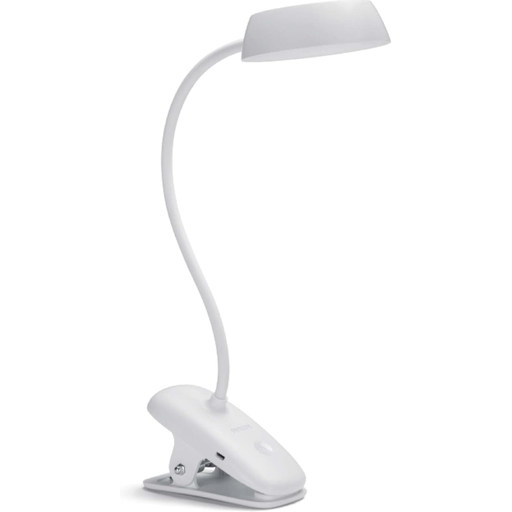
Philips Doughnut Desk Clip Lamp, USB Rechargeable, 3W, White
The clip format is worth considering if you want to keep the worktop clear while directing light towards a page or small project.
The product name specifies USB-rechargeable power and 3W. Check the clip opening against your desk edge and whether the lamp can reach your usual inspection position.
View on Joybuy
 No image available
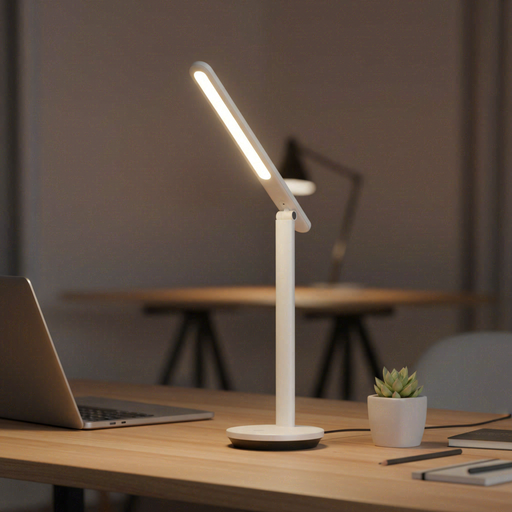
Yeelight LED Folding Desk Lamp Z1 Pro, White
The folding format suits a desk where you want to reposition local light and put the lamp away when the work is finished.
The product name specifies a rechargeable design and adjustable brightness. Check its reach and charging arrangements against how and where you plan to use it.
View on Joybuy
 No image available
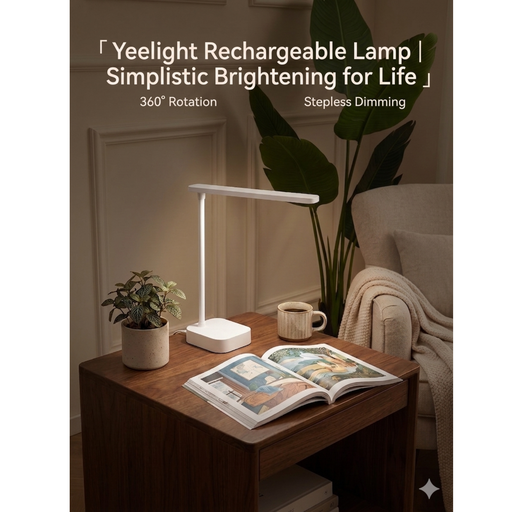
Yeelight Rechargeable Desk Lamp, Portable LED
This portable format is an option if you move between positions on a hobby desk and want to aim light towards the current task.
The product name specifies rechargeable power, warm light and adjustable angles. Check its reach, brightness controls and charging arrangements if those will determine whether it suits your fine-print work.
View on Joybuy
Questions about fine-print lighting
Should I choose a brighter lamp or a magnifying lamp for small print?
Choose adjustable task lighting if positioning the light makes the print readable; consider a magnifying lamp if the characters remain too small to distinguish. The Royal National Institute of Blind People advises selecting a magnifier for the particular task, so check the lens and working position rather than comparing brightness alone.
Where should the lamp go if I use a monitor for patterns?
Place the light so it illuminates your physical work without reflecting in the display. The Health and Safety Executive advises arranging the desk and screen to avoid glare and bright reflections; if you prefer a monitor-mounted bar, check its compatibility with your display before ordering.
Is a clamp or a base-mounted lamp more suitable for my desk?
A clamp can preserve worktop space if the exposed desk edge fits its opening and offers a suitable mounting position. A base-mounted lamp avoids that edge requirement and may be easier to move between surfaces, but its base needs clear space where you work.


