Small-desk webcam callers
If there is little room beside your laptop or monitor, a monitor mount or desk-edge clamp may be more practical than a freestanding light. Check that the chosen mount fits the space you have.


Start with a diffused light in front of you, angled towards your face, rather than relying on a side or back light. A monitor-mounted light avoids using desk space, while a clamp-mounted light gives you another way to position it if the desk edge is suitable; check the mount and power requirements before buying.
If there is little room beside your laptop or monitor, a monitor mount or desk-edge clamp may be more practical than a freestanding light. Check that the chosen mount fits the space you have.
If one side of your face looks dark on calls, prioritise a light you can place in front of you and angle towards your face. A diffused light is worth considering when the existing light creates sharp shadows.
If you intend to use a computer port or an existing charger, compare its output with the light’s power requirements. The maximum stated brightness of some lights depends on the USB power source.
Decide where the light can sit before comparing its controls: a suitable mount lets you bring light towards your face, but diffusion and the available power source also affect the choice.
| Concern | What to check | Who this matters to |
|---|---|---|
| Keeping the worktop clear | Check monitor-mount fit or measure the clear desk edge needed for a clamp. | When my desk is crowded, I want the light near webcam height without losing more worktop space. Around 40% of consumers put a space-saving mount first. |
| Softening facial shadows | Look for diffusion and an angle you can adjust to light your face from the front. | If my current light leaves a hard shadow across my face, I would prioritise a diffused light I can reposition. Around 40% of consumers put softer facial lighting first. |
| Power and controls | Compare the exact light’s power input with your USB port or charger, and check its brightness controls. | I want a straightforward setup, but the light must work as expected with the power source I plan to use. Around 20% of consumers prioritise power and controls. |
That position can leave one side of the face dark, so choosing a brighter light alone may not address the shadow.
Place the light in front of you and angle it towards your face. Adjust its position and brightness before deciding whether a second light is needed.
Elgato specifies 400 lm from USB-A, 700 lm from USB-C and 1,000 lm with a 3A power supply for Key Light Neo.
Match the light’s stated power requirements to the port or charger you intend to use, and check what comes in the box.
Reaching the stated maximum may require a suitable higher-current power supply.
A clamp needs an accessible edge; a rear lip, cable tray or nearby monitor stand may obstruct its intended position.
Measure the available edge and allow room for the arm and light head. If the edge is unusable, consider a compatible monitor mount.
A product marking does not tell you which cable or power adapter is included with a particular light.
Check the listing for the supplied power equipment, stated input requirements and suitability for your intended UK socket or power source.
NEEWER’s R10 is a clamp-mounted, diffused desktop light for consumers who have a usable desk edge and want to position the light independently of the monitor.
Key Light Neo provides a monitor-mounted option when keeping the desk surface clear is the priority.
Logitech G’s Litra Glow and Litra Beam LX are streaming-light options for consumers considering diffusion or an adjustable desktop key light.
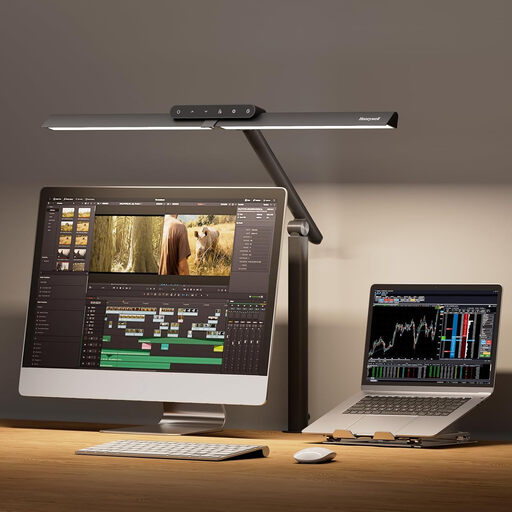
This clamp-mounted desk lamp is a lighting alternative if you have a suitable desk edge and can position its heads towards your face. It is not identified as a dedicated webcam panel, so check its light spread if softening sharp shadows is your main aim.
 No image available
Consider this clamp lamp if you can direct its heads towards your face without obstructing your monitor; check the light spread if reducing hard shadows is the priority.
The product title lists 1,200 lm, four colour modes and stepless dimming.
Check desk-edge fit, clearance around the light heads and the supplied power connection before ordering.
Place it in front of you and angle it towards your face. Adjust its position and brightness first; if a pronounced shadow remains on the far side, a lower-intensity second light can provide fill.
No: output figures alone do not establish how the light will fall across your face. NEEWER specifies 880 lx for the R10 at 0.5 m, so compare any lux figure with its stated distance and consider diffusion and placement as well.
A USB port may power a light without delivering its maximum stated output. For Key Light Neo, Elgato specifies 400 lm from USB-A, 700 lm from USB-C and 1,000 lm with a 3A power supply; check the exact light’s input requirements and what power equipment is supplied.
No: check the specific listing for the plug, adapter or cable supplied. Also compare the light’s stated input requirements with the power source you intend to use.