Choose the desktop layout around the space people need for worksheets, books and writing. A mini PC keeps the computer itself small, a small-form-factor or tower desktop offers configurations to consider for future expansion, and an all-in-one combines the computer and display. Whichever layout you choose, check the exact configuration, printer and software compatibility, included equipment and whether each regular user can position the screen comfortably.
Who is this setup for?
Worksheet makers short on desk space
If paper, books and another user need room, consider where the computer and screen will sit together. Lenovo UK describes its ThinkCentre M Tiny range as taking very little space; an all-in-one is another layout to assess if a combined screen and computer suits the desk.
Users connecting several devices
A printer, keyboard, mouse, storage device and additional display can make connection choices more important than the size of the computer alone. Dell UK and HP United Kingdom list different port and expansion options across their desktop configurations, so check the individual model.
People sharing a workstation regularly
When several people use the same desk, screen position and space for input devices matter alongside the PC. The Health and Safety Executive advises considering the equipment, furniture, working conditions and individual users when assessing a workstation.
What matters when choosing?
Decide where the computer and display can go, then check the connections and working position before settling on a configuration.
Mini PC and separate monitor
Choose it when: keeping the computer's footprint small matters most. Lenovo UK describes its ThinkCentre M Tiny range as requiring very little space.
Bear in mind: you still need room for a monitor, and ports and upgrade options depend on the exact PC.
Small-form-factor PC and separate monitor
Choose it when: you want to examine expansion options without moving straight to a tower. Dell UK lists memory and storage choices and up to three PCIe slots for a cited OptiPlex Small Form Factor configuration.
Bear in mind: measure both the case location and the separate monitor's footprint.
All-in-one desktop
Choose it when: combining the screen and computer appeals more than selecting them independently, as in Dell UK's OptiPlex all-in-one example.
Bear in mind: screen placement and later changes to either component depend on the particular design.
Tower PC and separate monitor
Choose it when: the case can sit away from the work surface and future configuration choices take priority. HP United Kingdom describes flexible storage and memory options for its cited ProDesk tower.
Bear in mind: check the case location, cable routes and available legroom as well as the monitor space.
| Concern |
What to check |
Who this matters to |
| Usable desk space |
Measure the computer and monitor positions, keyboard depth and cable routes while leaving room for paper. |
I need space to spread out worksheets and books without moving the computer each time. Around 31% of consumers put usable desk space first. |
| Device connections |
Check the exact model's USB and display connections against the intended printer, monitor and other devices. |
Printing worksheets and using my usual input devices need to work with this setup. For around 31% of consumers, connecting those devices is the primary concern. |
| Shared-workstation comfort |
Check screen adjustment, viewing distance and room for the keyboard and mouse for each regular user. |
If several of us work at this desk, we need to be able to reposition the setup for repeated use. Around 23% of consumers place that shared-use need first. |
| Future configuration |
Confirm memory, storage and available upgrade options for the exact model and the software you intend to use. |
I may keep more files locally or change peripherals later, so I want to understand what this configuration allows. That is the main concern for around 15% of consumers. |
Buying pitfalls
-
Planning for the computer but not the whole desk
A small case does not tell you whether the monitor, printer access, paper and input devices will fit together. The Health and Safety Executive advises looking at the whole workstation, including equipment and furniture.
Measure the working area and list the devices you need. Check the exact package contents before ordering.
A separate monitor, input devices, cables or adapters may be needed to complete the intended setup.
-
Assuming a product family defines the configuration
Dell UK and HP United Kingdom show differing configurations within their desktop ranges. A family name alone does not establish the memory, storage or connections of the model you receive.
Check the full model details for the operating system, memory, storage, ports and included peripherals.
-
Assuming compact means comfortable to use
Less computer clutter does not settle screen height or distance, keyboard placement or chair position. The Health and Safety Executive's display-screen guidance addresses these parts of the workstation separately.
Check that regular users can position the display and input devices appropriately without losing the space needed for documents.
A riser, monitor arm or separate input devices may be needed if the chosen layout cannot be adjusted sufficiently.
Brands to consider
Dell
Dell UK lists both OptiPlex Small Form Factor and all-in-one desktop configurations relevant to different shared-desk layouts.
- A cited Small Form Factor configuration offers DDR5 and M.2 NVMe storage choices, with up to three PCIe slots.
- The all-in-one and separate-case configurations differ; check the selected model's display arrangement, operating system, memory and connections.
Lenovo
Lenovo UK positions its ThinkCentre M Tiny range around a small physical footprint.
- Its compact case is relevant when the computer must take little space at the shared desk.
- Check the individual model's ports, monitor connections, memory, storage and upgrade options rather than assuming they are common to the range.
HP
HP United Kingdom lists ProDesk Mini, Small Form Factor and Tower desktops, allowing buyers to consider different case layouts.
- HP describes flexible storage and memory options and multiple USB ports for its cited ProDesk tower configuration.
- Capacities and connections are configuration-specific; check the full model before planning the workstation around it.
Mini PCs for a shared desk
These Joybuy mini PCs are options for keeping the computer case small while arranging a separate display at the shared desk. Check each model against your worksheet software, printer and intended monitor, and confirm what comes in the box.
 No image available
FIREBAT F1 Mini PC, Ryzen 5 7640HS, 24GB RAM, 512GB SSD
Consider this mini PC where the computer itself needs a small place beside a separately positioned screen.
The listed configuration has an AMD Ryzen 5 7640HS, 24GB LPDDR5 RAM and a 512GB PCIe 4.0 SSD. The title lists USB 4.0, HDMI 2.1 and 2.5G Ethernet.
Confirm the package contents and that its display connections and your printer suit the planned setup.
Joybuy
 No image available
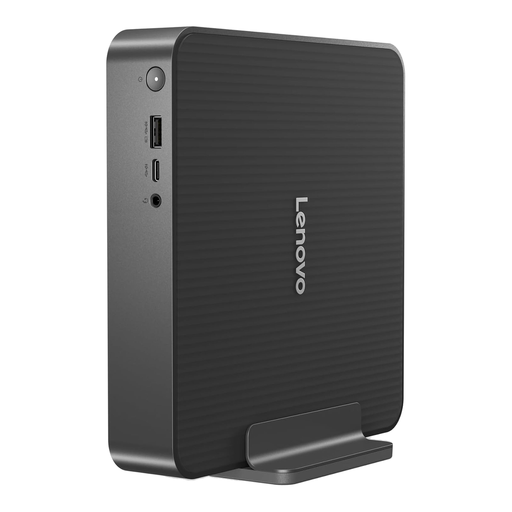
Lenovo IdeaCentre Mini PC 01IRH10R, 91B2000XUK
This mini PC is worth considering if the computer needs to take little room while you position the monitor separately.
The product title specifies Intel Core 5, 16GB RAM and a 512GB SSD.
Check the intended monitor and printer connections, along with whether a monitor, keyboard and mouse are included.
Joybuy
 No image available
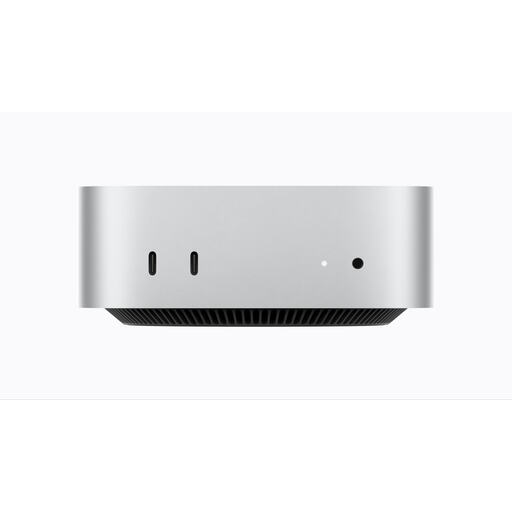
Apple Mac mini (2026), M6, 16GB, 256GB SSD
This compact desktop is an option if the worksheet software and printer you intend to use are compatible with your chosen setup.
The product title lists an M6 chip with a 12-core CPU and 12-core GPU, 16GB memory and a 256GB SSD.
Check software and printer compatibility, the intended monitor connection and the package contents before choosing it.
Joybuy
 No image available
FIREBAT R3 Mini PC, Ryzen 5 7430U, 16GB RAM, 512GB SSD
This mini PC is another small-case option for a desk where worksheets need room beside the display.
The product title specifies an AMD Ryzen 5 7430U, 16GB LPDDR4 RAM and a 512GB SSD; it also lists Wi-Fi 6 and Bluetooth 5.2.
Confirm the exact ports, monitor and printer connections, and included equipment for the layout you intend to use.
Joybuy
 No image available
SOYO Y5Pro Mini PC, Core i5 8250U/8350U, 8GB RAM, 256GB SSD
Consider this mini PC if its small-case layout and exact configuration meet the needs of your shared desk.
The product title lists Windows 11, 8GB DDR4 memory and a 256GB SATA SSD, but gives the processor as 8250U/8350U rather than one confirmed option.
Confirm the processor, monitor and printer connections, and whether the display and input devices are included.
Joybuy
Common questions
Should I choose a mini PC, small-form-factor desktop or all-in-one for a shared desk?
Choose a mini PC if keeping the computer case small is the priority, a small-form-factor desktop if you want to examine more expansion options, or an all-in-one if a combined screen and computer suits the space. Lenovo UK, Dell UK and HP United Kingdom show why it matters to check the particular configuration rather than relying on its case type; measure the complete desk layout and confirm its connections.
What if the shared computer will be used regularly for work at home?
Check the whole workstation, not just the desktop computer. The Health and Safety Executive describes workers using display screen equipment daily for continuous periods of an hour or more as DSE users, and its workstation guidance asks employers to consider equipment, furniture, working conditions and individual needs.
How should we arrange the screen and input devices for different users?
Choose an arrangement that each regular user can adjust to a suitable position. The Health and Safety Executive's posture guidance describes placing the top of the screen at eye level and the screen about an arm's length away; check that the desk also leaves room to position the keyboard and mouse comfortably.
What should I check on a computer listing before ordering?
Confirm the exact model, seller details, package contents, connections and applicable product information before ordering. If a listing refers to CE or UKCA marking, check which requirements apply to that product and destination rather than assuming Great Britain guidance also describes the position in Northern Ireland.


