What matters when choosing
Start with the size of the files and versions you need to retain, then decide whether the drive will stay at a desk or move around the studio. Connection, access control and a repeatable restore routine still matter whichever format you choose.
Desktop HDD
Choose when: The backup is a growing archive kept beside one computer.
Allow for: A mains socket and a drive that is less convenient to carry between workspaces.
Portable SSD
Choose when: The drive will move regularly or transfer large studio files using a compatible connection.
Allow for: Checking that the chosen capacity covers the full backup set; advertised speed and ruggedness depend on stated conditions.
| Concern |
What to check |
Who this matters to |
| Archive capacity |
Total the folders and accounts to back up, including the versions you intend to retain; compare that requirement with the exact drive variant and available desk power. |
If my family photos and studio files keep growing, I need room for the archive without repeatedly moving the drive. Around 33% of consumers put fixed-desk archive capacity first. |
| Movement and transfers |
Check the computer’s USB connector and generation against the drive and supplied cable; treat maximum transfer figures as conditional. |
When I carry files between studio desks, a manageable drive and a suitable connection matter more to me than leaving it in one place. Roughly 27% of consumers make movement and transfer time their primary concern. |
| Access to sensitive files |
Decide who may restore the backup, whether compatible encryption is appropriate, and where its recovery information will be stored. |
If the drive holds family or customer information, I want to limit who can read it without locking out authorised users. Around 20% of consumers prioritise control of access to those files. |
| Backups and restores |
Confirm that the intended folders are included, restore a test file, and plan when to connect and disconnect the drive. |
I need to know I can retrieve the right file after a mistake, not merely that a drive is attached. Roughly 20% of consumers put a dependable backup and restore routine first. |
Joybuy drives for this setup
These choices cover a fixed-desk archive and portable backups, including HDD and SSD formats. Match the capacity and connection to the family computer before deciding how the drive will fit into the studio’s backup routine.
 No image available
Western Digital My Passport Portable External Hard Drive, 2TB, Black
Consider this portable HDD if the backup needs to move between workspaces and the files and versions you intend to keep fit within the chosen capacity.
Capacity: 2TB. Check the computer connection and handling instructions before putting it into a regular backup routine.
View on Joybuy
 No image available
Samsung T7 Shield MU-PE1T0S Portable SSD, 1TB, Black
Consider this portable SSD when the backup moves frequently or large files need transferring, provided 1TB covers the intended backup set.
The MU-PE1T0S uses USB Type-C and USB 3.2 Gen 2. Samsung lists sequential speeds of up to 1,050 MB/s read and 1,000 MB/s write under compatible host, cable and UASP conditions.
Samsung’s IP65 and 3 m drop-test claims are based on specified tests; real-world resistance can vary, and water, dust and drop damage are excluded from warranty coverage.
View on Joybuy
 No image available
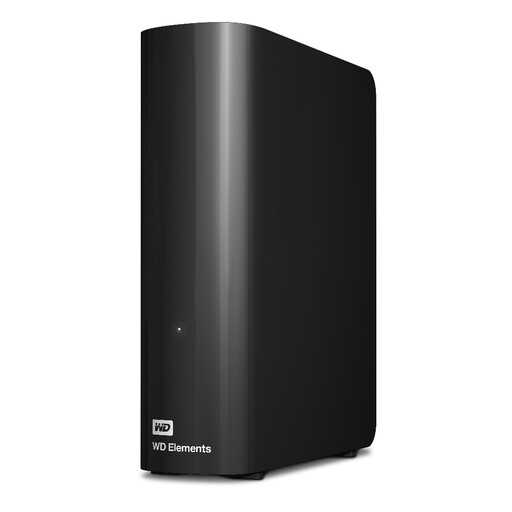
Western Digital WD Elements Desktop Hard Drive, 20TB
Consider this desktop HDD for a large archive kept at a fixed studio desk with access to mains power.
The Joybuy UK listing specifies 20TB, USB 3.2 Gen 1/USB 3.0 connectivity and an AC adapter. Formatted user capacity can be lower than the labelled capacity, so compare the space available with your backup set.
View on Joybuy
 No image available
SanDisk Portable SSD, 2TB
Consider this portable SSD if the intended backup set fits within 2TB and the drive needs to travel between workspaces.
Check the exact connector and the computer’s port before buying. If the backup will contain sensitive files, decide how access and encryption will be managed.
View on Joybuy
 No image available
Western Digital Elements Portable Hard Drive, 4TB, Black, USB 3.0
Consider this portable HDD when the backup needs to move but requires a 4TB capacity variant.
Check the computer connection and file-system needs before setup, particularly if the drive will be used with a Mac. Plan separate protection for sensitive files where appropriate.
View on Joybuy
Common questions
Can I use an external drive with Windows File History?
Yes, on supported Windows installations, File History can back up files to an external drive or network location. Microsoft Support advises configuring the folders you need; check that they are included and restore a test file before relying on the setup.
Should I leave the backup drive connected?
Disconnect a drive used for periodic backups when the backup is complete. The National Cyber Security Centre advises against leaving backup storage connected when it is not in use because some viruses can affect attached devices; keep the disconnected drive in a secure place.
Should a shared-studio backup be encrypted?
Consider encryption according to what the drive holds and who can access it. For organisations storing personal information on removable media, the Information Commissioner’s Office advises using encryption; also decide who will keep the recovery information so authorised users can restore files.
What if I cannot open a BitLocker-encrypted backup drive?
A BitLocker recovery key may be needed to regain access after a suspected unauthorised access attempt or certain system changes, according to Microsoft Support. Keep that key securely and separately from the drive, and ensure an authorised person knows how to retrieve it.
Will a portable SSD reach its advertised maximum speed?
Not necessarily. Samsung says the T7 Shield’s stated maximum sequential speeds depend on a USB 3.2 Gen 2-capable host, a suitable connection cable and UASP; check the family computer’s port and the drive connection before using those figures to choose.


