Shared-records coordinators
If colleagues or household members use one maintenance computer, separate sign-ins help keep their files and browser favourites apart. Microsoft describes these as features of separate Windows user accounts.


For a shared office used to track home maintenance, start with a compact desktop if it has the connections, storage and software compatibility your records workflow requires. Choose a small-form-factor system when future internal expansion matters more than the smallest footprint, or a mini desktop when desk space is the tighter constraint. If several people use the computer, plan separate Windows accounts; account separation does not settle how personal data may be shared.
If colleagues or household members use one maintenance computer, separate sign-ins help keep their files and browser favourites apart. Microsoft describes these as features of separate Windows user accounts.
A permanent records station may have to fit alongside other shared-office equipment. Lenovo states that its ThinkCentre M Tiny range has a footprint 96% smaller than a traditional desktop tower; check the space and connections needed for the complete setup, not just the computer.
Maintenance logs, calendars, supplier correspondence and documents call for a configuration that fits the actual applications and peripherals. Dell and HP describe configurable small-form-factor business lines, but their ports and expansion options depend on the model.
A mini desktop puts desk space first; a small-form-factor business desktop is worth considering when internal expansion is a priority. In either case, match the exact configuration to the people, software and equipment that will use it.
Consider when: You want a fixed workstation and may need additional internal storage or expansion later. Dell describes its OptiPlex small-form-factor line as compact and expandable, while HP offers configurable options in its ProDesk SFF line.
Trade-off: Expansion and port options vary by exact model and configuration.
Consider when: Preserving shared desk space takes priority and your maintenance work centres on browser services, calendars, spreadsheets and documents.
Trade-off: A smaller unit does not establish which ports or upgrade options it has; check both before choosing it over a larger format.
| Concern | What to check | Who this matters to |
|---|---|---|
| Separate users and records | Check the Windows installation and plan an account for each regular user, including who manages administrator access. | If several people update the same maintenance records, I need their files and browser sessions kept apart. Roughly 31% of consumers put shared-user separation first. |
| Desk fit and connections | Compare the exact model’s display outputs and front and rear ports with your monitor, printer, network and other existing equipment. | When the office desk is already crowded, I need the computer and my existing equipment to fit together. Around 31% of consumers make desk fit and connectivity their primary concern. |
| Records software and Windows | Confirm the required operating system and the software publisher’s requirements, then check the exact processor, memory and storage configuration. | I need maintenance software, documents and routine office apps to work on the computer I choose. Roughly 23% of consumers prioritise that workflow and compatibility. |
| Room to expand | Check storage positions, memory slots and relevant expansion ports on the exact configuration before relying on future upgrades. | If invoices, photographs and correspondence build up over time, I want options for adding storage or equipment. Around 15% of consumers place expansion first. |
Microsoft lists 4GB RAM and 64GB storage as Windows 11 installation minimums and notes that updates and some features can need more storage. Those minimums do not establish what your maintenance applications will need.
Check the requirements of your actual software, files, browser use and displays against the desktop’s exact configuration.
Dell and HP describe configurable ports and expansion within their business desktop lines, but options differ between models and configurations.
Compare the exact front and rear ports, monitor outputs, network connection and upgrade options with the equipment already in the office.
Incompatible existing equipment may call for adapters or replacement peripherals.
A shared sign-in can mix files and browser information. Microsoft says separate Windows accounts provide separate files, browser favourites and private desktops.
Give each regular user an account and decide who manages accounts, maintenance files and backups.
Separate accounts do not determine whether sharing personal data is lawful. The Information Commissioner’s Office says organisations must identify a lawful basis before sharing personal data.
If the records contain identifiable tenant, contractor or customer information, assess the specific access and sharing arrangements separately from the hardware purchase.
Dell’s OptiPlex small-form-factor line is relevant if you want a compact, fixed business workstation with potential for internal expansion.
HP ProDesk includes small-form-factor and mini business desktops with configuration-dependent ports and storage.
Lenovo ThinkCentre offers Tiny systems and other business desktop formats for different space and expansion needs.
These desktops cover compact mini-PC options alongside other fixed-workstation choices for maintenance records. Match each one to your desk, software and peripherals; their inclusion does not mean they offer the same connections or expansion options.
 No image available
Consider this mini PC where the shared desk has limited room and Windows 11 Pro suits the intended records workflow.
The named configuration includes an AMD Ryzen 5 7535HS, 16GB LPDDR5 memory and a 512GB NVMe SSD. Confirm the supplied wireless configuration and check monitor and peripheral connections before ordering.
 No image available
This is another mini-PC option for a desk where the system unit needs to take up little space.
The title specifies Win11, an AMD Ryzen 4300U, 16GB LPDDR4 memory, a 512GB SSD, and HDMI 2.0, Type-C and DisplayPort 1.4 display connections. Check those connections against your monitors and confirm the supplied Bluetooth configuration.
 No image available
Consider this mini desktop if a compact fixed workstation fits your shared-office plan.
The named variant has an Intel Core 5 processor, 16GB RAM and a 512GB SSD. Confirm its display outputs, full port layout, operating system and storage-upgrade options against your intended setup.
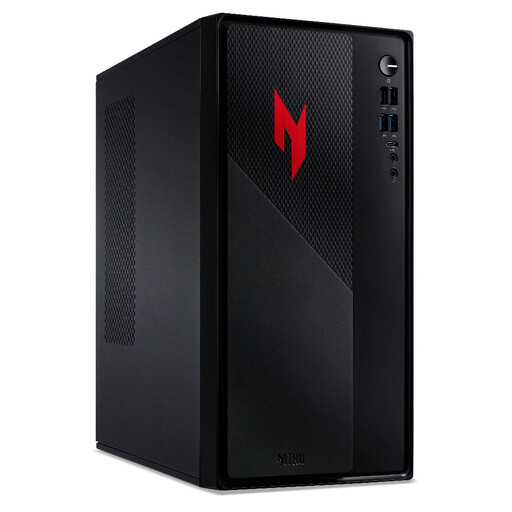 No image available
Consider this desktop only if its named configuration also serves a separate need beyond routine maintenance records; the graphics model alone does not establish an advantage for that work.
Its name specifies 16GB RAM, a 512GB SSD and Windows 11. Check its dimensions, physical ports and display connections against the shared desk and existing equipment.
 No image available
Consider this fixed desktop if its physical size fits the office and local document storage is a priority.
The named configuration includes Windows 11 Home, 8GB RAM and a 1TB SSD. Check that its memory meets your applications’ requirements and confirm upgrade options if you expect those requirements to grow.
Yes, if each person uses a separate Windows account. Microsoft says separate accounts provide separate files, browser favourites and private desktops; assign responsibility for creating accounts and managing administrator access.
Windows 11 minimums are installation requirements, not a specification for your maintenance workload. Microsoft lists 4GB RAM and 64GB storage among those minimums and notes that updates or features may need more; check your actual applications and files before choosing a configuration.
Choose a mini PC when desk space is the main constraint and its exact ports and upgrade options meet your needs. Consider a small-form-factor desktop when future internal storage or expansion matters more, checking the particular model rather than assuming those options come with the format.
They can affect how an organisation handles or shares identifiable tenant, contractor or customer information, regardless of the desktop chosen. The Information Commissioner’s Office says organisations must identify a lawful basis before sharing personal data; assess the specific records and sharing activity separately from the computer purchase.
Check the available electrical-equipment recycling or return route for your circumstances, and deal with stored records before handing over the device. GOV.UK describes the UK waste electrical and electronic equipment framework for recovery, reuse and recycling; ask the seller or local authority which route applies to your equipment.