What to check before buying
Decide first whether the computer must stay at a desk or travel, then compare the configuration and connections needed for your existing home setup.
| Priority |
What to check |
Your needs |
| Everyday responsiveness |
Compare the processor, RAM and SSD capacity. For a new everyday desktop, Which? identifies 8GB RAM and a 512GB SSD as useful starting points; integrated graphics are sufficient when gaming and graphics work are not required. |
I want browsing, email and household administration to remain comfortable with ordinary multitasking, without paying for workstation or gaming hardware. |
| Storage and connections |
Check SSD capacity and the exact USB, USB-C, HDMI and other connections needed for a monitor, printer, external drive, headset or card reader. Confirm internal-drive space separately if you plan to reuse an old drive. |
My replacement needs room for household files and must work with the accessories I already use. |
| Form factor and mobility |
A separate desktop needs a monitor and input devices; an all-in-one includes its display; a laptop adds portability. Compare equivalent specifications rather than assuming one format is automatically better value. |
A fixed desk setup may suit me, but if the computer must be carried between rooms, stored away or taken out of the home, portability matters more. |
| Windows support |
For a Windows PC, confirm the installed and activated operating system and the exact model’s Windows 11 eligibility. Microsoft lists TPM 2.0, compatible hardware, UEFI firmware and Secure Boot capability among Windows 11 requirements. |
I need a supported operating system for online banking and other internet use, especially when considering a refurbished machine. |
Joybuy product options
Joybuy product options for fixed-desk desktop setups, all-in-one computers and a portable laptop alternative for everyday home computing.
 No image available
ASUS V400 AiO V470VAK-WPE032W 27-inch Full HD All-in-One PC
A fixed shared-computer option with an integrated 27-inch Full HD display for a lower-clutter desk setup.
Listed with an Intel Core i7-13620H, 16GB DDR5 RAM, 512GB SSD and Windows 11 Home. Check the exact USB-port types and included mouse, plus whether the integrated screen and ergonomics suit long-term use.
Joybuy
 No image available
HP M02-0005na OmniDesk Ryzen 5 Desktop
A separate desktop for a fixed desk where you can use or add a monitor and retain flexibility around peripherals.
Listed with an AMD Ryzen 5 8500 processor, 8GB RAM, 1TB SSD and Windows 11 Home, plus HDMI 2.1, USB-A, USB-C and Ethernet. A monitor is required; check its connection before buying.
Joybuy
 No image available
Lenovo IdeaCentre Mini PC 01IRH10R Core 5
A compact separate-PC option for a space-limited desk with an external display and existing accessories.
Listed with an Intel Core 5 processor, 16GB RAM, 512GB SSD and Windows 11 Home, with Thunderbolt 4, USB-A, USB-C, Wi-Fi 7 and Bluetooth 5.4. An external monitor, keyboard and mouse are required.
Joybuy
 No image available
SOYO M5 Mini PC Ryzen 4300U, 16GB/512GB
A small separate-PC route for a fixed location where broad connection options for existing accessories are useful.
Listed with a four-core Ryzen 4300U, 16GB LPDDR4 RAM, 512GB SSD, Windows 11, HDMI, DisplayPort, USB-C and six USB ports. Confirm the Windows 11 edition and activation status, and check whether a monitor, keyboard and mouse are included.
Joybuy
 No image available
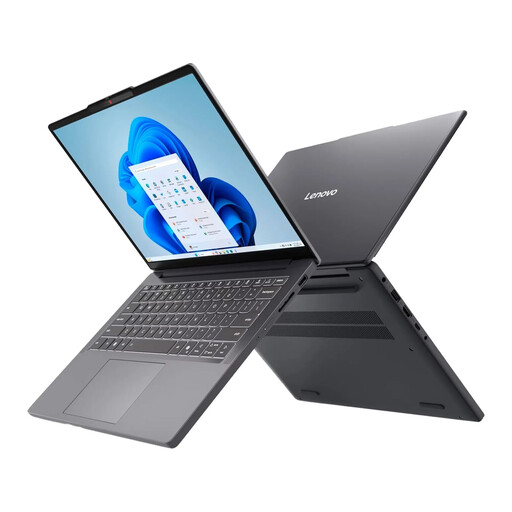
IP Slim 3 14IRH10 Core i5 Laptop, 8GB/512GB
A laptop alternative for households that need to move the computer between rooms, store it away or travel with it.
Listed with an Intel Core i5-13420H, 8GB RAM, 512GB SSD, Windows 11 Home and a 14-inch WUXGA IPS display. Confirm the UK keyboard layout, mains plug and detailed port configuration before purchase.
Joybuy
Frequently asked questions
Does a Windows 10 desktop still work after support ended?
It may still function, but Microsoft ended Windows 10 technical support, feature updates and security updates on 14 October 2025. For online banking and other internet activity, continued operation is not the same as continued security support; move to Windows 11 if eligible, use Consumer Extended Security Updates only where applicable, or replace the device.
What should I verify before buying a refurbished Windows desktop?
Confirm the exact model, processor, RAM, SSD capacity, operating-system edition and activation status, Windows 11 compatibility, condition grade, included power lead and any peripherals. Microsoft lists a compatible 64-bit processor, 4GB RAM, 64GB storage, UEFI firmware capable of Secure Boot and TPM 2.0 among minimum Windows 11 requirements, but the exact machine and configuration still need checking.
Should I choose an all-in-one merely because it saves space?
No. Saving space is a reason to consider an all-in-one, but it does not replace checking the screen, webcam, speakers, ports, keyboard and mouse. Because the display and computer are combined, choose a screen size and connectivity arrangement you will be comfortable using for several years.
What should I do with the old computer?
Back up files you need and remove personal data before passing it on or recycling it. Desktop computers fall within the UK WEEE framework, which encourages recovery, reuse and recycling; check the retailer’s and local authority’s current collection or recycling arrangements.


