What to check before buying
Start with your workload and desk arrangement, then check the exact configuration, included equipment and support status before deciding between an all-in-one, tower or compact desktop.
| Priority |
What to check |
Your needs |
| Everyday responsiveness |
For the cited new basic-desktop route, Which? recommends an Intel Core 5/i5 or AMD Ryzen 5 processor with at least six cores, 8GB RAM as a minimum and a 512GB SSD. Prefer 16GB RAM where multitasking is likely. |
I want documents, browsing, email, banking and video calls to remain responsive while I have several tasks open. |
| Windows support |
Check Windows 11 eligibility, the installed release and its support end date. Microsoft lists 4GB RAM and 64GB storage as installation minimums, not a recommendation for home-work performance. |
I need a Windows PC that can run a supported release and the software I rely on. |
| Desk and workstation fit |
Measure the desk and inspect display position, stand adjustment, webcam, ports and included input devices. A separate monitor can be positioned independently; an all-in-one ties the screen to the computer. |
I need a setup that supports a comfortable posture and works with my preferred keyboard, mouse and display position. |
| Repair and future changes |
Read the exact model's service information for memory slots, storage bays, ports and supported upgrades. Which? notes that conventional desktops are generally easier to repair because individual components can be replaced. |
I may want to change storage, memory, displays or peripherals instead of replacing the whole workstation. |
Joybuy product options
Joybuy product options for a permanent home desk, including all-in-one, tower and compact desktop routes.
 No image available
ASUS V400 AiO V470VAK-WPE032W 27-inch Full HD All-in-One PC
An integrated option for a tidy fixed desk and frequent video calls.
Listed with an Intel Core i7-13620H processor, 16GB DDR5 RAM, 512GB SSD, 27-inch Full HD display and Windows 11 Home. Check the package contents, stand adjustment and installed Windows release before buying.
Joybuy
 No image available
HP M02-0005na OmniDesk Ryzen 5 Desktop PC
A conventional desktop route for an adaptable home-office setup with separate display choice.
Listed with an AMD Ryzen 5 8500G processor, 8GB DDR5 RAM, 1TB NVMe SSD, Windows 11 Home, HDMI, Ethernet, USB-A and USB-C. A monitor is not listed; check display compatibility and whether the two-DIMM memory configuration suits future needs.
Joybuy
 No image available
FIREBAT R3 Mini PC AMD Ryzen 5 7430U, 16GB RAM, 512GB SSD
A compact desktop option for a small fixed desk using separate displays and peripherals.
Listed with a six-core AMD Ryzen 5 7430U, 16GB LPDDR4 RAM, 512GB SSD, Wi-Fi 6, Bluetooth 5.2 and triple-display support. Confirm the operating-system licence, exact display outputs and cables, supplied peripherals and expansion options.
Joybuy
 No image available
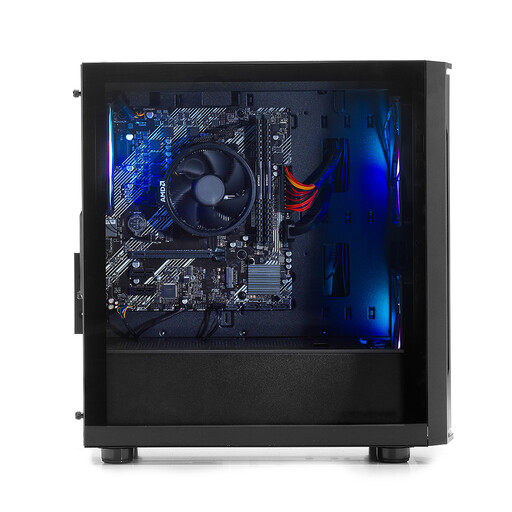
Stormforce PC AMD Ryzen 5 5500GT, 8GB RAM, 500GB SSD
A compact separate-display desktop for everyday productivity and home-office connections.
Listed with a six-core AMD Ryzen 5 5500GT, 8GB DDR4 RAM, 500GB NVMe SSD, Windows 11 Home, HDMI and DisplayPort. The stated SSD capacity is below the 512GB practical baseline in the cited UK guidance; check usable storage, supported upgrades and included peripherals.
Joybuy
 No image available
SOYO M5 Mini PC AMD Ryzen 4300U, 16GB RAM, 512GB SSD
A small desktop for a fixed workstation with several wired peripherals and external displays.
Listed with a four-core AMD Ryzen 4300U, 16GB LPDDR4 RAM, 512GB SSD, HDMI 2.0, DisplayPort 1.4, Type-C video, six USB 3.0 ports and Gigabit Ethernet. Check the Windows licence, supplied accessories, display-cable compatibility, Bluetooth specification and upgrade options.
Joybuy
Frequently asked questions
What specification should I treat as the starting point for routine home-office work?
For the cited UK new-desktop route, Which? recommends checking for an Intel Core 5/i5 or AMD Ryzen 5 processor with at least six cores, at least 8GB RAM, preferably 16GB, and a 512GB SSD. Inspect the exact ports as well, including accessible USB connections and sufficient rear display connections for your desk.
Are Windows 11 minimum specifications enough for a home-work desktop?
No. Microsoft lists 4GB RAM and 64GB storage among Windows 11 installation minimums, but applications may need more capable hardware. For regular video editing, Which? advises at least 16GB RAM; check the requirements of your applications and the support end date of the installed Windows release.
Is an all-in-one suitable if I work at home every day?
It can be suitable when an integrated display and simple setup fit your space, but check screen position, stand adjustment, display quality, webcam, ports and input devices on the exact model. The Health and Safety Executive says that where display screen equipment rules apply to home workers, employers should assess the whole workstation, work and individual needs rather than the computer alone.
Are keyboard and mouse always included with an all-in-one?
Do not assume so. All-in-ones are often described as integrated packages, but Lenovo states that keyboard, mouse and headphones are optional and sold separately for its cited IdeaCentre AIO Gen 10 configuration. Read the included-items list for the exact configuration before purchase.
What should I check before buying a refurbished desktop in the UK?
Check the exact processor, RAM, storage condition where available, Windows version and eligibility, power supply and accessories, condition grade, warranty or return terms, recall status and availability of instructions. GOV.UK says commercially sold used products must be safe, while warning that wear, missing modern safety features and modifications can create risks that are not obvious.


