What to consider before buying
Separate desktop and monitor
Consider it when: The computer will stay at one desk and you want to keep or choose the monitor separately.
Trade-off: Allow space for the case and check which screen, cables and peripherals are included or still needed.
All-in-one desktop
Consider it when: You want the computer and screen integrated for a fixed workspace.
Trade-off: The included screen shapes your setup, so check its ergonomics, ports and the model’s repair or upgrade options.
Which? and Microsoft Support guidance highlights workload, operating-system support and file transfer as practical checks when replacing a home PC. The priorities below help connect those checks to the kind of setup you need.
| Concern |
What to check when buying |
Who this matters to |
| Everyday tasks and moving from an old PC |
Check your applications, operating system, memory and storage; plan file transfer separately from reinstalling software. |
If I mainly browse, handle administration or work from home, I want a suitable replacement without paying for capacity I will not use. Around 36% of consumers put everyday computing and the move from an old PC first. |
| Desk space and screen |
Measure the desk and check the screen, its positioning, connections and included peripherals. |
When space is limited, I need a screen and computer that fit the way I use the desk. Around 29% of consumers prioritise workspace and screen fit. |
| Repairs and future changes |
Check the exact model’s accessible components, expansion options, compatible parts and service terms. |
If I expect my needs to change, I want to know which parts can be replaced or upgraded on this particular model. Around 21% of consumers put future changes first. |
| More demanding applications |
Compare the exact processor, graphics, memory and storage with the requirements of your software. |
For applications that need more than routine browsing, I want the configuration to meet their stated requirements. Around 14% of consumers prioritise demanding regular tasks. |
Desktop products on Joybuy
These products cover pre-built desktop options for a fixed home workspace, including compact computers and separate-display towers. Check each listing against your software, screen and peripheral needs.
 No image available
SOYO Y5Pro Mini PC, Intel Core i5 8250U/8350U, 8GB DDR4, 256GB SATA SSD
A compact pre-built option for a fixed desk; check that its connections and configuration suit your display and regular applications.
Windows 11; 8GB DDR4 memory; 256GB SATA SSD; Wi-Fi 5 and Bluetooth 5.2.
Listed dimensions: 105 × 113 × 45 mm. The product name gives two processor variants, 8250U/8350U; confirm the selected variant.
Joybuy
 No image available
CyberPowerPC JOYB1013 Gaming Desktop PC, Ryzen 7 9800X3D, RTX 5080 16GB, 32GB DDR5, 2TB NVMe SSD
This separate-display tower is a pre-built option; compare its listed configuration with the requirements of your intended applications.
Windows 11 Home; 32GB DDR5 memory; 2TB SSD; HDMI and DisplayPort outputs.
Monitor, keyboard and mouse are not included.
Joybuy
 No image available
ASUS Ascent GX10 1TB Desktop AI Supercomputer
Check software compatibility for the exact configuration before choosing this specialist desktop for a home setup.
The product name lists NVIDIA GB10 Grace Blackwell, 128GB unified memory and a 1TB NVMe SSD. Confirm operating-system and application compatibility for the selected listing.
Joybuy
 No image available
Apple Mac mini (2026), M6, 12-core CPU and 12-core GPU, 16GB, 256GB SSD, Silver
This compact desktop is a separate-screen option; check that your display, peripherals and software are compatible.
macOS; 16GB unified memory; 256GB SSD. The listed connections include HDMI, USB-C and Thunderbolt 4.
Joybuy
 No image available
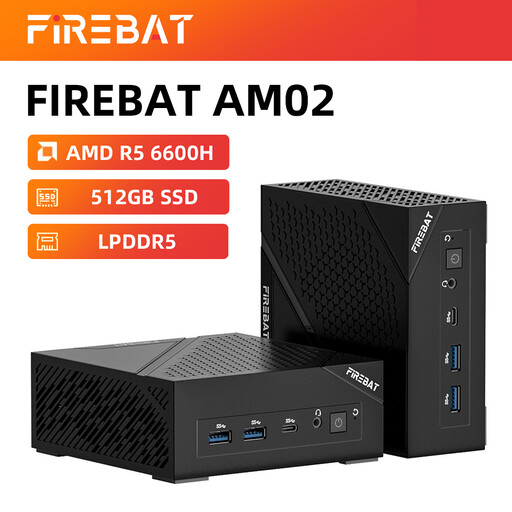
FIREBAT Mini PC AM02L, AMD 6600H, 16GB LPDDR5, 512GB M.2 NVMe SSD
A compact pre-built option for a small fixed desk; check the listed outputs against your screen and other devices.
Windows 11 Home; HDMI 2.1 and DisplayPort 1.4 outputs; Wi-Fi 6 and 2.5G Ethernet.
The product name lists Bluetooth 5.2. Check the exact configuration and software requirements before choosing.
Joybuy
Frequently asked questions
Does an ageing Windows 10 PC stop working because ordinary support ended?
No. Microsoft says Windows 10 continues to function, but ordinary security updates and support ended on 14 October 2025. Microsoft’s consumer Extended Security Updates option can provide coverage through 12 October 2027, subject to eligibility and terms.
Will transferring files install my old applications on a new Windows PC?
Not necessarily. Microsoft Support says its described PC-to-PC transfer excludes previously installed applications and saved passwords. Identify the software, licences and sign-ins you need before retiring the old computer.
What should I check before connecting an existing monitor and peripherals?
Match the specific computer’s video outputs and other ports to your monitor, camera, printer and storage devices, and check what the package includes. A separate-display desktop does not by itself include a suitable monitor.
Does a desktop sold for use anywhere in the UK have to display UKCA?
No blanket UKCA-only requirement follows. GOV.UK guidance lists UKCA or CE for electrical equipment placed on the Great Britain market, and CE, or CE together with UKNI, for the Northern Ireland market. Check the applicable product rules for the product and destination; a marking is not a performance rating.
Is a tower easier to upgrade than an all-in-one?
A tower can offer more room for customisation, but upgrade access depends on the exact model and configuration. Check its documentation for accessible components, compatible parts and service terms rather than assuming every desktop is easy to upgrade.


