What to check before buying
Establish how the exact desktop will connect and extend both displays, then decide how much desk space, configuration capacity and ongoing support your work calls for.
Mini desktop
Choose when: Desk space is limited and the selected configuration can connect both monitors for the intended workflow.
Trade-off: Fitted ports and optional expansion differ between configurations, as Lenovo UK’s ThinkCentre M90q Gen 5 information illustrates.
Small-form-factor desktop
Choose when: A fixed desk can accommodate a larger chassis and you value expansion options on the specific model you select.
Trade-off: Its size does not establish two-monitor compatibility; Dell UK’s OptiPlex specifications also show why expansion claims must be checked model by model.
| Concern |
Buying checks |
Who this matters to |
| Independent two-screen setup |
Match the exact PC’s video outputs to both monitor inputs, including any required cables or adapters. Confirm support for an extended desktop with the intended display combination. |
I need the source and translation visible separately, not the same image on both screens. Around 40% of consumers put a confirmed independent two-screen setup first. |
| Workstation fit and comfort |
Measure space for both screens, stands, keyboard and PC. The Health and Safety Executive advises placing the screen and keyboard centrally to avoid twisting, with the top of the screen around eye level and the screen about an arm’s length away. |
If the monitors crowd my desk or make me turn repeatedly, a smaller computer alone will not fix the layout. Workspace fit is the primary concern for around 30% of consumers. |
| Everyday work and files |
Compare the processor, installed memory and SSD capacity of the exact configuration; do not substitute a product family’s maximum specification. |
I move between drafts, PDFs, browser resources and local files, so the supplied configuration matters to my routine. Around 20% of consumers prioritise everyday work and file capacity. |
| Support and replacement |
Confirm the supplied operating system and support terms. If replacing equipment, plan how work data will be erased and where the old device can be taken for reuse or recycling. |
For a work-managed or longer-term setup, I need a clear support route and a plan for the old computer. Those are the main concern for around 10% of consumers. |
Compact desktops on Joybuy
These mini desktops are options for a desk where space is limited. Their listed configurations offer different memory, storage and connection choices; check extended-display support with your particular monitors before choosing one for translation-draft work.
 No image available
SOYO Y5Pro Mini PC, Core i5-8250U/8350U, 8GB, 256GB SSD
Consider this compact desktop if desk space is a priority and its connections meet your two-monitor needs. The title lists Windows 11, 8GB DDR4 memory and a 256GB SATA SSD; confirm whether the supplied processor is the i5-8250U or i5-8350U, and check extended-display support for your monitors.
View on Joybuy
 No image available
FIREBAT Mini PC, Ryzen 7 7735HS, 16GB, 512GB SSD
This mini desktop is worth comparing if you want 16GB of listed memory and a 512GB SSD alongside a compact chassis. Its title also names Radeon 680M graphics and dual M.2 slots; confirm the video connections and extended-display arrangement required by your monitors.
View on Joybuy
 No image available
SOYO M5 Mini PC, Ryzen 4300U, 16GB, 512GB SSD
This is a compact option to examine when matching named video connections to two monitors. The title lists Windows 11, 16GB LPDDR4 memory, a 512GB SSD, HDMI 2.0, Type-C and DisplayPort 1.4; confirm which outputs can be used together in extended mode at your intended resolutions.
View on Joybuy
 No image available
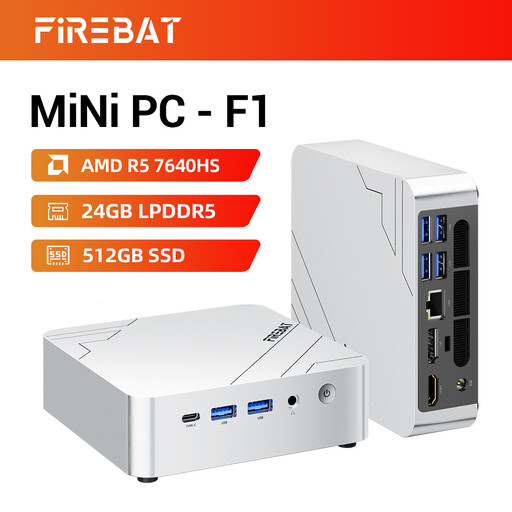
FIREBAT F1 Mini PC, Ryzen 5 7640HS, 24GB, 512GB SSD
Compare this compact model if its listed 24GB LPDDR5 memory and 512GB PCIe 4.0 SSD suit the files and applications you use. The title names HDMI 2.1 and USB 4.0, but check the simultaneous outputs, extended-display support and supplied operating system before relying on it for this workstation.
View on Joybuy
 No image available
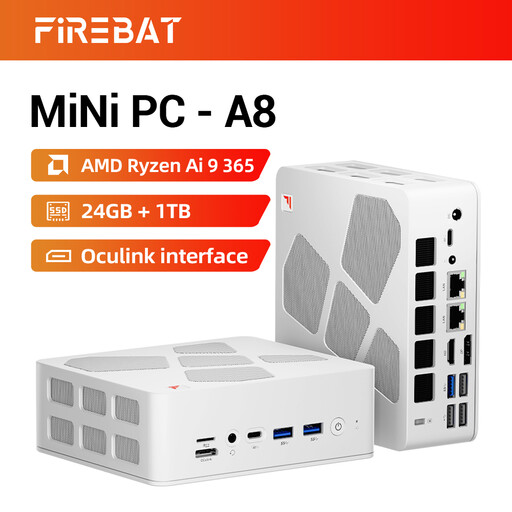
FIREBAT A8 Mini PC, Ryzen AI 9 365, 24GB, 1TB SSD
Consider this mini desktop if the listed 1TB PCIe 4.0 SSD and 24GB DDR5 memory fit your local-file requirements. Its title names USB4 and OCuLink and claims quad-display support; check the actual video outputs, the two-monitor extended configuration and the supplied operating system.
View on Joybuy
Frequently asked questions
How can I show different documents on the two monitors?
Use an extended desktop rather than duplicate mode once both compatible monitors are connected. Microsoft Support explains that Windows display settings let you identify and rearrange screens; in Windows 11, open Settings, then System and Display, to set up their positions.
Do I need a separate graphics card for two-screen draft checking?
Not necessarily: the deciding check is whether the exact desktop supports your intended pair of monitors in extended mode. Lenovo UK and HP Store UK list compact business-desktop configurations with integrated graphics, but confirm the selected unit’s fitted outputs, supported display arrangement and any adapters before buying.
Where should I place two monitors for regular desk work?
Put the display you use most directly ahead and keep the second close enough to avoid repeated large turns. The Health and Safety Executive advises a screen top around eye level, a viewing distance of about an arm’s length and a central screen-and-keyboard position that avoids twisting.
Does an employee working from home need a workstation assessment?
The employer must assess the workstation if the employee uses display screen equipment daily, continuously for an hour or more, as part of normal work, according to the Health and Safety Executive. The assessment covers the workstation, the work and individual requirements; this employer duty is not a formal assessment requirement for infrequent personal use.
What should I do with an old desktop or monitor?
Back up needed files and arrange appropriate data erasure before passing on the equipment. UK government guidance places electrical and electronic equipment within the WEEE framework; check a suitable retailer take-back option or local-authority recycling guidance for the device.


