Choose a controller that works with your main console or computer and the detective games you intend to play before comparing extra features. Wireless play keeps a cable out of the route between your seat and screen, while a wired controller avoids charging and wireless pairing; on PC, check game support and whether the features you want require USB.
Who this is for
PC detective-game players
If you play on a Windows PC or laptop, check both the controller’s connection to your computer and support in each game you own. Steam’s controller filters can help you find games to investigate, but the individual game’s information matters before purchase.
Console-first students
If you mainly play on Xbox, PS5, Nintendo Switch or Nintendo Switch 2, start with a controller intended for that console. Then check whether its particular controls or connection options work in the games you plan to play.
Players with a compact room setup
If you alternate between a desk, bed and monitor, consider where the controller will connect. A cable needs a reachable port and a clear route; wireless play needs a supported connection and a way to keep the controller charged.
What matters when choosing
Start with your playing device and individual games, then decide which connection suits your usual seat. Consider console-specific features and adjustable controls only where you would use them.
| Concern |
What to check |
Who this matters to |
| Device and game compatibility |
Match the exact controller to your console or computer, then check controller support for each intended game. |
If my detective game does not accept the controller, its extra features will not help me play; around 36% of consumers put device and game compatibility first. |
| Connection and room layout |
Check host Bluetooth support or a reachable USB port, and measure the cable route if buying wired. |
Moving between my desk and another seat changes whether I want a cable across the room or a controller to charge; for around 29% of consumers, the connection and room layout are the primary concern. |
| Console features and layout |
Choose for your console generation; check game and connection requirements for features such as haptics or remappable buttons. |
If I mainly play on one console, I want its familiar controls without assuming every feature carries over to PC; around 21% of consumers primarily care about console features and layout. |
| Adjustable controls |
Check which buttons or profiles the exact model lets you change and whether its configuration software works on your device. |
When default controls feel awkward during longer sessions, I want settings I can adapt; adjustable controls are the leading need for around 14% of consumers. |
Buying pitfalls
-
Buying for a feature before checking the game
A controller may connect to a PC without every feature working in your detective game. PlayStation says DualSense haptic feedback on PC requires USB and a supported game.
Check the game’s controller information first, then its support for any particular feature you want.
-
Assuming wireless removes every setup step
Wireless play avoids a cable across your usual playing area, but it calls for a supported connection, pairing and charging. Wired play instead depends on cable reach and a usable port.
Check your usual seat, available connections and cable route before choosing between them; keep any cable out of walkways.
-
Confusing Nintendo controller generations
Nintendo lists different features for the Switch Pro Controller and Switch 2 Pro Controller, including remappable GL/GR buttons and an audio jack on the Switch 2 model.
Check the exact controller against the Switch generation you own and the features you intend to use.
-
Putting an old controller in household rubbish
GOV.UK advises that unwanted electrical products and batteries should go to an appropriate recycling collection point rather than household rubbish.
Find a suitable electrical-waste collection route when replacing your controller.
Brands to consider
Xbox
The Xbox Wireless Controller is a route for Xbox and Windows players who want wireless connection options.
- Xbox lists Xbox Wireless and Bluetooth connectivity, button mapping and a 3.5 mm jack for a compatible headset.
- Its stated device compatibility does not establish controller support in every PC game or on other console families.
PlayStation
DualSense suits a PS5-centred setup that may also include compatible PC, Mac or mobile play.
- PlayStation lists Bluetooth and USB connections for supported devices.
- On PC, haptic feedback requires USB and a supported game; the headset jack requires a wired connection on PC and Mac.
Nintendo
Nintendo’s Pro Controllers are relevant when your detective games are primarily on Switch hardware.
- Nintendo describes wireless or dock-based pairing for the Switch Pro Controller, and remappable GL/GR buttons and an audio jack on the Switch 2 Pro Controller.
- Choose for the Switch generation you own rather than assuming the two models have identical features or compatibility.
8BitDo
The Ultimate 2 Bluetooth Controller is an option to examine if you use supported Switch and Windows devices and want configurable controls.
- 8BitDo lists a charging dock and mapping and profile options for this model.
- Its compatibility and firmware requirements are model-specific; check them for your device before buying.
PowerA
The Enhanced Wired Controller is a cable-based Xbox and Windows route for a seat near the playing device.
- PowerA lists a detachable 3 m USB cable, a headset jack and two mappable buttons for this controller.
- A fixed cable route may not suit a distant seat; these specifications should not be assumed for every PowerA controller.
Joybuy controller choices
These controllers cover several ways to play detective adventures: Xbox or Windows with a wireless or wired controller, Switch 2, PS5 with compatible computer use, and PS4 or PC. Match the exact model to your device and games before choosing by connection or controls.
 No image available
Xbox Wireless Controller – Carbon Black
Consider this model for Xbox or Windows play when you want a wireless controller. Xbox lists Bluetooth and Xbox Wireless connectivity, button mapping and a 3.5 mm headset jack; check your computer’s connection options and each game’s controller support.
Shop on Joybuy
 No image available
Hyperkin DuchesS Wired Controller – White, Xbox Series X|S, Xbox One and Windows 10/11
A wired option if your Xbox or Windows computer is close enough to your usual seat. Check that its cable can reach a suitable connection without crossing a walkway, and confirm support in your games.
Shop on Joybuy
 No image available
Nintendo Switch 2 Pro Controller – Black
Choose this model for a Nintendo Switch 2 setup rather than assuming it is the same as the original Switch Pro Controller. Nintendo lists remappable GL/GR buttons and an audio jack for the Switch 2 Pro Controller; check whether your games use the features that matter to you.
Shop on Joybuy
 No image available
Sony DualSense Wireless Controller – HYPERPOP Techno Red
A PS5-focused choice if you may also play compatible games on a PC or Mac. PlayStation lists Bluetooth and USB connections; on PC, haptic feedback requires USB and a supported game, while the headset jack requires a wired connection on PC and Mac.
Shop on Joybuy
 No image available
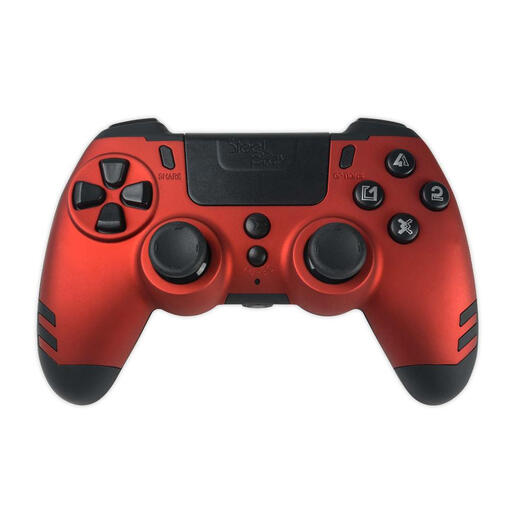
Lexip SteelPlay Slim Pack Wireless Controller – Ruby Red, PS4 and PC
Consider this model if you play on PS4 or PC and want a wireless controller. Check its connection requirements for your device and controller support in your particular detective games; do not assume it works with other console families.
Shop on Joybuy
Common questions
Will every PC detective game work with my controller?
No: controller support depends on the individual game and controller. Steam offers filters for controller types, but check the game’s own store information and developer notes before buying.
Is wired or wireless more practical in a student room?
Wired play suits a seat within safe cable reach if you would rather avoid charging and pairing; wireless suits a changing playing position if your device supports the connection. For DualSense on PC, PlayStation says haptic feedback requires USB and a supported game, so connection choice can also affect features.
Will DualSense haptics and adaptive triggers work in my PC game over Bluetooth?
Do not count on those features over Bluetooth: PlayStation says PC haptic feedback requires USB and a supported game, and adaptive triggers also depend on game support. Check the particular game’s feature information before choosing DualSense for either effect.
What should I do with an old controller in the UK?
Take an unwanted electrical controller to an appropriate recycling collection point rather than putting it in household rubbish. GOV.UK gives the same disposal advice for batteries; check your local collection options when replacing the controller.


