What matters when choosing a backup route?
Decide whether you need a supported device restore, a disconnected local copy, or both. A USB flash drive is more suited to files you deliberately select and copy than to an assumed full-device restore.
Cloud backup
Choose it when: You want supported automatic backup or account-based access while setting up a replacement device.
Bear in mind: Restoration depends on account access, available capacity and the data covered by that service.
External drive
Choose it when: You want a local copy that can be stored separately and disconnected between backups.
Bear in mind: You need a routine for making and checking new copies, as well as a secure place to keep the drive.
USB flash storage
Choose it when: You want to copy a selected set of documents or other files onto removable storage.
Bear in mind: Selecting and updating those files takes attention; do not assume the drive captures a whole phone or computer backup.
Cloud and offline storage
Choose it when: Important files warrant copies in both an online account and a separate physical location.
Bear in mind: Both copies need maintaining, and you still need to protect the cloud account and store the physical device securely.
| Concern |
What to check |
Who this matters to |
| Automatic recovery |
Check which data your device backs up and the date of its latest successful backup. Apple says automatic iPhone and iPad iCloud Backup requires Wi-Fi, power and a locked screen. |
If my device is lost or replaced, I want a supported restore available without sorting through every file myself. Around 36% of consumers put automatic recovery first. |
| A separate offline copy |
Confirm that the drive works with the intended device and plan when you will update, disconnect and securely store it. |
I want a copy I can reach without signing in to an online storage account, while accepting that I must keep it current. For around 29% of consumers, that separate local copy is the main priority. |
| Capacity and device access |
Compare the files you intend to keep with the available storage, then check the exact drive’s connection and operating-system requirements or the cloud plan’s allowance. |
A growing collection of photos, videos and documents needs enough room and a workable route back to my devices. Sufficient capacity and access come first for around 21% of consumers. |
| Household accounts |
Check membership eligibility, how capacity is allocated, file permissions and each person’s account-recovery arrangements. |
We need to share storage without giving up separate accounts or control of personal files. Around 14% of consumers make that household arrangement their primary concern. |
Brands and services to consider
These providers illustrate different backup and storage arrangements; a brand’s inclusion does not establish compatibility for every device or product.
Apple
iCloud Backup is relevant to people preparing to restore a supported iPhone or iPad during replacement-device setup.
- Apple lists 5 GB of free iCloud storage and iCloud+ capacity tiers from 50 GB to 12 TB. Family Sharing can include up to five family members using separate Apple Accounts.
- Automatic iPhone and iPad iCloud Backup requires the stated Wi-Fi, power, locked-screen and available-storage conditions. Check what your device’s backup includes.
Google
Google Backup, Photos and Drive are relevant to Android replacement planning and files held in a Google account.
- Google says an account has up to 15 GB shared across Drive, Gmail and Photos, and documents Android backup and restoration during device setup.
- Those services draw on the shared allowance. Google’s family-sharing rules include living in the same country as the plan manager; members’ files are not automatically accessible to one another.
Microsoft
OneDrive is relevant to people moving files to a new Windows PC or considering storage for several household accounts.
- Microsoft lists 5 GB of free cloud storage and says Microsoft 365 Family can be shared with up to five other people, each receiving 1 TB.
- Microsoft says cancellation can reduce the storage allowance; if usage remains above it, new uploads, edits and synchronisation can stop. Check the applicable plan terms before relying on continued access.
Seagate
Seagate is one example of an external-drive manufacturer for people making a local copy of computer files.
- Seagate describes external-drive models for differing devices and operating systems, with capacities varying across its range.
- Compatibility and capacity depend on the exact model. Check its connection and your intended backup workflow rather than treating support across a product range as support from every drive.
Removable storage for local copies
These Joybuy choices cover external drives for local file copies and a USB flash drive for selected files. Before choosing one for a phone, check that the phone can access the drive and use it for the files or backup workflow you have in mind.
 No image available
Western Digital My Passport Ultra for Mac 5TB external hard drive, silver
Consider this portable external hard drive if you want a 5TB local copy for files from a compatible Mac. Check the exact connection and any requirements for accessing the same files on another device before relying on it for a move.
View on Joybuy
 No image available
Western Digital My Passport 2TB portable external hard drive, black
This 2TB portable drive is an option for keeping a local copy of selected computer files. Confirm that its connection and your intended backup method work with the computer you will use to make and restore that copy.
View on Joybuy
 No image available
Samsung T7 Shield 1TB portable SSD, blue
Consider this 1TB external SSD for a portable local copy if your intended device supports the connection and file-access method. Its title specifies USB 3.2 Gen. 2; confirm the requirements of the particular phone or computer you plan to use.
View on Joybuy
 No image available
Western Digital Elements Port 4TB external hard drive, black
This 4TB USB 3.0 drive is an option if you need space for a substantial local file collection and will manage the copies yourself. For a Mac or a second operating system, check the required setup and how it affects access to files before moving your only copy.
View on Joybuy
 No image available
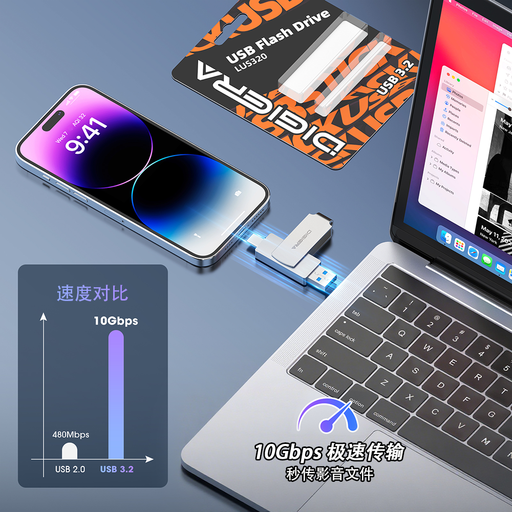
DigiEra LUS320 128GB USB flash drive, USB-A and USB-C
Use this as a candidate for copying a deliberately selected set of files between compatible devices, not as an assumed full-device backup. It has 128GB capacity and USB-A and USB-C connectors; check direct file access and the required file system on your particular phone or computer.
View on Joybuy
Backup questions before replacing a device
How much storage do I need for a personal backup?
Start with the photos, documents, videos and device data you actually intend to keep, then allow room for later files. Check current use as well as the backup’s latest successful date: Apple lists 5 GB of free iCloud storage, Google up to 15 GB shared across Drive, Gmail and Photos, and Microsoft 5 GB of free cloud storage.
Can a drive left plugged into my computer be my only backup?
A connected drive can hold a copy, but leaving it connected when it is not in use exposes that copy to problems affecting the computer. The National Cyber Security Centre advises disconnecting external backup storage, keeping it secure and considering both online storage and a storage device for additional resilience.
Will everyone on a family storage plan see my files?
Sharing storage does not automatically give every member access to every file, but account and file-sharing settings matter. Apple describes separate Apple Accounts for iCloud+ family members; Google says family members cannot access one another’s files without permission. Check the chosen plan’s membership rules and each person’s permissions.
What happens to my cloud storage if I cancel a plan?
Your available allowance may fall, so check the provider’s cancellation terms before depending on that space for backups. Microsoft says cancellation can reduce the allowance to 5 GB and, when usage remains above it, can stop new uploads, edits and synchronisation. Make sure you have a workable copy and access plan before changing a subscription.


