Start with the work or study task that is difficult, then try a built-in accessibility feature if it addresses that task on your device. Add specialist software or an input or audio accessory when the built-in route does not meet the need, checking the exact device and applications before buying. For workplace use in England, Scotland or Wales, discuss reasonable adjustments with your employer and check whether Access to Work could support needs beyond those adjustments.
Who is this setup for?
Workers adapting a digital workstation
If standard keyboard, pointer, screen or audio interaction makes a job task difficult, identify the task before choosing equipment. GOV.UK describes built-in accessibility features, specialist accessories and workplace adjustments as distinct routes to consider.
Students who need another way to read or write
Screen reading, spoken text, dictation, magnification and captions are relevant to different study tasks. Check the feature in the documents, learning platform and applications you actually use.
People choosing alternative input hardware
When a standard touchscreen, keyboard or mouse does not suit the required interaction, consider the input method as a complete setup: accessory, connection, device controls and software configuration. Google’s Android guidance, for example, documents external switch and keyboard connections for Switch Access.
What should you check first?
Match the access barrier to a task, then check whether the proposed feature or accessory works throughout that task on your own device.
| Priority | What to check | Your needs |
|---|
| Reading and navigation |
Try screen reading or spoken text with the required documents and controls. Microsoft documents Narrator for reading and interacting with Windows screen content; Apple documents VoiceOver spoken and braille output, and Google documents Android TalkBack. |
I need to read text or find controls without relying on the standard visual layout. |
| Typing and pointer control |
Test the required typing, selection and pointer tasks. For an external keyboard, switch or mouse, check both the connection and how its input is configured in the operating system. |
Long typing sessions are difficult, or I need another way to select items and move around the screen. |
| Device and software fit |
Check the exact device, operating-system version, language and essential applications. Microsoft lists Windows 11 version 22H2 or later for Voice Access; Google says TalkBack setup varies with the Android device and software versions. |
A feature needs to work in my work or study applications, not just in a device demonstration. |
| Speech and audio |
Test the microphone and whether speaking aloud is practical. Check captions and alternative alerts in the services you use; Microsoft says Voice Access needs an internet connection for initial setup. |
I may need to dictate privately, follow audio with captions or notice alerts another way. |
| Workplace support |
Discuss the task and possible reasonable adjustments with your employer before choosing workplace equipment. GOV.UK says Access to Work may support eligible specialist equipment or software in England, Scotland and Wales, but does not pay for reasonable adjustments. |
For my job, I need to establish who will arrange an accessible setup before I buy equipment myself. |
What can go wrong when choosing a setup?
-
Assuming a platform feature works on every device
Availability can depend on the model, software version, language or application. Apple notes regional and language limits for some features, while Microsoft sets a minimum Windows version for Voice Access.
Check the exact model, installed software and required language, then try the feature in an essential work or study application where possible.
-
Equating a connection with usable input
A connected accessory may still need accessibility settings configured. Google says an external switch or keyboard can hide the Android on-screen keyboard during Switch Access setup.
Check how the accessory connects and how you will select items and enter text after it is connected.
-
Expecting speech input to cover every task
Voice input depends on supported software and a setting where speaking aloud is practical. Microsoft says Windows Voice Access requires an internet connection for initial setup.
Try the actual microphone, essential applications and usual noise and privacy conditions; keep another input method for tasks that need it.
-
Buying workplace equipment before discussing support
GOV.UK distinguishes an employer’s reasonable-adjustment duty from Access to Work support for eligible needs beyond that duty. The route used can affect who arranges the equipment.
Discuss the access barrier and possible adjustment with your employer. In England, Scotland and Wales, check the applicable Access to Work process before purchasing specialist equipment for work.
Which platform features are worth checking?
These platform features offer starting points for testing a task; their presence does not establish that a particular device or application will meet your needs.
Microsoft
Windows users can check built-in screen reading and voice-led control before choosing separate software or input equipment.
- Microsoft Support says Narrator reads and interacts with screen content and can be used with a braille display.
- Microsoft lists Voice Access for Windows 11 version 22H2 or later. It supports English-UK and requires internet access for initial setup; test it with the applications you need.
Apple
For an iPhone, iPad or Mac setup, check the built-in accessibility feature against the intended reading, navigation or input task.
- Apple says VoiceOver provides spoken and braille output and supports compatible refreshable braille displays.
- Apple notes that some features, applications and services are not available in every region or language.
Google
Android and ChromeOS provide different built-in routes for screen reading, spoken text, dictation and alternative input.
- Google documents TalkBack on Android and Dictation, Select-to-Speak and Live Caption on Chromebook; Android Switch Access supports an external switch or keyboard connected by USB or Bluetooth.
- Google says TalkBack setup depends on the device manufacturer and software versions. Check feature availability and configuration on the intended device.
Joybuy options for different setup needs
These options cover alternative keyboard and mouse input, a wired headset for communication, and a laptop on which to check the accessibility tools needed for work or study. Choose by the task and device fit rather than treating an accessory as a substitute for a feature you have not tried.
 No image available
HP 960 split-layout wireless keyboard with padded wrist rest
Consider this alternative keyboard layout if standard typing is difficult. Check whether the split layout and wrist-rest position suit your input needs, and confirm connection compatibility with your computer.
View on Joybuy
 No image available
V7 MW500BT Bluetooth vertical mouse
This is an alternative pointing shape to consider when a conventional mouse grip is difficult. The product name specifies Bluetooth and 2.4 GHz modes, six buttons and an adjustable sensor up to 1600 DPI; check hand fit and compatibility with your computer before choosing it.
View on Joybuy
 No image available
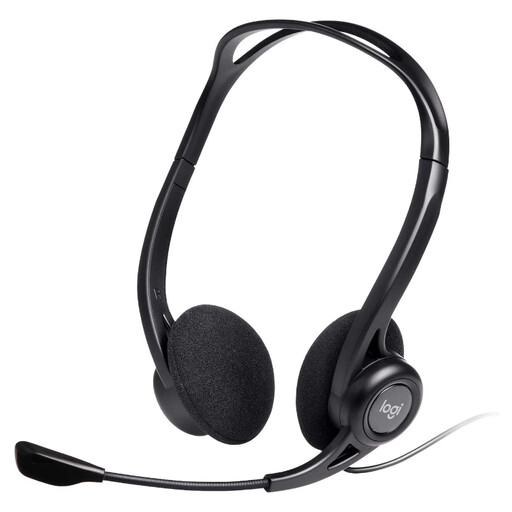
Logitech 960 wired USB headset with microphone
A wired headset is an option for work or study calls that need a microphone. Check the USB connection on your device and test the headset with your calling or speech-input application; a microphone alone does not establish that every voice workflow will work.
View on Joybuy
 No image available
ASUS Vivobook 15 X1504VA, 15.6-inch laptop, Intel Core 5 120U, 24 GB, 1 TB SSD
If you need a computer for work or study, check its installed operating system and whether the accessibility tools you require work with your applications. Microsoft documents Narrator as a Windows screen reader, but that alone does not establish how a particular task will work on this laptop.
View on Joybuy
Frequently asked questions
Should I try built-in features before buying specialist hardware?
Try a built-in feature first if it addresses the task you find difficult. GOV.UK notes that phones, computers and tablets often include accessibility features; consider an accessory when the task remains difficult and you have checked that the accessory works with your device.
What should I check before buying an external switch or keyboard?
Check the connection, operating-system support and the complete selection and typing workflow. Google says Android Switch Access accepts an external switch or keyboard via USB or Bluetooth, but connecting one can hide the on-screen keyboard, which may need to be re-enabled for text entry.
Can I use Windows Voice Access in English-UK?
Yes, Microsoft lists English-UK among its supported Voice Access languages for Windows 11 version 22H2 or later. Initial setup needs an internet connection; check your Windows version, microphone and essential applications before relying on voice control for a task.
Who should arrange accessible equipment for my workplace?
Discuss the access barrier and possible reasonable adjustments with your employer first. GOV.UK says employers must make reasonable adjustments for workers covered by that duty and gives a special keyboard as an equipment example. Access to Work may support eligible needs beyond reasonable adjustments in England, Scotland and Wales; Northern Ireland has a different service, so check its local process.


