What to check before choosing
Start with the task that will be hardest to complete, then check connectivity, setup help and ongoing software support before choosing a device format.
| Priority |
What to check |
Your needs |
| Everyday tasks |
Check whether regular tasks need sustained typing, a larger workspace, touch interaction or access while away from home. Compare the device against longer forms, learning work and shared use rather than internet access alone. |
I need a device that handles the online tasks I do regularly, not just messages or a quick login. |
| Connectivity and support |
Ask whether local support can provide a device, mobile data, setup help or warranty information. For National Databank data support, check that the recipient device is unlocked or compatible with O2 or VodafoneThree. |
I need the device to be usable with a connection and enough help to get started, not simply affordable on its own. |
| Accessibility and confidence |
Discuss text size, touch accuracy, keyboard or mouse needs, charging and account setup. Check compatibility before buying accessories such as a keyboard, stand or alternative input device. |
I want to be able to read, control and set up the device comfortably, with help available if needed. |
| Software updates |
Confirm the manufacturer's update support for the exact model, then enable automatic device and app updates where available. Avoid choosing an unsupported older model solely because it costs less. |
I need a device that can keep receiving security updates for accounts, services and everyday communication. The National Cyber Security Centre advises avoiding phones that are no longer supported where possible. |
Relevant brand references
No brand references are available to display.
Joybuy product options
Joybuy product options for a mobile-first route, particularly calls, messages, authentication and shorter online-service tasks.
 No image available
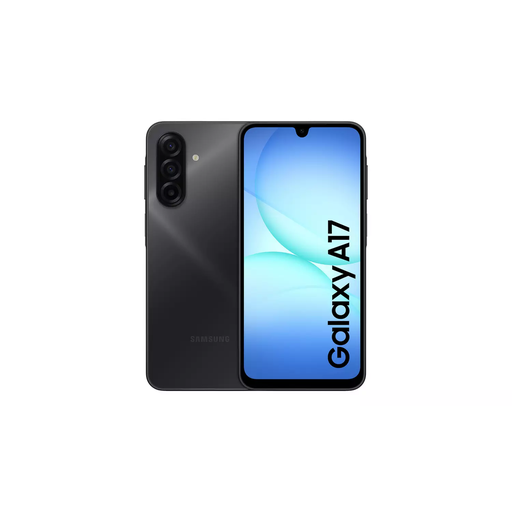
Samsung Galaxy A17 5G A176 Dual Sim 4GB 128GB Grey
For a mobile-first routine involving communication, authentication and shorter online tasks.
Stated features include a 6.7-inch Super AMOLED display, 128GB storage, microSD expansion, Wi-Fi, 5G and a fingerprint scanner. The listing states a six-year security-update commitment; confirm the exact end date and enable automatic updates during setup. A USB charging adaptor is not included, and a suitable 10W–25W PD adaptor is required.
Joybuy
Frequently asked questions
Where can someone in the UK look for device or data support before buying?
Start with a local Digital Inclusion Network organisation. Good Things Foundation's National Device Bank distributes laptops, tablets and mobile phones through local organisations rather than directly to individuals, while its National Databank can provide qualifying people with mobile-data support through those organisations. Ask what device, data and setup help is available locally.
Can a smartphone be the only device for getting online at home?
Yes, when the routine is genuinely mobile-first and mainly involves calls, messages, authentication and shorter online tasks. It should not automatically be treated as suitable for longer forms, learning work or shared use; Ofcom distinguishes mobile-data-only users, while UK government guidance recognises that the appropriate device varies by need.
What should be checked before accepting or buying a refurbished device?
Confirm the exact model, charger and included accessories, physical condition, return and warranty terms, and whether the manufacturer still provides security updates. The National Cyber Security Centre advises avoiding phones that are no longer supported where possible.
What setup support is available for an older or disabled person?
AbilityNet offers free technology support for older and disabled people through DBS-checked volunteers who can help at home or by phone. Its support includes smartphone and tablet use, email, public services, video calls and online banking; available sessions can vary by area.
Does a phone need to be compatible for National Databank mobile data?
Yes. Good Things Foundation's National Databank guidance says the recipient device needs to be unlocked or compatible with O2 or VodafoneThree networks for the supplied data to activate. This applies to that support route, not to every device purchase.


