Choose an offline-ready laptop when you need desktop software, sustained typing or broad file compatibility; choose a keyboard tablet when lighter carrying matters more than a full desktop workflow. Download essential files before travel, and treat tethering, onboard Wi-Fi, train sockets and power banks as contingencies that need checking rather than guaranteed services.
Who this setup suits
Train commuters who must finish documents offline
Suitable for people who need uninterrupted access to work or study files on regular rail journeys. Local copies, enough device storage and a physical keyboard where needed matter because Ofcom found poor mobile performance in 58% to 83% of train tests, depending on network.
Business travellers using desktop-style workflows
Useful for travellers who need full laptop applications, multi-window work, presentations or substantial typing. Prioritise local storage and a charging plan instead of assuming a train socket or Wi-Fi connection will be available; National Rail says availability varies by train company.
Light-packing students and readers
A keyboard tablet can suit reading, annotation, document review and lighter writing when lower carry weight matters. Check that required apps and document formats can be opened and edited offline before relying on this workflow.
What to prioritise before buying
Build the setup around work that must continue without a signal, then check charging compatibility and use mobile data only for tasks that can tolerate interruption.
| Priority |
What to check |
Your needs |
| Offline file access |
Check local storage capacity, offline-sync controls and whether essential document formats can be edited without an internet connection. |
I need priority documents, notes or coursework to open and remain editable during a blackspot. Mark required folders for offline use and test them while disconnected before travelling. |
| Charging resilience |
Compare the device’s USB-C Power Delivery input requirement with a charger or power bank’s single-port output. Check cable rating as well as capacity. |
I want to complete the journey without depending on a particular train’s sockets. National Rail says many train companies provide power outlets, but availability and charges vary. |
| Interruption-tolerant connectivity |
Check hotspot or tethering capability, Wi-Fi and cellular compatibility, and whether the core task still works with no connection. |
I can use a connection for messages and synchronisation, but essential work must stay available locally. Ofcom reported poor mobile performance in 58% to 83% of train tests, depending on network. |
Common buying pitfalls
-
Assuming a cloud-file icon means the file works offline
Online-only OneDrive files and streamed Google Drive files may not open during a connection loss, even when they appear in the file browser.
Before travelling, mark only the folders needed for the journey as offline, check free storage and test opening and editing them with Wi-Fi and mobile data disabled.
-
Choosing a power bank by mAh alone
Capacity does not show whether a bank can charge a laptop. USB-C Power Delivery input, single-port output, cable rating and shared-output behaviour all affect whether it is suitable.
Check the laptop maker’s minimum or recommended charging wattage first, then compare it with the bank’s single-port output rather than its total output or capacity headline.
-
Expecting a hotspot, tethering plan or train Wi-Fi to work throughout a route
Ofcom found frequent poor mobile performance in its train testing, while onboard train Wi-Fi performed well in only 1% of the measured tests. A mobile plan can still help, but it cannot remove route-specific coverage uncertainty.
Use mobile connectivity for synchronisation and communication when it is available, while keeping the core task workable offline.
-
Assuming every train has a usable socket or Wi-Fi connection
National Rail says many train companies offer onboard Wi-Fi and power outlets, but availability and charges vary.
Check the operating train company for the service you are taking, start with a charged device and carry a suitable charger or power bank when losing power would interrupt essential work.
Relevant brand references
Apple
Relevant for commuters choosing a MacBook Air for a full laptop workflow or an iPad Air for a lighter tablet workflow. Apple UK specifies USB-C charging support for the MacBook Air and a 464g weight for the 11-inch Wi-Fi iPad Air.
- Apple states up to 15 hours of wireless web use and up to 18 hours of video streaming for the cited 13-inch MacBook Air, with a 30W minimum USB PD charging requirement.
- These are manufacturer test figures rather than a promise of train-work duration. For an iPad Air, separately check keyboard, app and file-workflow suitability.
Lenovo
Relevant for buyers who need a Windows business-laptop workflow and value a UK-layout physical keyboard, Windows Pro and an anti-glare display.
- The cited ThinkPad X1 Carbon Gen 11 configuration includes a 14-inch anti-glare display, 32GB memory, 1TB SSD, a 65W adapter and a three-year courier or carry-in warranty, according to Lenovo UK.
- Those details apply to that specified configuration, not automatically to every ThinkPad X1 Carbon variant.
Anker
Relevant for a portable charging add-on after confirming that a laptop or tablet accepts the power bank’s USB-C output.
- The cited Anker model has 25,000mAh capacity, three 100W USB-C ports and a 100W maximum single-port output, according to Anker UK.
- Output is shared when several devices are connected. Anker says actual performance can vary and its 100W peak recharging condition applies only when the bank is above 25% charge.
Joybuy product options
Joybuy product options for offline laptop work, keyboard-tablet work and portable charging on train journeys.
 No image available
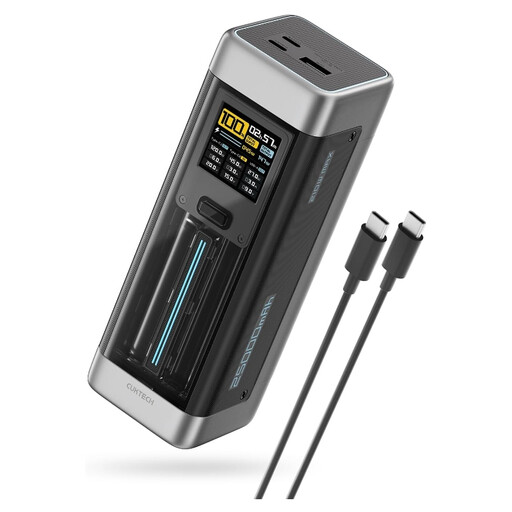
CUKTECH NO.20 25,000mAh 140W USB-C Power Bank
For compatible USB-C laptops or multi-device setups when a train socket cannot be confirmed.
Stated specifications include 25,000mAh capacity, 140W USB-C PD3.1 output, two USB-C ports and one USB-A port.
Confirm the laptop’s charging input, cable rating and multi-port power allocation before buying. Follow the supplied ventilation and cable-safety guidance during high-speed charging.
Joybuy
 No image available
Lenovo LOQ Essential 15ARP11 Ryzen 7 170, 16GB, 1TB SSD
For desktop-style writing and locally stored files during signal loss where a full Windows workflow is needed.
It has Windows 11, a UK physical keyboard, 1TB NVMe SSD, 15.6-inch 144Hz FHD anti-glare display, 60Wh battery and USB-C PD input rated at 65W–100W.
The stated 2.30kg weight is a luggage trade-off. Battery capacity does not establish work duration, and USB-C charging needs a compatible 65W–100W Power Delivery charger.
Joybuy
 No image available
Lenovo IdeaPad 1 15-inch Ryzen 3 7320U, 8GB, 128GB SSD
For regular train writing and local-file access when a lighter Windows laptop is preferred.
Stated specifications include Windows 11 Home in S Mode, a physical keyboard, 128GB SSD, 1.58kg weight, 17.9mm chassis, Wi-Fi 6 and a 42Wh battery with up to 10 hours stated runtime.
Check whether 128GB is enough for the required local files and whether USB-C charging is supported before pairing it with a power bank. The stated battery figure is not a guaranteed train-work duration.
Joybuy
 No image available
TECLAST ArtPad Pro 12.7-inch 2K Tablet, 256GB
For lighter document review, annotation and writing with files prepared in local tablet storage.
The bundle states a 12.7-inch 2K display, Helio G99 processor, 20GB RAM, 256GB storage, 10,000mAh battery, Android 15, Bluetooth keyboard, stylus and case.
Check that the work apps and document formats support offline editing. Its stated 4G LTE capability does not establish reliable connectivity on a particular train route.
Joybuy
 No image available
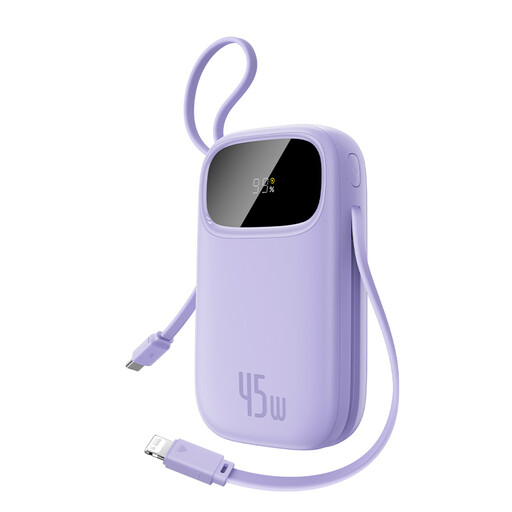
Baseus EnerFill FC31 Qpow 3 10,000mAh 45W Power Bank
For shorter journeys or tablet-focused work when an uncertain socket calls for a compact charging contingency.
Stated specifications include 10,000mAh capacity, 45W single-device USB-C output, built-in USB-C and Lightning cables, USB-C and USB-A ports, and a battery display.
The 45W output applies through USB-C with one connected device; simultaneous charging reduces total output to 15W. Confirm the intended device’s USB-C charging requirement and cable needs.
Joybuy
Questions about working on trains
How should I prepare cloud files before a train journey?
Do not assume that a file visible in OneDrive or Google Drive is stored locally. In OneDrive, mark essential files or folders as “Always keep on this device”; in Google Drive, select “Make available offline” or use mirrored folders, then check the files while disconnected before travelling.
Can a mobile hotspot or phone tethering guarantee a connection on my route?
No. It can provide an additional connection method, but it still relies on mobile coverage. Ofcom found poor mobile performance in 58% to 83% of train tests depending on network, so use it as a contingency alongside downloaded files rather than as the only way to access essential work.
Can I rely on a train socket or onboard Wi-Fi?
No. National Rail says many train companies offer Wi-Fi and power outlets, but charges and availability vary. Check the train company for the service you are taking and carry sufficient battery capacity for the journey regardless.
What should I match when buying a power bank for a laptop?
Match the laptop’s stated charging requirement to the power bank’s single-port USB-C output, then check cable rating and capacity. Apple specifies a minimum 30W USB PD power source for the cited current 13-inch MacBook Air, while the cited Anker bank states a maximum 100W output from each USB-C port under its stated operating conditions.


