Who these tools may suit

People who need screen access

If you need to read and navigate work documents, course materials or apps, test the screen-access method on those actual tasks. GOV.UK’s guide to assistive and accessible technology covers support for reading and learning.

People who compose by voice

If writing or computer control is the main difficulty, try dictation, corrections and spoken commands with your device and the apps you use. Microsoft Support and Apple Support describe different voice-input options for their systems.

People who need different keys

If standard keys are difficult to identify or operate, distinguish more visible key legends from changes to the physical keys or how they respond. Logickeyboard and AbleNet describe different keyboard approaches.

What to consider before buying

Begin with the document, app or activity that is difficult, then check whether your current device can handle it before adding software or equipment.

Concern What to check when buying Who this matters to
Reading and navigation Try the built-in reader or a compatible screen reader with essential documents, websites and forms. If I need to read and navigate onscreen content, I want to check more than whether text is spoken. Around 28% of consumers prioritise screen access.
Voice composition Test dictation and corrections in the intended app; confirm operating-system requirements and microphone input. If composing or correcting text is my main task, I need voice input that fits the apps I use. Around 22% of consumers prioritise writing or computer control by voice.
Physical keys Identify whether the difficulty is seeing key legends or operating the keys; check layout, connection and device compatibility. If I struggle to identify or operate standard keys, I need to distinguish visible lettering from a different key design. Around 22% of consumers prioritise physical-key access.
Task planning Try creating tasks, setting reminders and finding them again using your usual access method. If keeping track of tasks is my main barrier, I need to check that I can enter tasks and notice reminders. Around 17% of consumers prioritise task planning.
Audio input Test a representative call or recording task; check the computer port, cable and selected audio input. If computer-based communication depends on a suitable microphone input, I need to check the whole setup rather than the microphone alone. Around 11% of consumers prioritise communication audio.

Buying pitfalls

  • Assuming large-print keys are physically larger

    A keyboard with more visible legends and one with different key operation address different needs.

    Work out whether seeing, reaching or activating keys is the difficulty, then check that specific operation before choosing.

    Choosing by appearance alone may leave you needing another setup or purchase if the key operation still does not suit the task.

  • Buying a microphone as if it were dictation software

    A microphone provides audio input; it does not provide speech-recognition software. Windows voice access and Dragon Professional are separate software routes.

    Choose and test the intended speech workflow first, then decide whether changing the microphone input would help that setup.

    Check for any separate software, connector or adapter needs before settling on the equipment.

  • Assuming a screen reader works with every required app

    Microsoft documents particular screen readers tested with To Do, which does not establish support for every app or workflow.

    Try the documents, forms and app navigation you need for work or study.

    Allow time to adjust software or configuration if an essential task needs a different approach.

  • Buying first when you expect study or workplace support

    For Student Finance England’s Disabled Students’ Allowance, the guidance says equipment bought before assessment will not be reimbursed. Access to Work support is distinct from an employer’s reasonable adjustments.

    Confirm the applicable nation, funder, assessment and entitlement before buying on the assumption that you will be reimbursed. GOV.UK provides the relevant England, Scotland and Wales Access to Work guidance; Northern Ireland has a separate scheme.

    A purchase made before the relevant assessment or approval may not be reimbursed.

Relevant brands to consider

Microsoft

Windows voice access and Microsoft To Do are documented options for voice input and task planning.

  • Microsoft says Windows 11 voice access requires version 22H2 or later and an internet connection for initial setup. Its To Do guidance describes workflows tested with Narrator, JAWS and NVDA.
  • Documented testing does not establish that every required app or complete task will work for you; test your own workflow.

Apple

Apple documents VoiceOver for screen access and Voice Control for spoken control on Mac.

  • These built-in settings offer routes to test on the device and tasks you use.
  • Apple states that standard macOS Dictation is unavailable while Voice Control is on, so check which voice workflow suits your task.

NV Access

NVDA is a free screen-reader option for compatible Windows PCs.

  • NV Access lists Windows 10 and later for NVDA.
  • NV Access warned that its May 2026 NVDA 2026.1 release was incompatible with add-ons made for NVDA 2025.3.3 and earlier. Check essential add-ons and apps before changing versions.

Freedom Scientific

JAWS is a screen-reader option for supported Windows systems.

  • Freedom Scientific lists supported Windows systems and architecture recommendations.
  • Those requirements do not establish compatibility with every institution’s apps or licensing arrangements; check the exact setup you need.

Nuance

Dragon Professional v16 is a dedicated speech-recognition option for Windows writing workflows.

  • Nuance describes it as optimised for Windows 11 and compatible with Windows 10.
  • Check your language, microphone and essential apps; the stated operating-system compatibility does not predict recognition results for an individual user.

Logickeyboard

Its Large Print ASTRA2 keyboard is a Windows option for people assessing key-legibility needs.

  • Logickeyboard specifies adjustable backlighting, USB-A wired use and a British English layout option.
  • More visible key legends do not establish that the physical keys address difficulty operating them.

AbleNet

BigKeys LX is a different physical-keyboard approach to assess for key-operation needs.

  • AbleNet’s guide describes a USB connection and an option designed to send one keystroke for each key depression.
  • Check whether its layout and key operation suit the person and device; the guide does not establish UK retail availability.

RØDE

The NT-USB Mini is an external audio-input option to assess for a compatible computer setup.

  • RØDE specifies a supplied USB-C-to-USB-A cable and class-compliant USB audio for compatible PCs and Macs.
  • A microphone is not speech-recognition software, and its connection details do not establish recognition performance.

Joybuy products

These products are microphones for computer audio-input tasks. A microphone alone does not provide dictation software, so check the device connection and intended app before choosing.
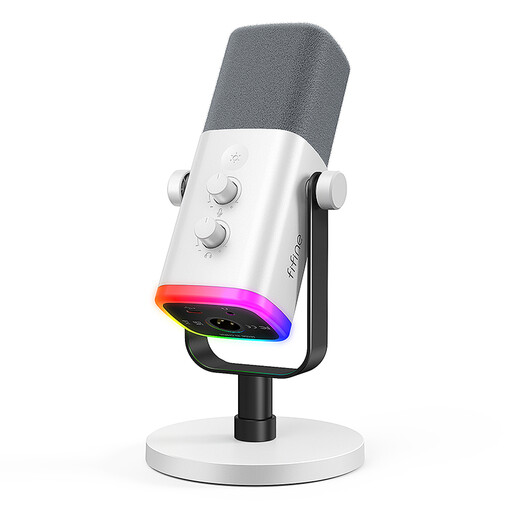
FIFINE AM8W dynamic USB and XLR microphone, white

FIFINE AM8W Dynamic Microphone, White

Consider it if you need a computer microphone with USB or XLR connectivity.

The product name lists a gain knob, mute button and monitoring jack. An XLR cable and boom arm are not included.

Joybuy

FIFINE K688CTW podcast microphone kit, white, with boom arm

FIFINE K688CTW Podcast Microphone Kit, White

Consider this kit if a computer audio-input setup with a boom arm suits your task.

The product name lists USB and XLR ports and a headphone jack. An XLR cable is not included.

Joybuy
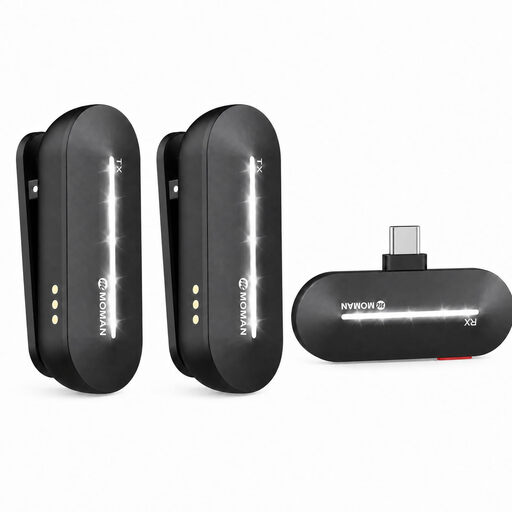
Moman M1CXT wireless USB-C lavalier microphone system

Moman M1CXT Wireless Lavalier Microphone

Consider it if a wireless microphone setup with a USB-C receiver fits your computer or online-class task.

The product name specifies 2TX+1RX and a 150 m range.

Joybuy
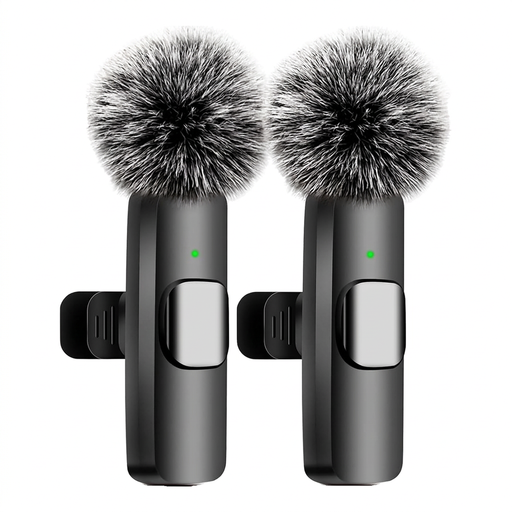
K1 black dual lavalier microphone kit with USB Type-C and Lightning connections

K1 Dual Lavalier Microphone Kit, Black

Consider it if a two-microphone setup suits your computer-based communication task.

The product name lists USB Type-C and Lightning connections. Check that the connection suits your device.

Joybuy

Frequently asked questions

When should I seek an assessment before buying equipment?

If you are seeking equipment through a study-support award, follow the relevant funding body’s assessment and approval process first. Student Finance England’s Disabled Students’ Allowance guidance says equipment bought before assessment will not be reimbursed. For workplace barriers, discuss adjustments with your employer; Access to Work in England, Scotland and Wales concerns support beyond an employer’s reasonable adjustments, while Northern Ireland has a separate Access to Work scheme.

Will a Windows screen reader or voice tool work on a Mac?

Do not assume it will: NVDA and JAWS specify supported Windows systems, and Nuance describes Dragon Professional v16 for Windows 10 and 11. Mac has its own VoiceOver and Voice Control settings. Check the precise software version and test the apps you need.

What should I test before relying on voice access?

For Windows voice access, confirm that the device runs Windows 11 version 22H2 or later and has an internet connection for initial setup. Then test your usual app, commands and text corrections. If using an external USB microphone, check its connection and cable and select it as the computer’s audio input.

What costs and support arrangements should I check?

Check whether the software route has a licence or support arrangement, and whether setup or training is needed. For Student Finance England’s Disabled Students’ Allowance, the assessment and entitlement letter determine the awarded equipment and any training; its computer-contribution rule applies only in the circumstances specified by that scheme, not to every UK buyer.

Do I have to buy accessibility equipment myself for work?

Do not assume that you must personally buy equipment to address a workplace barrier. GOV.UK says employers must make reasonable adjustments for workers covered by that duty, and Access to Work in England, Scotland and Wales does not pay for those adjustments. Discuss your circumstances with your employer and check the applicable support arrangements.