
24/7 Customer Support

Free returns

Same-day & Next-day Delivery

Quality Guaranteed

Unlock Your Welcome Offers: FREE Delivery | Up to 80% OFF | Free 30-day JoyPlus trial
Download the APP
Are you tired of juggling stacks of paper notebooks, struggling to find important information and feeling the eye strain from staring at a bright tablet screen all day? For professionals, academics and students, the search for a more efficient way to manage notes, documents and ideas is constant. A dedicated digital notebook offers a focused, paper-like solution that standard tablets often can't match.
This guide is designed to help you navigate the growing market of smart paper tablets. We will explore the key features to consider and present our top recommendations for 2026, helping you find a device that streamlines your workflow, from capturing handwritten thoughts to organising complex projects.
Choosing the right device depends on your specific needs. Here are a few practical points to consider before making a decision.
The screen is arguably the most important feature. Most dedicated digital notebooks use an E-Ink display. Unlike the backlit LCD or OLED screens on conventional tablets and smartphones, an E-Ink screen reflects ambient light, just like paper. This technology is exceptionally comfortable for long reading and writing sessions, significantly reducing eye fatigue. If your primary goal is to replace your paper notepad for reading documents and handwriting notes, an e-ink writing tablet is an excellent choice.
A key advantage of a smart paper tablet is its superior writing experience. Look for devices with low latency and a textured screen surface that provides a satisfying pen-on-paper feel. Beyond simple handwriting, many modern devices now function as an AI note taking tablet. These can convert your messy scrawl into clean, editable text and even offer advanced tools. For those in frequent meetings or lectures, a built-in voice to text transcription device can be invaluable, capturing conversations and turning them into searchable notes. This makes it the perfect tablet for meeting notes.
Your digital notepad for work should make your life simpler, not more complicated. Consider how a device organises your notes and syncs with your other gadgets. Look for features like folder systems, tagging and the ability to search your handwritten text. Cloud synchronisation with mobile and desktop apps is crucial for accessing your notes anywhere. Some devices also integrate with calendars and support a wide range of file formats (PDF, EPUB, DOCX), making them a central hub for all your work and study materials.
Based on features that enhance productivity and user experience, here are our recommendations for devices that cater to different needs.

Why It Stands Out: The iFLYTEK AINOTE 2 is a highly specialised device designed for the ultimate note-taking and transcription experience. Its standout feature is the 10.65-inch E-Ink screen, which provides a glare-free, paper-like canvas that is easy on the eyes. At just 4.2mm thick and weighing 295g, it is incredibly portable. The device integrates powerful AI tools, including real-time transcription in 16 languages and note summarisation, making it a formidable productivity partner. According to the brand, its AI assistance helps streamline workflows by allowing you to interact with text for study support and idea organisation.
Pros:
Who is it for? Professionals, researchers and students who require a dedicated, distraction-free device for intensive note-taking, meeting transcription and AI-powered organisation.
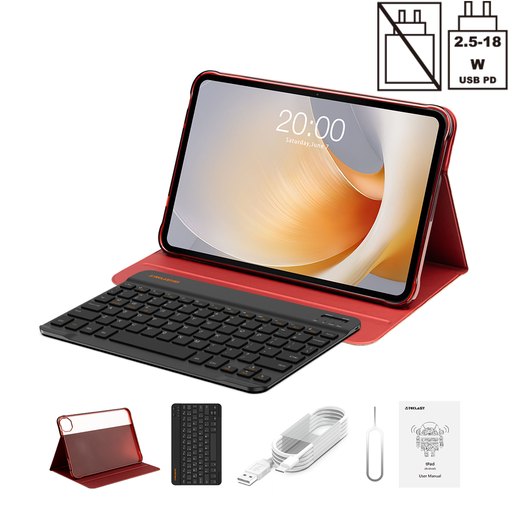
Why It Stands Out: For those who need more than just a note-taker, the TECLAST T65 Plus offers versatility on a grand scale. This is a full-featured Android 15 tablet with a massive 13.4-inch display and a smooth 120Hz refresh rate. While it uses a traditional LCD screen, its sheer size makes it ideal for multitasking, viewing large documents and media consumption. Powered by an MTK Helio G99 Octa-Core processor and equipped with 20GB of RAM (including 12GB virtual), it handles demanding applications with ease. The inclusion of a Bluetooth keyboard and protective case makes it a complete productivity package straight out of the box.
Pros:
Who is it for? Users seeking a large-screen, all-purpose tablet that can handle everything from note-taking and work documents to streaming video and light gaming.
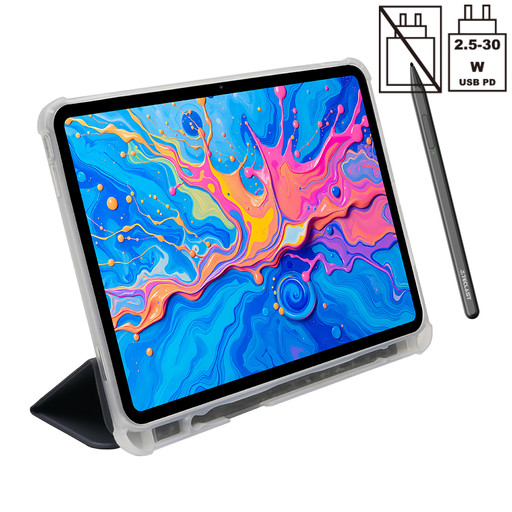
Why It Stands Out: The TECLAST ArtPad Pro strikes a balance between creative expression and productivity. Its 12.7-inch 2K display offers a vibrant and detailed canvas, but its main draw is the support for 4096 levels of pressure sensitivity with the included T-Pen stylus. This makes it an excellent choice for digital artists, designers or anyone who enjoys detailed, nuanced handwriting and annotations. It runs on the same capable Helio G99 processor as the T65 Plus and boasts a large 10,000mAh battery to power through long creative sessions.
Pros:
Who is it for? Creative professionals, students and hobbyists who want a versatile tablet for both artistic projects and everyday productivity tasks like note-taking and document management.
A digital notebook is a valuable tool for your work or study. To ensure it lasts, investing in a good cover is essential. Whether you choose a slim e-ink tablet or a larger Android device, keeping it safe from scratches and bumps is crucial. Explore our range of protective tablet case options to find the perfect fit for your new digital companion.
1. Can a digital notebook completely replace paper? For many users, a digital notebook can successfully replace paper. It offers superior organisation, searchability, cloud backup and the ability to edit notes—features that paper cannot provide. The natural feel of an e-ink writing tablet helps make the transition smooth. However, some people may still prefer paper for quick, disposable jottings.
2. What is the main difference between a digital notebook and a regular tablet? The primary difference lies in the screen and intended purpose. A dedicated digital notebook or smart paper tablet typically uses an E-Ink screen to mimic paper, which reduces eye strain and offers a more natural writing feel. They are optimised for reading, writing and annotation. A regular tablet uses a backlit LCD/OLED screen and is a general-purpose device designed for a wide range of apps, multimedia and web browsing, which can lead to more screen fatigue during long reading or writing sessions.
3. Is a voice to text transcription device accurate enough for meetings? Modern transcription technology, particularly when enhanced with AI, has become highly accurate, especially in environments with clear audio. Devices designed for this purpose, like the iFLYTEK AINOTE 2, are built to capture speech effectively. While they are a powerful tool for creating a tablet for meeting notes, it is always good practice to review the final text to correct any specific terminology or nuances the AI may have missed.