Dinner-party multitaskers
If you are preparing other dishes while the dough rises, an alert and a display positioned where you will notice them can bring you back for a dough check.


Choose a count-up and countdown timer whose maximum duration covers your planned dough check and whose alert you can notice while preparing dinner. A 99-minute-59-second model suits checks within that limit; a longer-range timer avoids resetting for extended schedules. Use either timer as a reminder to inspect the dough, not as proof that it is ready: King Arthur Baking notes that dough and its surroundings affect how quickly it rises.
If you are preparing other dishes while the dough rises, an alert and a display positioned where you will notice them can bring you back for a dough check.
If you follow a same-day recipe, count-up or countdown timing can help you track its stated window. Check the dough against the recipe’s readiness cues when the reminder sounds.
If you plan a longer or chilled proof, check that the timer can run for your intended interval without resetting. Consider whether its alarm setting suits the household.
Start with the time until your next planned dough check, then consider whether you will see or hear the reminder while cooking. King Arthur Baking describes a typical first rise as around one to two hours, depending on the dough and environment, so check your recipe rather than assuming one timer limit covers the whole rise.
| Concern | What to check | Who this matters to |
|---|---|---|
| Noticing the reminder | Check the alarm setting, display readability and whether the timer can stand where you work or attach to your intended surface. | When several dishes need attention, I want a prompt that brings me back to inspect the dough without watching the clock. Around 42% of consumers would put a noticeable reminder first. |
| Simple proof tracking | Check for count-up and countdown modes, and confirm that the maximum countdown covers your recipe’s planned check. | For a same-day bake, I want to set one straightforward reminder and assess the dough when it sounds. Around 33% of consumers would prioritise that simple tracking. |
| Longer schedules | Compare the maximum countdown with your longest planned interval; check volume controls or memory if you would use them. | If I prepare dough well ahead of dinner or use a chilled proof, I want the timer to run until my next check without resetting it. Around 25% of consumers would make longer-range timing their primary concern. |
King Arthur Baking notes that temperature, humidity, dough size, the vessel and shaping can change the rate of rising. The same recipe time will not tell you by itself when the dough is ready.
Set a reminder for the recipe’s first inspection point, then check the dough against its stated volume and readiness cues.
Lakeland and Salter list basic models limited to 99 minutes 59 seconds. That limit cannot accommodate a longer interval in one countdown.
Compare the exact model’s maximum duration with the longest interval you intend to time.
A magnetic back helps only if you have a suitable surface where the timer will be visible or audible during food preparation.
Check the intended surface and consider a model with a stand if you may need to move the timer.
Where a timer uses a button or coin battery, an accessible battery presents an ingestion risk. The UK Office for Product Safety and Standards highlights the particular danger to children and pets.
Check that the compartment closes securely and store spare batteries out of reach.
Salter lists both short-range kitchen timers and a longer-range option, giving you different ways to balance simple controls against timing flexibility.
Lakeland’s Classic Digital Kitchen Timer is a compact option for a recipe check that fits within its stated timing range.
The TM01 is relevant if you want to compare a long timing range with display and alarm controls.
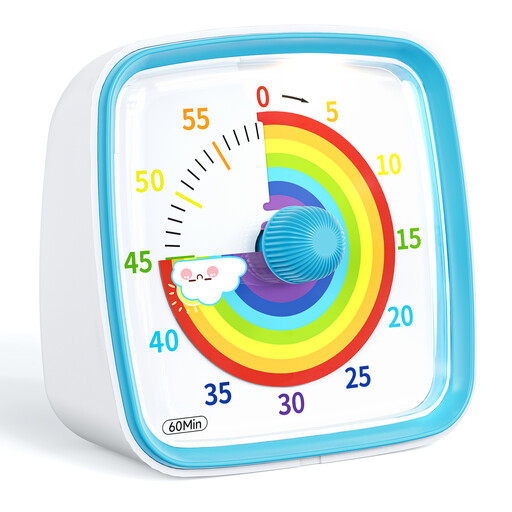
This visual timer is suited to a planned dough check within 60 minutes while you prepare other dishes. Use the alert to inspect the dough rather than to decide that proving is complete.
 No image available
Set a reminder for a dough check within 60 minutes while you prepare the rest of dinner.
Its 60-minute maximum cannot cover a longer rise in one countdown. If you need a silent but noticeable alert, confirm how the mute function signals the end of the timer.
No: use the alert as a prompt to inspect it. King Arthur Baking notes that rise time changes with factors including temperature, humidity, dough size, the vessel and shaping, so check the recipe’s readiness cues before moving on.
It is long enough for a planned check within that limit, but not for every full rise in one countdown. King Arthur Baking describes a typical first rise as around one to two hours, depending on the dough and environment; compare your recipe’s check interval with the timer’s maximum.
Use countdown for a reminder at your recipe’s planned check point, or count-up to track elapsed time as you inspect the dough periodically. Neither mode replaces checking whether the dough is ready.
If a timer uses a button or coin battery, check that its compartment is secure and keep spare batteries out of reach. The UK Office for Product Safety and Standards warns that these batteries can cause severe injury if swallowed or inserted, particularly for children and pets.