Who needs which sort of timer?

Batch cooks who need a noticeable alert

If other cooking jobs draw you away from the roast, consider how clearly you can hear the alarm and read the display from where you work. Check whether the timer can stand on a worktop or attach to a suitable metal surface.

Repeat-roast cooks who want a quick reset

If you regularly use the same resting interval, a memory function or straightforward controls may matter more than a long maximum countdown. Check these features on the exact model you choose.

Cooks who also check meat temperature

A countdown marks the rest period but cannot measure internal temperature. If you need both measurements, consider a thermometer-and-timer combination or use a separate cooking thermometer.

What matters when choosing a timer?

Start with whether one noticeable rest-time alert is enough; then consider repeated settings, overlapping deadlines and any need to measure temperature.

Concern What to check Who this matters to
Noticing the alert Check alarm-volume options and whether the display can be placed where you will see it. With pans on and other food to prepare, I need to notice when the roast's rest ends without watching the clock; around 33% of consumers put a noticeable alert first.
Repeating an interval Check for memory recall and controls that make a familiar countdown easy to restart. When I cook the same roast regularly, I want to restart a familiar interval without setting it from scratch; around 27% of consumers make quick repeat setting their main concern.
Separate deadlines Check for independently controlled countdowns if one reminder cannot cover your tasks; a longer maximum duration is not the same feature. If vegetables and the roast need attention at different times, I want separate reminders rather than one countdown for both; around 20% of consumers prioritise separate deadlines.
Temperature as well as time Check whether the device includes a suitable temperature probe and which time or temperature alerts it offers. Before timing the rest, I also want to check the meat's internal temperature rather than assume time proves it is cooked; around 20% of consumers primarily need temperature confirmation alongside timing.

Common timer-buying mistakes

  • Assuming every alarm will be easy to hear

    An alert you miss while occupied with other dishes cannot reliably mark the end of a roast rest. An alarm feature does not necessarily mean adjustable volume.

    Check the exact model's volume controls and choose a position where you can notice both the alert and display.

  • Choosing duration when you need separate reminders

    A timer that can count down for several hours does not necessarily track the roast and side dishes independently.

    Map the deadlines that overlap in your usual cooking session. Look for independently controlled countdowns or use more than one simple timer if needed.

  • Treating a rest-time alarm as a temperature check

    Elapsed time cannot show the roast's internal temperature or establish that it has cooked through.

    Use a timer for the resting interval and an appropriate cooking thermometer when you need to check temperature.

  • Overlooking the battery requirement

    A timer needs its specified power source before you can use it, and battery requirements differ by model.

    Check the battery type, whether one is supplied and any restrictions on rechargeable batteries for the model you select.

    ProCook says its Magnetic Timer requires one AAA battery that is not included; Judge lists one AAA battery as included with its TC400 timer.

Timer brands to consider

Salter

Salter lists both a big-button timer and a longer-duration model with more alarm options.

  • Salter states that its Loud Digital Kitchen Timer 355 BKXCDU counts up or down to 19 hours, 59 minutes and 59 seconds, with three adjustable alarm volumes, memory, magnetic mounting and a worktop stand.
  • Salter's Big Button model has a 99-minute, 59-second limit; check that the duration suits any tasks beyond the roast rest.

ProCook

ProCook's Magnetic Timer is a straightforward option for a single countdown in a visible kitchen position.

  • ProCook lists a 100-minute digital timer with an LCD display, bell sound, magnetic backing and pull-out stand.
  • ProCook says the timer needs one AAA battery, which is not included, and that rechargeable batteries are unsuitable.

Judge

Judge offers a timer with several placement options for cooks who move around while food rests.

  • Judge lists countdown, alarm and stopwatch functions, along with worktop, clip and magnetic placement options for its Kitchen Digital Kitchen Timer.
  • If adjustable volume, memory recall or a long countdown is essential, confirm those features on the exact Judge model before choosing it.

KitchenCraft

KitchenCraft has a thermometer-and-timer option for cooks who want to track time and measure food temperature.

  • Lifetime Brands Europe describes its KitchenCraft Digital Cooking Thermometer and Timer as combining a temperature probe with alerts for a target time or temperature.
  • Probe use and temperature settings add steps that are unnecessary if you only need a rest-time reminder.

A Joybuy timer for a roast rest

This visual countdown timer is an option for one planned roast-rest reminder. Check its 60-minute limit and where you can place it before choosing it for a busy kitchen.
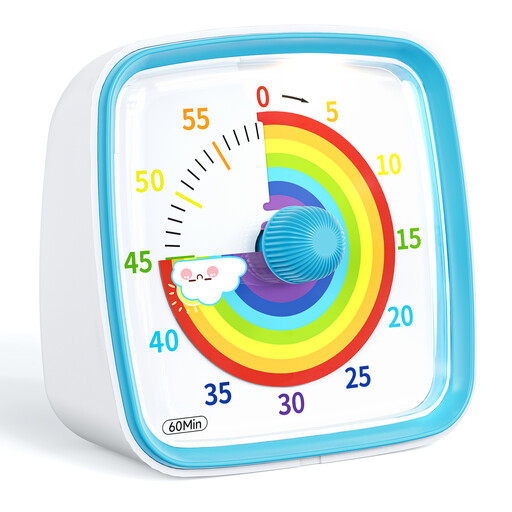
Yunbaoit Rainbow Visual Timer, Blue Rainbow variant

Yunbaoit Rainbow Visual Timer, 60-Minute Countdown (Blue Rainbow)

Consider it for a single rest interval that fits within its 60-minute countdown.

Its visual countdown disk and mute with flash, low and loud alarm modes offer different ways to notice the timer. Check how you can position it where you will see it; it tracks time, not internal meat temperature.

View on Joybuy

Questions about roast-rest timers

Can a kitchen timer tell me whether a roast is cooked through?

No. A timer records an interval, including the rest period, but cannot measure internal temperature. If temperature confirmation is part of your cooking task, use an appropriate thermometer; the Food Standards Agency distinguishes cooking food through from simply tracking time.

How long should the timer be able to count down?

Choose a maximum countdown longer than the rest interval you intend to set, then consider any other jobs you will time with the same device. Salter lists a 99-minute, 59-second Big Button model and a Loud Digital Kitchen Timer reaching 19 hours, 59 minutes and 59 seconds; the longer range matters only if your wider workflow calls for it.

Is a magnetic timer or a worktop stand more useful?

Choose the position that keeps the display visible during your own cooking routine. Magnetic mounting needs a suitable metal surface, while a stand can keep the timer near the preparation area; ProCook lists both options for its Magnetic Timer.

How can I check for a UK product safety recall?

Search the UK government's Product Safety Alerts, Reports and Recalls service for the exact timer or model. The service lists recalls alongside other product safety alerts and reports, so check which type of notice applies to any result.