Noise-conscious shared-office writers
If you draft and edit beside colleagues, check the key or switch variant rather than assuming every keyboard in a range sounds alike. Logitech lists Tactile Quiet, Clicky and Linear variants of MX Mechanical.


Start with typing noise and comfort rather than assuming a mechanical keyboard will suit dissertation writing. A quiet chiclet or low-profile design is worth considering when colleagues sit nearby; if you prefer mechanical feedback, check the exact switch rather than the keyboard family. For long sessions, consider the whole workstation as well as keyboard shape: the Health and Safety Executive advises placing the keyboard just below elbow height.
If you draft and edit beside colleagues, check the key or switch variant rather than assuming every keyboard in a range sounds alike. Logitech lists Tactile Quiet, Clicky and Linear variants of MX Mechanical.
If you spend extended periods drafting, make room to position the keyboard comfortably. The Health and Safety Executive advises assessing the whole workstation, not just one piece of equipment.
If you move between a laptop, desktop or tablet, check connection methods and compatibility with each device. Confirm workplace rules before relying on Bluetooth, a USB receiver or configuration software.
For dissertation writing in a shared office, settle your main priority before choosing a switch, layout or connection method. A feature that helps with one task can make another less convenient.
| Concern | What to check | Who this matters to |
|---|---|---|
| Typing noise | Check the exact switch variant; do not mistake a clicky mechanical option for a quiet one. Treat quiet-key descriptions as a starting point, not a sound measurement. | If colleagues work close by, I want to draft without distracting them, while keeping a typing feel I can use comfortably; around 36% of consumers put limiting typing disruption first. |
| Long-session comfort | Allow space to position the keyboard centrally and just below elbow height, as the Health and Safety Executive advises. Consider whether a shaped layout suits you. | When I spend hours revising chapters, I need a typing position that works with my desk setup; roughly 29% of consumers make long-session comfort their primary concern. |
| Editing layout | Check access to your usual navigation keys and shortcuts, whether you need a number pad, and the selected variant's key layout. | If citations, navigation shortcuts or numerical work are part of my writing, I do not want essential keys hidden behind unfamiliar combinations; about 21% of consumers put editing and layout needs first. |
| Device connection | Check supported connection methods and device compatibility. Confirm office permission before depending on Bluetooth or a USB receiver. | If I alternate between study devices or shared desks, I need a connection I can use in each setting; approximately 14% of consumers place that flexibility first. |
Switch variants within one model family can have different sound characteristics. Logitech lists Tactile Quiet, Clicky and Linear options for MX Mechanical, so praise for one version does not describe them all.
Check the selected switch in the product listing. If nearby colleagues need a quiet room, do not assume a clicky variant will be suitable.
A shaped keyboard cannot make up for an awkward screen or keyboard position. The Health and Safety Executive advises considering equipment, furniture and working conditions together.
Position the keyboard centrally and just below elbow height, then judge whether a different shape would help you use that setup comfortably.
Saving desk space may change access to a number pad or familiar editing keys, which matters if you regularly navigate long documents or enter numerical data.
List the keys and shortcuts you use while drafting and revising, then inspect the physical layout of the exact variant.
A range may contain different regional layouts. Keychron identifies UK-ISO variants separately, so the range name alone does not establish the selected keyboard's key positions.
Confirm the variant's layout before ordering, particularly if you rely on familiar punctuation and symbol positions.
Its productivity range includes low-profile, mechanical and shaped keyboards relevant to different shared-office priorities.
Its office keyboard lines include quiet-key wireless models with differing connection options.
Its range is relevant if you want to check a UK-ISO mechanical layout alongside connection options.
Its low-profile mechanical office keyboards offer another route for writers considering mechanical keys.
These products offer different starting points for dissertation writing: full-size layouts, a split keyboard, a mechanical switch variant and multi-device options. Compare each selected variant's key layout, likely typing sound and permitted connection method before deciding what fits your shared desk.
 No image available
Consider this full-size option if you want space for the keys used in document editing and numerical work. Its title identifies a UK wireless variant; check its typing sound and which wireless connections your office permits.
 No image available
Consider the split layout if keyboard shape is a priority during long writing sessions, while allowing for a change in typing feel. The title specifies a padded wrist rest; confirm the selected key layout and permitted wireless connection before buying. Keyboard shape does not replace a suitable workstation arrangement.
 No image available
If you prefer mechanical key feel, this is a variant whose title identifies Silent Tactile switches rather than an unspecified switch. It also specifies a 108-key, full-size US layout and tri-mode connectivity. Check whether its key positions suit your writing and whether your office permits the connection method you plan to use; the switch name is not a comparative sound measurement.
 No image available
Consider this keyboard-and-mouse set if you want both devices for a shared-office desk. Its title specifies 2.4 GHz wireless connection and a full-size US keyboard layout. Check the key positions against your writing habits and confirm that your office permits the wireless receiver; the quiet-typing wording does not establish how it compares with other keyboards.
 No image available
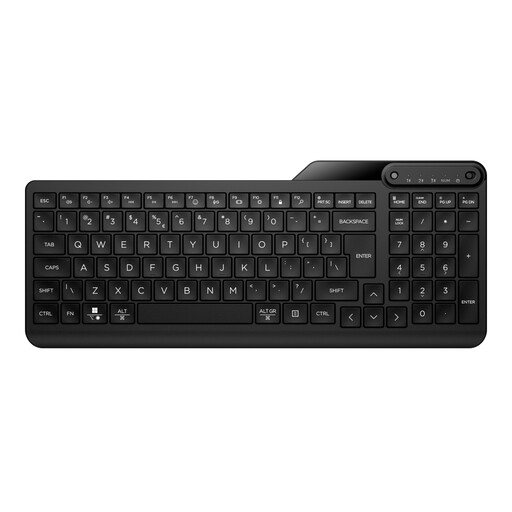
Consider this Bluetooth model if switching study devices matters to you. Before choosing it for dissertation editing, inspect the selected keyboard's physical keys and symbol positions, and confirm that Bluetooth use is allowed at your workplace.
No, but check the exact switch. Logitech lists Tactile Quiet, Clicky and Linear variants of MX Mechanical; a clicky version may be a poor fit where nearby colleagues need quiet. The model name alone does not tell you which variant is selected.
Not by itself. The Health and Safety Executive advises considering the whole workstation, including equipment, furniture and working conditions, and placing the keyboard just below elbow height. Assess the desk and screen arrangement alongside the keyboard's shape; if discomfort persists at work, raise it through your workplace's workstation assessment process.
Choose a connection supported by your devices and permitted in your office. Check the exact keyboard's connection options, whether you need to switch between devices and any workplace rules on Bluetooth, receivers or configuration software before buying.
Check an appropriate electrical recycling route or a retailer collection scheme that accepts keyboards. UK government guidance on waste electrical and electronic equipment encourages recovery, reuse and recycling; confirm the requirements of the collection option you intend to use.