
24/7 Customer Support

Free returns

Same-day & Next-day Delivery

Quality Guaranteed

Unlock Your Welcome Offers: FREE Delivery | Up to 80% OFF | Free 30-day JoyPlus trial
Download the APP
For vloggers, YouTubers, interviewers and live streamers, a DJI Mic Mini 2 wireless microphone can simplify recording by moving the microphone closer to the speaker. However, choosing the wrong kit may leave you with missing receivers, unsuitable connectors or less battery capacity than your filming routine requires.
Before buying a DJI wireless microphone, look beyond phrases such as “professional sound” or “universal compatibility”. The useful questions are more practical: how many transmitters are included, which devices can receive the signal and how will the microphone cope with long recording sessions?
A transmitter, or TX, is the microphone worn by the speaker. A receiver, or RX, connects to the phone, camera or computer. A kit with 2 TX + 1 RX can record two speakers, while a 1 TX + 1 RX kit is generally more suitable for solo content.
Some DJI Mic Mini 2 kits can also connect directly to compatible phones through Bluetooth or to selected DJI products through OsmoAudio. Even so, direct connection does not mean every device will work in the same way. Check the intended phone, camera or tablet before ordering.
A Bluetooth wireless microphone, a radio microphone with a dedicated receiver and a USB-C system may have different setup requirements. iPhone users should check whether their phone needs a compatible mobile receiver or connector. Android phones, tablets and newer computers commonly use USB-C, but port compatibility and recording-app support can still vary.
The REMAX K15, for example, combines wireless operation with a Lightning connection. This makes it more relevant to shoppers using compatible Lightning devices than to someone who only needs USB-C connectivity.
Battery claims are normally based on specified conditions. The DJI Mic Mini 2 listings state up to 48 hours with the charging case, while the BOYA BY-V20 listing states 9 hours of battery life. These figures should be compared with your real workflow, including charging time, standby periods and whether you are filming a full day of interviews or short social clips.
A wireless microphone with charging case can be convenient, but only if the case is charged and carried with the kit.
Choose the configuration around your filming pattern:
The DJI Mic Mini 2 range includes single-transmitter and dual-transmitter options, allowing you to avoid paying for equipment you will not use or discovering that one microphone is insufficient for interviews.
A noise-cancelling microphone can be useful in busy UK streets, cafés or public spaces, but noise reduction does not remove the need for sensible microphone placement. Keep the transmitter close to the speaker and avoid covering it with thick clothing.
The DJI Mic Mini 2 listings specify two-level noise cancelling, auto limiting and three voice tone presets: Rich, Bright and Regular. Auto limiting is intended to help reduce sudden clipping, while the tone presets offer different sound profiles for podcasts, vlogs or balanced speech. These are practical controls, but they do not replace checking the final recording for traffic, wind or handling noise.
A lightweight microphone is easier to wear for long shoots. The DJI Mic Mini 2 transmitter is listed at 11 g, which may suit mobile creators who move between indoor and outdoor locations.
For longer sessions, compare the stated operating time and charging arrangements. A case can protect the components, keep the kit together and recharge the transmitters between recordings. Also check charging guidance: use a suitable charger, charge in a dry, ventilated area and keep small components away from children.
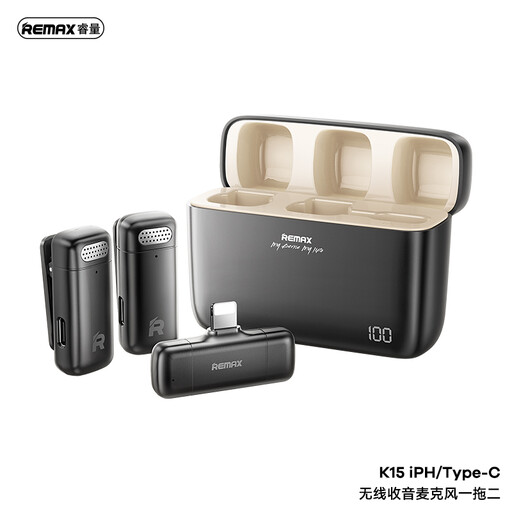
Why This Fits Their Persona: A practical option for shoppers who want a portable microphone for compatible Lightning phones, online meetings, casual recording or occasional live streaming.
Its Lightning and wireless functions are stated clearly, helping buyers check device fit before purchasing rather than assuming every phone uses the same connection.
2-in-1 wireless and Lightning operation; plug-and-play design without complicated driver installation.
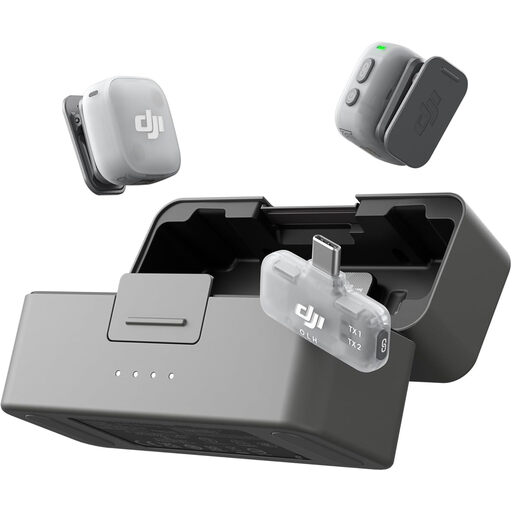
Why This Fits Their Persona: Designed for creators who want two-speaker recording, a mobile receiver and a case-based charging setup for regular content production.
The listing identifies two transmitters, one mobile receiver and the charging case, reducing uncertainty about what is included.
11 g transmitters; two-level noise cancelling; up to 48 hours of use with the case.
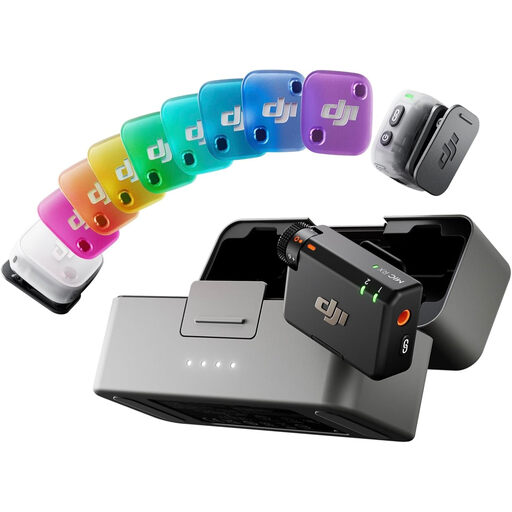
Why This Fits Their Persona: Suitable for interviewers, co-hosted podcasts and mobile creators who need two microphones and extended case-supported operation.
The dual-TX layout avoids relying on a single microphone for two-person recordings, while the case addresses repeated charging between sessions.
Two transmitters; three voice tone presets; stated operating time of up to 48 hours with the charging case.
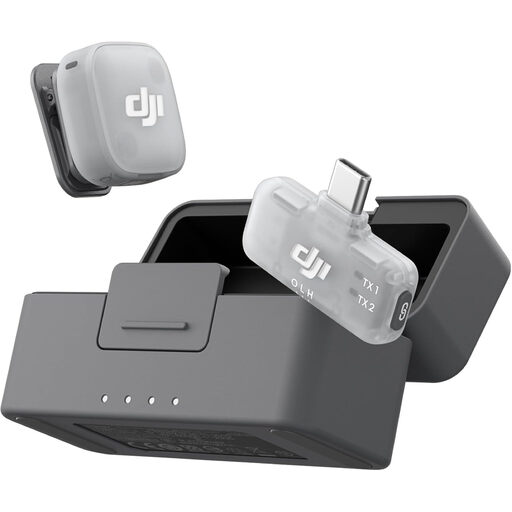
Why This Fits Their Persona: A compact configuration for solo vloggers and live streamers who want a mobile receiver without carrying a second transmitter.
The one-transmitter configuration keeps the kit focused on solo recording, while the listed case and mobile receiver clarify the intended setup.
11 g transmitter; direct phone connection options; up to 48 hours with the case.
We have compiled a complete, real-time list of products that fully satisfy these strict selection criteria and UK safety regulations.
The listed DJI Mic Mini 2 configurations support iPhone and Android connections, PCs and tablets, with the exact setup depending on whether you use Bluetooth, a mobile receiver or a compatible DJI device. Check the connector and operating-system requirements for your specific phone before purchase.
Yes, the dual-transmitter versions are more suitable when two people need separate microphones. The Rich voice tone preset is listed for podcast-style recording, while the two-level noise cancelling and auto limiting are designed to help manage vocal recording conditions.
The DJI Mic Mini 2 listings state up to 48 hours of use with the charging case. Actual runtime can vary with recording conditions and usage. For frequent filming, charge the case before leaving home and store the transmitters securely inside it between sessions.