What should you check before buying?
Decide what each camera must see before comparing recording plans or adding more viewpoints. A doorbell can focus on callers at one entrance; an outdoor camera or multi-camera setup needs its own coverage plan for every view.
| Priority |
What to check |
Your needs |
| Camera coverage |
Mark the area to monitor; check physical aiming, mounting options and privacy masking on the exact model. The ICO advises capturing only your own property where possible. |
I want to see callers or activity at my entrance without routinely recording a neighbour’s property or a shared path. |
| Footage handling |
Check whether you can find, download and export a particular clip, and how you would handle footage showing other people. Review retention and overwrite settings for your purpose. |
If an incident happens, I need to retrieve the relevant recording without searching through an unmanageable history. |
| Recording storage |
Check whether recordings use a card, hub, recorder or cloud plan; confirm the device’s recording features, history terms and what happens if a plan ends. |
I would rather manage local recordings than maintain a cloud subscription—or I may prefer provider-managed event history if its terms fit how I use the camera. |
| Device security |
Check the manufacturer’s stated security-update period. During setup, use a unique password, two-step verification where offered and current firmware. |
My camera connects to an account or network, so I need a device that will remain supported and settings I can maintain. |
| Installation |
Check the mounting position, power supply and network requirements for each viewpoint. Confirm that the planned position gives a useful view before adding cameras. |
I need a setup that works at my actual doorway or outside wall, not just a wider view that also covers the street or adjoining homes. |
Brand and storage references
These brand examples illustrate different recording arrangements; features and requirements depend on the particular device and plan.
Ring
Ring offers doorbells and cameras with recorded event history through subscription plans.
- Ring says its Solo plan can retain recorded events for up to 180 days for one Ring device.
- Confirm the chosen device’s eligible features and the current plan terms before relying on recorded history.
Google Nest
Nest doorbells and cameras can be considered alongside Google’s paid cloud video-history plans.
- Google lists 30 days of event-based history for its Home Premium Standard plan.
- Google says the Nest Doorbell (battery) cannot continuously record 24/7 video history; check the exact device and plan if continuous recording matters.
Reolink
Reolink offers doorbell and hub-based options for households considering local recordings.
- Reolink describes local storage without monthly fees for its Video Doorbell WiFi; its Home Hub Mini kit supports microSD storage.
- Check the selected kit’s storage media, power supply and network requirements rather than assuming they match across models.
eufy
eufy offers doorbell and exterior-camera bundles marketed around local storage.
- eufy describes local storage without monthly fees for a UK bundle that includes its Video Doorbell E340 and HomeBase.
- Check the exact bundle contents, app requirements and footage controls; that bundle’s features do not establish the features of every eufy model.
Outdoor camera options on Joybuy
These are outdoor-camera options for monitoring a defined area around a home, including a two-camera local-storage kit. They are not doorbells: assess each proposed camera position against neighbouring property and shared space before choosing either setup.
 No image available
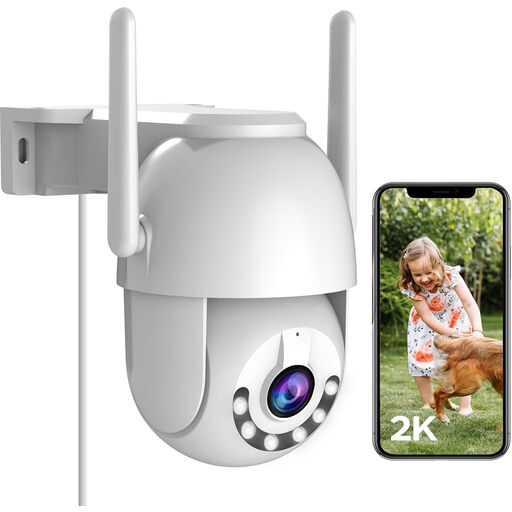
JOOAN 2K Outdoor PTZ Camera, 2.4G WiFi
Consider this single outdoor camera for a defined home area, provided its planned view can be restricted appropriately near neighbours or shared space. The product title lists 360° PTZ movement, IP66, motion alerts, colour night viewing and cloud or 8–256G card recording; check the recording settings you would actually use.
Confirm privacy masking and clip search, export and redaction functions before relying on them. The listing notes that a Micro SD card is not included and that an exposed plug connection needs waterproofing.
View on Joybuy
 No image available
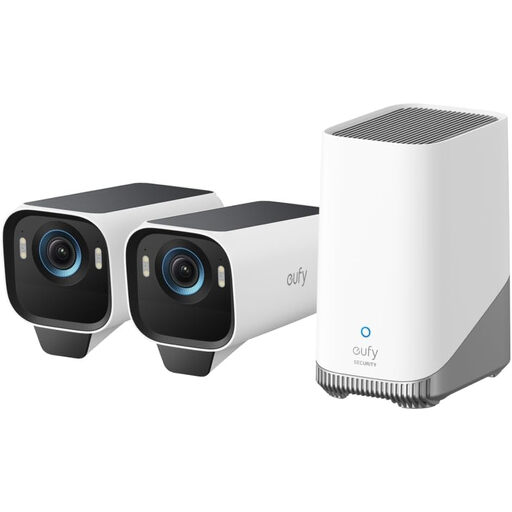
eufy Security eufyCam S3 Pro 2-Cam Solar Kit, 4K
Consider two outdoor viewpoints only if each covers a distinct area you need to monitor. The product title describes solar-powered cameras, 4K video and expandable local storage with no monthly fee; plan the view from both mounting positions rather than assuming more coverage is preferable.
Confirm privacy controls and clip retrieval functions for this kit. Check whether HomeBase S380 is included and what storage expansion requires; the listing also calls for periodic solar-panel cleaning.
View on Joybuy
Common questions
When do UK data-protection rules apply to a home doorbell camera or CCTV system?
GOV.UK’s domestic CCTV guidance says the GDPR and Data Protection Act 2018 apply if the system captures images beyond your private domestic property boundary, including neighbours’ property, shared spaces or public areas. Check the view the camera will actually record, not just where it is mounted.
Should a camera cover a communal path or a neighbour’s entrance?
Aim to cover the part of your own property needed for the monitoring purpose. The ICO advises positioning home cameras to capture only your own property where possible; if the view extends beyond it, consider a different position, narrower framing or suitable masking, and account for the applicable data-protection conditions.
Does local storage avoid the rules that apply to cloud recordings?
No. GOV.UK’s domestic CCTV guidance ties the data-protection condition to images captured beyond your private boundary, not to where the footage is stored. Local storage can change how clips are kept and retrieved, but camera positioning and footage handling still matter.
What footage controls are worth checking before purchase?
Check whether you can locate and export a specific clip, set appropriate retention or overwrite behaviour, and deal with footage showing other people. The ICO’s subject-access guidance recommends systems that can easily locate and extract personal information; assess those functions on the exact model you intend to use.
How should I check a smart camera’s security support?
Look for the manufacturer’s stated minimum security-update period and avoid a device whose support has ended or will end soon, as the National Cyber Security Centre advises. Use a unique account password, enable two-step verification where offered and keep the camera app and firmware updated.


