If you only need an alert when someone calls, a non-camera doorbell avoids filming altogether, but cannot show you visitors or save video. If you need video, assess the view from the proposed mounting position and look for an image-blocking control where neighbouring or shared space could appear; an activity zone alone is not a privacy mask. Compatible wired power avoids routine battery charging, while a battery model leaves charging frequency dependent on activity, settings and conditions.
Who needs to consider these trade-offs?
Homes beside a pavement or shared entrance
Check what the proposed camera position would show, including neighbouring property, a communal landing or a public path. The Information Commissioner's Office advises aiming home cameras at your own property where possible.
Households concerned about charging downtime
Consider whether compatible wired power is possible before relying on a battery doorbell. Google Nest Help says recorded activity and app settings affect battery life, so a busy entrance can change the charging routine.
Renters and residents of managed buildings
Check the tenancy or lease and ask the relevant property manager before fixing equipment or adding wiring. Islington Council, for example, requires its tenants and leaseholders to seek permission when a device is fixed to the building fabric or needs fixed wiring; that is not a rule for every UK property.
What should you check before choosing?
Decide whether video is necessary, then check what the camera would capture and how the doorbell would be powered.
Non-camera doorbell
Choose when: You want an audible or visual visitor alert without a camera.
Give up: Live viewing, recorded footage and remote video conversations.
Wired video doorbell
Choose when: Avoiding routine charging matters and compatible power and any required property permission are available.
Allow for: Supply checks and installation work; wired power does not resolve an unsuitable camera view.
Battery video doorbell
Choose when: Suitable wired installation is not available and you can manage recharging.
Allow for: Charge intervals that vary with recorded activity, settings and temperature, according to Google Nest Help.
| Priority | What to check | Your needs |
|---|
| Camera view |
Assess the mounting angle and actual view against the property boundary. Check whether an exact-model privacy control blocks part of both live and recorded images; consider audio controls separately. |
I want to see callers without unnecessarily filming a neighbour's property, a shared entrance or a public path. |
| Privacy versus alerts |
Ask whether a setting hides image content or only changes motion detection and notifications. Ring says its Privacy Zones are not shown or recorded, but motion may still be detected behind a blocked zone. |
If an area must stay out of the picture, fewer alerts alone will not meet my need. |
| Power and charging |
Check compatible wired or plug-in power, or plan charging around entrance activity. Google Nest Help says battery life depends on recorded activity and app settings. |
Frequent charging would interrupt the visitor alerts I rely on, particularly at a busy entrance. |
| Installation |
Check the exact power requirements and proposed fixing method. Review any tenancy, lease or building rules before mounting or wiring the device. |
I need an installation my property permits and a supply that matches the chosen doorbell. |
Mistakes that can change the choice
-
Assuming an activity zone hides part of the picture
An unwanted area may still appear in live video when a setting only changes detection or alerts. Ring distinguishes image-blocking Privacy Zones from Motion Zones.
Check the exact model's controls before buying, then inspect the installed live and recorded views and adjust the angle, image blocking and audio settings as needed.
-
Planning around a maximum battery-life claim
Recorded events, settings and temperature affect charging. Google's illustrative Nest Doorbell (battery) scenarios run from about one month at a busy entrance to about six months at a quiet one; they are not promised runtimes for another model.
Consider how active your entrance is. If charging interruptions are unacceptable, check whether compatible, approved wired power is possible or whether a non-camera alert would meet your needs.
-
Assuming wire-free means permission-free
A battery device can still involve fixing equipment to building fabric, while a shared entrance raises a separate question about what the camera captures.
Read the tenancy or lease and seek confirmation from the relevant landlord or building manager before drilling or fitting equipment. Islington Council's permission requirements for its own tenants and leaseholders illustrate why the property's rules matter.
-
Connecting a doorbell to an unchecked supply
An incompatible electrical connection can damage a device or create a shock risk; compatibility depends on the exact doorbell and supply.
Check the model's power requirements before installation. Electrical Safety First recommends a registered electrician for installation or repair work.
Relevant brand examples
Ring
Ring's Wired Doorbell 2K Plus is an example to examine if wired power and camera controls are both priorities.
- Ring lists hardwired or compatible plug-in-adapter power for this model and says its Privacy Zones block selected areas from view and recording.
- Privacy Zones are not available on every Ring device, and motion may still be detected behind a blocked area. Check exact-model and subscription conditions for audio controls.
Google Nest
The Nest Doorbell (battery) illustrates why charging plans should reflect activity at the entrance.
- Google Nest Help explains how recorded activity and app settings affect battery life.
- Its published usage scenarios are estimates, not a guaranteed charge interval; colder conditions can shorten battery life.
Aqara
Aqara's Smart Video Doorbell G4 offers a choice of battery or compatible transformer power, according to Aqara.
- Aqara says its G4 uses a six-battery pack or an AC/DC transformer, with batteries serving as backup when wired.
- Aqara's up-to-four-month battery figure is conditional. Confirm the exact model's image-blocking controls if camera boundaries matter.
Honeywell Home
The non-camera DC915N is an example for households that need a visitor alert rather than video.
- Resideo lists audible and visual alerts for the DC915N.
- It cannot provide live video, recorded footage or remote two-way conversation.
Doorbell cameras on Joybuy
These video-doorbell options include battery models, a solar-powered option and models whose titles offer hardwired operation. Compare their installation needs and confirm exact-model image and audio controls against the view at your entrance; a non-camera alert remains a separate choice if video is unnecessary.
 Image unavailable
BOTSLAB R810 5MP video doorbell with 32GB SD card
A wireless camera option for visitor alerts and two-way audio, with 5MP video and a 32GB SD card stated in its title.
Check how often its battery would need charging at your entrance and whether its image and audio controls suit the proposed view.
View on Joybuy
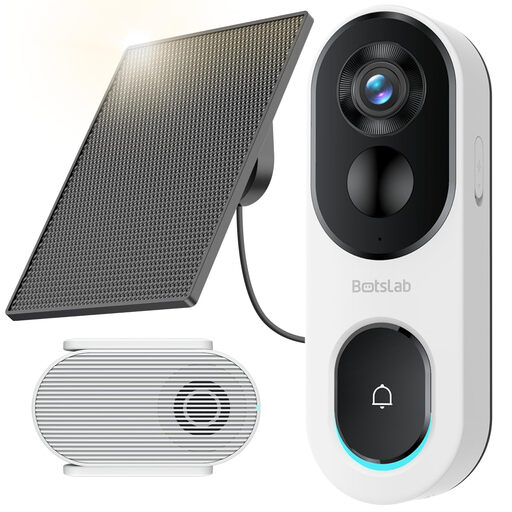 Image unavailable
BOTSLAB R810SE 2K solar-powered video doorbell
Consider this wireless, two-way-audio model if a solar-powered arrangement fits the proposed mounting location; its title specifies 2.4GHz WiFi only.
Check panel exposure, expected charging needs, network compatibility and exact-model image-blocking and audio controls.
View on Joybuy
 Image unavailable
tapo D230S1 smart battery video doorbell
Battery operation is an option where fixed wiring is unsuitable, provided a charging routine works for your entrance.
If local recording matters, confirm whether a microSD card is supplied; also check the exact model's image and audio controls.
View on Joybuy
 Image unavailable
eufy Security Video Doorbell C31, 2K, battery or hardwired
Its stated battery and hardwired options let you assess which power arrangement fits your property.
Confirm the required wired supply and any installation permission, or plan charging if using battery power. Check the exact image and audio controls before positioning its camera.
View on Joybuy
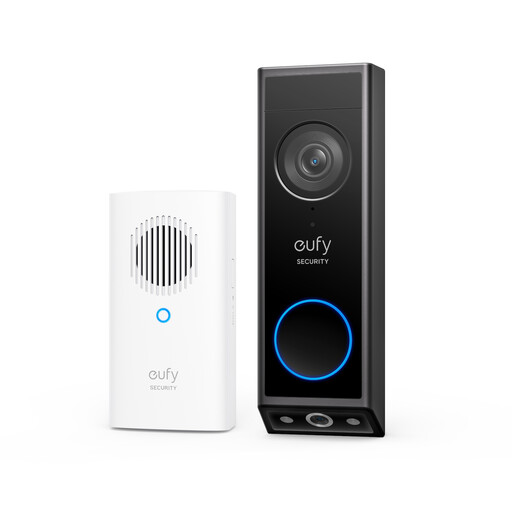 Image unavailable
eufy E340 2K dual-camera video doorbell with chime
The dual-camera, battery-powered design warrants a careful check of everything both cameras would show from the proposed position.
For wired mode, confirm a compatible 8–24V supply greater than 10VA and keep the battery installed. Check property permission, charging needs in battery mode and exact-model image and audio controls.
View on Joybuy
Common questions
Does UK data protection law apply if my video doorbell captures a shared area or pavement?
Yes, when domestic camera footage captures people beyond the boundary of your private property, including communal or public areas, data protection law applies, according to GOV.UK's domestic CCTV guidance updated on 21 May 2026 and the Information Commissioner's Office. The ICO advises positioning cameras to capture only your property where possible; check its current home CCTV guidance for the responsibilities that apply to your view.
Is an activity zone the same as a privacy mask?
No. An activity or motion zone changes how selected areas are monitored for events; do not assume it removes an area from live video. Ring says its Privacy Zones are not shown or recorded, although motion can still be detected behind one. Confirm what the exact model does before relying on a setting to block an area.
Can I disable sound recording on a Ring doorbell camera?
Ring says audio streaming and recording can be turned off on compatible subscription-enabled devices. Check the controls and subscription conditions for the exact doorbell, especially if you also want to use two-way talk.
When should I consider a wired doorbell instead of a battery model?
Consider wired power when routine charging would disrupt the alerts you need and the chosen model has a compatible, permitted supply. Check its electrical requirements and property rules first; Electrical Safety First recommends a registered electrician for installation work.


