Householders facing a pavement or shared path
Aim the camera primarily at your own doorway and consider how to reduce unnecessary capture of passers-by, neighbours and shared access. Mounting position, privacy blocking and audio controls all matter.


Choose a video doorbell if your main purpose is seeing and speaking to callers at one entrance; consider a separately mounted camera if the relevant part of your property cannot be covered from the doorway. For either choice, check the actual view, privacy blocking, audio settings and recording method before use. The Information Commissioner's Office (ICO) says UK data-protection law applies when a domestic camera captures another person's property, a public area or communal space; its domestic CCTV guidance is under review.
Aim the camera primarily at your own doorway and consider how to reduce unnecessary capture of passers-by, neighbours and shared access. Mounting position, privacy blocking and audio controls all matter.
Decide whether you want to manage local storage or use a cloud-recording plan. Check what is needed to review, retain and export footage rather than assuming every doorbell records in the same way.
Check the available mounting position, power source and Wi-Fi connection while keeping the monitored area as narrow as practicable. Where relevant, check tenancy, leasehold or building-management permissions separately.
Choose it when: Seeing and speaking to callers at one doorway is the main task, and the device can be aimed primarily at your entrance.
Consider: A doorway-mounted view may also include a shared path or pavement, so check what the camera actually captures.
Choose it when: The area you need to monitor on your property, such as side access, cannot be covered from the doorbell position.
Consider: More choice of mounting position also makes it important to restrict the view to the area needed.
Whichever device position suits the entrance, decide what it will show and record before comparing storage options.
| Priority | What to check | Your needs |
|---|---|---|
| Camera view | Check the view from the proposed mounting point, not just the stated viewing angle. The ICO advises positioning domestic cameras to capture only your own property where possible. | I need to see my entrance without unnecessarily including a neighbour's property, a shared route or the pavement. |
| Privacy controls | Check whether a privacy zone blocks an area in both live view and recordings. An activity or motion zone may only change which events trigger alerts. | If part of the view extends beyond my doorway, I want to know exactly what the device will still show and record. |
| Audio | Check two-way talk and audio-recording settings separately. Confirm whether audio recording can be switched off when it is unnecessary. | Speaking to a caller may be useful, but I do not want to assume that using talk requires audio to be recorded. |
| Recording | Check whether recorded-video review requires a plan or compatible local storage. Confirm retention settings, storage capacity and what happens when storage fills. | I want to know how I would retrieve an event later and what I would need to keep recording available. |
| Footage retrieval | Check clip search, export and a workable way to redact other people's information. The ICO advises choosing a system that can locate and extract relevant footage where an access request applies. | If my camera captures people beyond my property boundary, I need a practical way to find and handle relevant recordings. |
A view that includes more of the approach can also include neighbouring property, communal space or a public area. The ICO says UK data-protection law applies when domestic cameras capture those areas.
Work out which part of your entrance needs monitoring, then assess the mounting angle and any supported privacy blocking.
TP-Link describes the Tapo TD20's activity zones as alert controls. Ring describes privacy zones that block selected areas from live view and recording. Those descriptions do not establish that the controls work alike.
For the exact model you are considering, check separately what changes alerts, live view and saved video.
Ring says reviewing, saving and sharing recorded video on its Wired Video Doorbell 4K Pro require a subscription. Local-storage models instead need their compatible storage and recording settings to be checked.
Decide how you will store, retain and export clips before settling on a device.
Where data-protection law applies, footage containing someone's personal information may need to be located and extracted. The ICO also notes that third-party information may need redaction.
Check the app or recorder's search and export functions and how you would handle a clip showing other people.
A doorbell option to examine if blocking parts of the recorded view and controlling audio are important at your entrance.
The Tapo TD20 is a doorbell option for buyers considering activity-zone alerts and local storage.
The Reolink Video Doorbell WiFi is a wired doorbell option for buyers considering local recording.
The Video Doorbell Dual is an option to assess if seeing both callers and the doorstep matters.
These video doorbells are options for monitoring callers at an entrance. For a shared or public-facing view, assess each model's positioning, privacy and recording controls before use.
 Image unavailable
This battery video doorbell is an option for a doorway where seeing callers is the main task. Before using it towards a shared area, check the exact model's privacy blocking, audio-recording controls, footage export and retention settings.
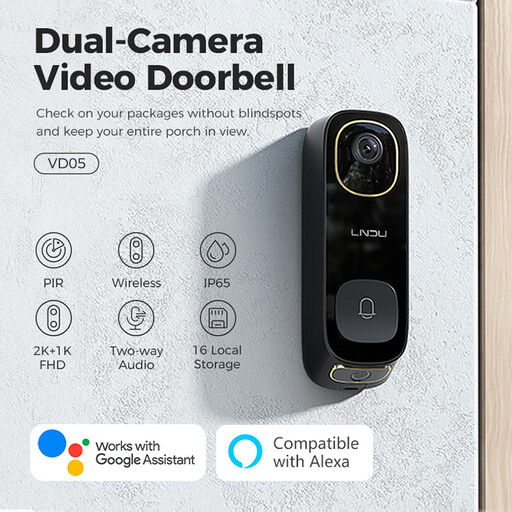 Image unavailable
This wireless video doorbell lists two-way audio for communicating at the entrance. Check whether its motion settings also restrict recording, how footage can be exported and which weather-resistance rating applies: the title and description give different ratings.
Yes, if a domestic camera captures images beyond your private-property boundary, including a shared path or public area. That is the position set out in ICO and GOV.UK domestic CCTV guidance; the ICO notes that its guidance is under review, so check its current wording before installation.
Start with where it can be mounted and what its camera would see. Then check whether the exact model can block areas from both live view and recordings, adjust motion alerts and disable audio recording; an activity zone alone may only filter alerts.
Some models offer local recording: TP-Link lists microSD support up to 512GB for the Tapo TD20, and Reolink describes local storage for its Video Doorbell WiFi. Check the compatible storage and recording workflow for the model you choose. Ring says reviewing, saving and sharing recorded video from its Wired Video Doorbell 4K Pro require a subscription.
Retention depends on the system and its settings. Ring describes event history of up to 180 days under its subscription plans; with local storage, check capacity, recording settings and overwrite behaviour rather than treating card capacity as a promised retention period.
Where data-protection law applies, choose a system that lets you locate and extract relevant footage. The ICO advises that third-party information may also need redaction, so check how you would handle a clip showing other people.