Bright-window diagram sketchers
If window reflections make fine lines and component labels hard to see, compare the exact model’s display treatment as well as its usable drawing area and pen arrangement.


Choose a standalone tablet if you need to sketch away from a desk; compare its display treatment, pen arrangement and diagram-app workflow before deciding. Samsung describes anti-reflective technology and an included S Pen for the Galaxy Tab S10+, while Apple specifies an anti-reflective display for the 13-inch iPad Air but lists compatible Pencils separately. A computer-connected pen display suits a different need: keeping the work on a compatible host device.
If window reflections make fine lines and component labels hard to see, compare the exact model’s display treatment as well as its usable drawing area and pen arrangement.
If diagrams need to remain editable or move between a tablet and computer, check grids, snapping and export in the intended app. Concepts lists these tools but notes a file-format difference between its iOS and Windows or Android versions.
If your work already depends on a host device, a connected pen display may keep drawing input alongside that workflow. Wacom lists Windows, Mac, Android and ChromeOS compatibility for the One 13 touch; confirm the required connection for your device.
Choose when: You want to draw away from a computer. Samsung specifies a 12.4-inch display, anti-reflective technology and an included S Pen for the Galaxy Tab S10+.
Allow for: Samsung’s display description is not a test at your window; confirm that your Android diagram app can produce the files you need.
Choose when: You prefer iPadOS and a 13-inch drawing area. Apple specifies an anti-reflective, fully laminated display for the 13-inch iPad Air.
Allow for: Apple lists compatible Pencil options separately; check the complete drawing setup and your app’s cross-device file workflow.
Choose when: Your diagrams need to stay on a compatible host device and you want to draw directly on a screen. Wacom describes the One 13 touch as a 13.3-inch pen display.
Allow for: This is a connected setup, not a standalone tablet; assess the display at your intended desk position before relying on it beside a bright window.
| Concern | What to check | Who this matters to |
|---|---|---|
| Daylight legibility | Check the exact model’s anti-reflective treatment and published brightness specification, then assess reflections at the intended desk position. | If window glare hides fine connections or labels, I need to see the diagram clearly before other features matter. Around 36% of consumers put daylight legibility first. |
| Diagram-app workflow | Confirm the required symbols, precision tools and export formats on the intended operating system; test a file hand-off if another device is involved. | If someone else must edit my circuit diagram, I need the app and file format to fit that hand-off. For around 29% of consumers, workflow compatibility is the primary concern. |
| Pen and drawing area | Compare screen size, compatible or included pen, and whether the device works independently or needs a host. | When I draw small labels or long connections, I need enough room and a pen arrangement that suits where I work. Pen and canvas usability come first for around 21% of consumers. |
| Complete setup | Check what comes with the exact model and what your desk and diagram app require, including a pen, stand, connection accessories or host device. | If I want to start drawing with the equipment I have, I need to know which essential parts must be arranged separately. Around 14% of consumers make setup completeness their first concern. |
Wacom describes the One 13 touch as a pen display for compatible host platforms. It serves a different workflow from a standalone tablet.
Decide whether you need to move away from your desk, then check host compatibility, connections and the intended application before choosing a pen display.
A connected setup also needs room for the host device and its cables.
Apple lists compatible Pencil options separately from the iPad Air. A tablet alone is not the complete pen-input setup.
Confirm which Pencil works with the exact iPad Air model and what else you need to draw comfortably at your desk.
Samsung’s anti-reflective description and Apple’s display specification do not establish how either screen will look at every desk angle or under direct reflections.
Compare the exact models and, where possible, assess legibility in your intended position; check the applicable retailer return terms before ordering for that purpose.
Concepts lists grids, snapping and export features, but notes a file-format difference between its iOS and Windows or Android versions. Sketching capability alone does not establish compatibility with a recipient’s CAD or schematic workflow.
Ask for the required symbols and file format, then try a complete sample diagram in the app and operating system you intend to use.
An unsuitable hand-off can mean converting or redrawing the diagram.
A standalone Android route represented here by the Galaxy Tab S10+.
A standalone iPadOS route represented here by the 13-inch iPad Air.
A connected pen-display route represented here by the One 13 touch.
These standalone tablet choices are relevant to pen-based circuit sketches. For either model, check screen legibility beside your window and whether your intended diagram app handles the tools and files you need.
 No image available
Consider this Android tablet if you want a standalone drawing area with a stylus included; check whether it stays legible at your window and supports your diagram app.
The product name specifies a 12.7-inch 2K display, 4096 pressure levels, Android 15 and 256 GB storage. It describes 20 GB RAM as 8 GB plus 12 GB virtual RAM.
 No image available
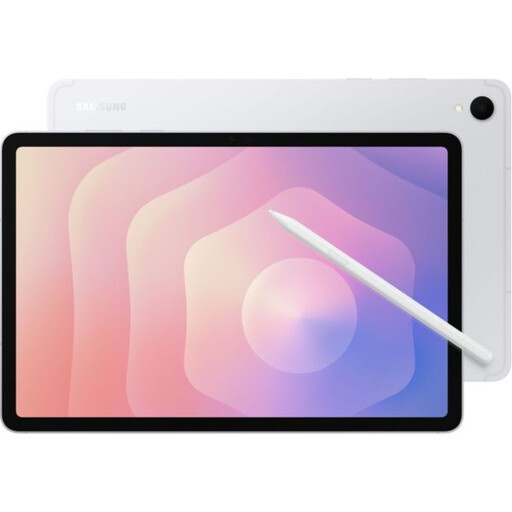
Consider this tablet if a 10.9-inch drawing area suits your diagrams. Confirm the pen arrangement, diagram-app compatibility and screen behaviour beside your window before choosing it.
The product name specifies a 10.9-inch screen, 256 GB storage and a Silver finish. The Galaxy Tab S10+ display claims discussed above should not be applied to this different model.
Prioritise whether you can read fine lines and labels at your intended desk position, then compare the drawing area and resolution. Samsung describes anti-reflective technology for the Galaxy Tab S10 series, while Apple specifies an anti-reflective coating and 600 nits for the 13-inch iPad Air; neither statement guarantees the same result under every window reflection.
A tablet can provide pen input for circuit sketches, but it does not by itself replace the software required for a particular engineering hand-off. Concepts lists grids, snapping, measurement and shape guides; confirm the symbols, file formats and editing workflow your recipient requires.
Check the exact tablet and its box contents. Samsung lists an S Pen with the Galaxy Tab S10+, whereas Apple lists compatible Pencil options separately for iPad Air; do not assume that the arrangement for either model applies to another tablet in its range.
Check local electrical-equipment recycling or take-back options for the device. GOV.UK describes the UK waste electrical and electronic equipment regime as intended to reduce electrical equipment sent to landfill or incineration.