Who these setups suit

Window-only stopgap monitor

If you cannot position a camera outside yet, test the view through your intended window after dark. Reolink warns that night-vision lights and reflections can wash out footage through glass, even when the daytime view looks usable.

No-drill outdoor coverage seeker

If you need a view of a driveway, garden or entrance without permanent wiring, consider whether a weather-rated battery camera can be mounted in a permitted, stable position with adequate Wi-Fi and a workable charging route.

Privacy-and-storage-conscious resident

If your proposed view includes a neighbour's property, a pavement or a communal area, framing and privacy controls deserve attention before installation. Check local-recording options as well if you do not want to depend entirely on cloud storage.

What to check before choosing

Indoor camera behind glass

Consider it when: You need an immediate indoor position and can test the important part of the view in daylight and darkness.

Trade-off: Reolink warns that infrared and other lights can reflect from glass; turning infrared off leaves the camera dependent on usable light outside.

Battery camera outdoors

Consider it when: Night coverage or a clearer outdoor view matters and you have a permitted position with adequate Wi-Fi.

Trade-off: Battery runtime varies with use and conditions; a solar panel also needs suitable exposure. Weather-rated equipment still requires an appropriate mount and power arrangement.

Concern What to check Who this matters to
Night view through glass Test a recording at the intended window after dark; check whether infrared can be turned off and whether outside lighting remains usable. If I need to recognise what happens outside at night, a clear daytime image is not enough. Around 31% of consumers put usable night footage first.
No-drill outdoor placement Confirm the model's outdoor suitability, a permitted stable mount, Wi-Fi at that position and how its battery will be recharged. When I cannot run permanent wiring, I need an outdoor position I can use and maintain without drilling; roughly 25% of consumers make that their primary concern.
Privacy and framing Aim the camera at your property first; distinguish privacy masking from zones that only control detection or alerts. I want to monitor my entrance without unnecessarily capturing a neighbour or shared space. For around 25% of consumers, limiting the view is the deciding need.
Local recording Check whether recording uses a microSD card or hub, what hardware is required and how footage can be accessed. If I want recordings available without relying entirely on cloud storage, the recording setup matters most; about 19% of consumers prioritise that need.

Mistakes to avoid

  • Assuming a daytime window view will work at night

    Reolink warns that infrared, status lights and room lighting can reflect from glass and obscure low-light footage.

    Test live view and a saved recording from the intended position after dark, with your usual indoor and outdoor lighting. If important details disappear, reconsider the placement.

  • Assuming wire-free means no upkeep

    TP-Link says battery duration varies with settings, use, router conditions and the environment. Solar charging also depends on panel placement and available light.

    Check how the camera is recharged, whether a solar panel is included and where the panel could be positioned without compromising the camera view.

    A separate panel or mount may be needed, and the battery may still need manual charging.

  • Using detection zones instead of careful framing

    Activity zones can control detections or alerts, but they do not necessarily prevent an area from appearing in video. The Information Commissioner's Office says data-protection law applies when home CCTV captures someone else's property, a public area or a communal space.

    Aim primarily at your own property. Then check whether the exact camera supports a privacy zone that blocks viewing, rather than assuming a motion zone does the same job.

  • Taking indoor electrical equipment outside

    An outdoor camera or light may need a separate power arrangement; a lead or connector intended for indoor use is not a substitute for outdoor-suitable equipment.

    Electrical Safety First advises using cables and connectors suitable for outdoor use. Follow the installation instructions for the camera, charger and lighting.

Brands to consider

Tapo

Relevant to a wire-free outdoor route where model-specific storage and privacy controls matter.

  • TP-Link lists a magnetic base, IP66 weather rating and local microSD support up to 512 GB for the Tapo C425. Its guidance lists the C425 among models supporting privacy zones.
  • TP-Link says actual battery life varies with settings, use, router specifications and environmental conditions; check the intended mount and charging arrangement.

Reolink

Relevant to an outdoor battery-camera route with local recording and configurable motion zones.

  • Reolink lists 2.4 GHz and 5 GHz Wi-Fi, local microSD storage and rechargeable-battery or optional solar power for the Argus Eco Pro.
  • Reolink also warns that night vision can wash out behind glass. An outdoor model's features should not be taken as proof that it will work from an indoor window position.

eufy

Relevant to a solar-assisted outdoor route where panel position and local-storage options are important.

  • eufy describes a removable solar panel and local storage for the SoloCam S340. Its support guidance describes activity zones as controls for motion detection and alerts.
  • An activity zone is not proof that excluded areas are absent from recorded video. Check whether the intended panel position receives suitable light.

Joybuy window-camera choices

This indoor plug-in option suits a no-drill window position, provided you can check the recorded view through your own glass after dark. It is not a substitute for assessing an outdoor route if night footage is essential.
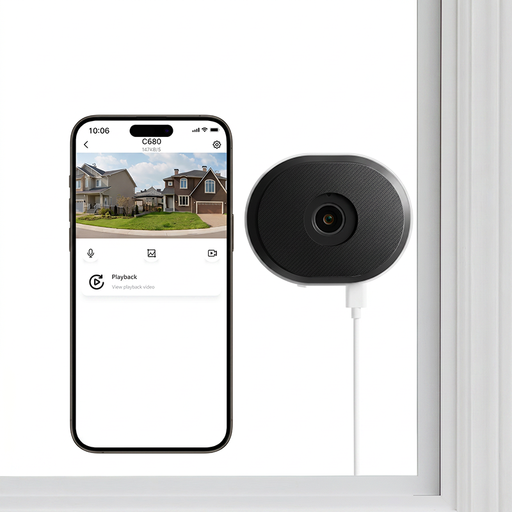
ZOSI C680 3MP 2K window camera, UK variant

ZOSI C680 3MP 2K Window Camera, 1 PCS (UK)

Consider this indoor plug-in camera if you need a window position without drilling; test footage from the intended glass after dark before relying on its night view.

The listed variant specifies 3MP, 2K and 2.4/5GHz Wi-Fi. Check that the intended mounting surface suits the adhesive arrangement and that you have the microSD card needed for your recording setup.

Check whether its controls can mask parts of the image: detection zones alone should not be assumed to block those areas from view. Aim primarily at your own property.

Joybuy

Common questions

Will an indoor camera work through a window at night?

Only if footage from your actual window position remains usable after dark. Reolink warns that infrared and other lights can reflect from glass and obscure the image; if you turn infrared off, check that outdoor lighting still provides the detail you need.

Does UK data-protection law apply to a home camera?

It applies when home CCTV captures someone else's property, a public area or a communal space, according to the Information Commissioner's Office. Aim primarily at your own property and check the ICO's home CCTV guidance for the obligations relevant to your view.

Is an activity zone the same as a privacy zone?

No. eufy describes activity zones as controls for motion detection and alerts, while TP-Link says privacy zones prevent selected areas from being viewed or monitored on supported models. Check the exact model's controls and minimise unwanted capture through physical aiming first.

Will a solar panel keep a battery camera running without attention?

Do not assume it will. TP-Link says battery life varies with settings, use, router conditions and the environment; solar assistance also depends on panel placement and available light. Confirm the panel arrangement and how you would recharge the camera when needed.

Can I use an indoor extension lead for an outdoor camera?

Do not use a lead outdoors unless it is suitable for that location. Electrical Safety First advises using outdoor-suitable cables and connectors; follow the camera and power equipment manufacturers' installation instructions too.