Laptop-first home workers
If you use a laptop for prolonged work, you may need to position its screen separately from your keyboard and mouse after an assessment. The Health and Safety Executive (HSE) gives this as a workstation setup consideration.


Choose equipment that addresses your DSE assessment and work tasks, rather than buying a standard home-office bundle. In Great Britain, equipment identified as necessary by the assessment must be provided without charge; agree the provision and approval process before buying optional extras, then check your workstation and laptop requirements.
If you use a laptop for prolonged work, you may need to position its screen separately from your keyboard and mouse after an assessment. The Health and Safety Executive (HSE) gives this as a workstation setup consideration.
If you regularly work at home and in an office, consider how equipment and connections will work at both assessed workstations. HSE guidance says a relevant assessment should cover home and office settings.
If your tasks call for a separate display or additional meeting equipment, check the display requirements, laptop connections and exact camera or headset variant before choosing.
Start with the assessment and your employer’s provision process, then identify the workstation need and check the equipment against your laptop and work tasks. HSE guidance informs the checks below; the figures describe approximate shares of consumers by their primary purchasing concern.
| Concern | What to check when buying | Who this matters to |
|---|---|---|
| Employer provision and assessment | Assessment actions; what your employer will supply; approved ordering arrangements. | I want to know what the assessment calls for and who will provide it before spending personally. Consumers whose main concern is agreeing provision account for about 25%. |
| Screen and input positioning | Screen position and viewing distance; keyboard position and mouse reach; stand fit. | I need the screen and input devices to work together at my desk, especially for prolonged laptop use. Consumers prioritising positioning account for about 25%. |
| Laptop and dock compatibility | Exact laptop model and port capabilities; display modes, charging and any required software. | I want to confirm that my laptop can support the displays and peripherals in the proposed setup. Consumers who put compatibility first account for about 25%. |
| Task-specific display or meeting functions | Required screen workspace and resolution; whether a webcam or headset is needed for the task. | I need the display or meeting functions my work actually calls for, rather than extra features by default. Consumers focused on task capability account for about 13%. |
| Moving between work locations | Whether equipment must travel; its folded form and stated weight; connections at each desk. | I need to carry and set up equipment at more than one assessed workstation. Consumers putting portability first account for about 12%. |
In Great Britain, necessary equipment identified by a DSE assessment cannot be charged to the worker. That does not make every preferred accessory an approved purchase.
Agree what will be supplied and how it should be ordered before spending.
Buying first can lead to unnecessary personal spending or a disagreement about reimbursement.
For prolonged laptop use, HSE setup guidance separates the keyboard and mouse so the screen can be elevated without relying on the raised built-in keyboard.
Consider screen, keyboard and mouse positions together as part of the workstation assessment.
A separate keyboard and mouse may also be needed for the intended arrangement.
Display modes can depend on the laptop’s capabilities, and some docking approaches require software drivers.
Check the exact laptop and dock requirements, intended display setup and whether any required software is approved for your work computer.
An incompatible dock or unapproved software can leave you unable to use the intended setup.
A webcam or headset should reflect the assessed or agreed work setup and the tasks you need to perform.
Confirm the need, meeting application and exact product variant before choosing one.
Optional accessories can mean spending on equipment that your agreed setup does not require.
The P2425HE is a model-specific example of a hub monitor for a setup requiring a separately positioned display and USB-C charging.
The K50417WW Easy Riser Aluminium Laptop Riser is a portable positioning option; Kensington docking documentation also illustrates host-compatibility checks.
The MK540 Advanced offers a separate keyboard-and-mouse option; Brio 100 is a camera option when the work setup requires one.
The Evolve2 40 SE line is relevant when the agreed work setup calls for a dedicated business headset.
The DK30C2DPPD technical documentation illustrates a DisplayLink-based docking approach for mixed laptop setups.
These options relate to task-dependent hybrid workstation setups, including a headset, displays, a dock and separate keyboard-and-mouse input devices. Choose only equipment that fits your assessment, work tasks and laptop connections.
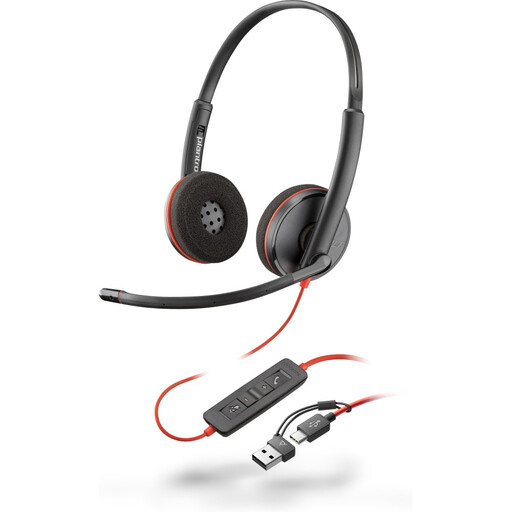 No image available
Consider it only if a headset is required for your agreed work setup; check the connection and meeting requirements of the computer you will use.
The product name specifies a USB-C headset with a USB-C/A adapter.
 No image available
Consider a portable second display when your assessment or tasks call for one and you need a screen that can move between work locations.
Check that the laptop supports USB-C DisplayPort Alternate Mode before relying on a USB-C video connection.
 No image available
Consider a separate display when your assessment and tasks call for one; check its screen requirements and connection against your laptop and desk setup.
The product name identifies an IPS WQHD monitor.
 No image available
Consider a dock when the agreed setup needs additional display and peripheral connections; check the laptop’s USB-C Alt. Mode support and intended display configuration first.
The product name specifies dual HDMI 4K and 100W Power Delivery pass-through.
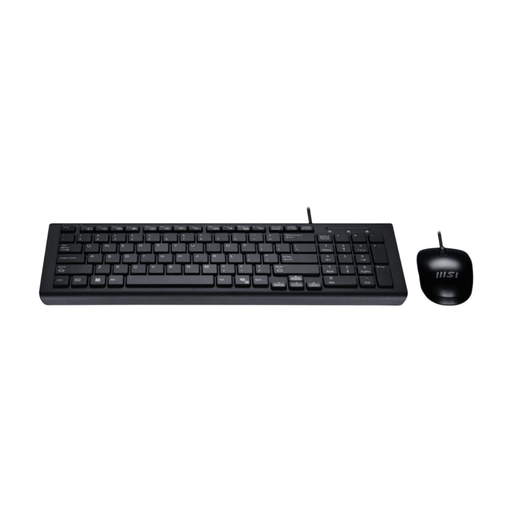 No image available
Consider separate input devices when your workstation setup calls for positioning the keyboard and mouse independently of the laptop screen.
The product name identifies a USB keyboard-and-mouse set in a UK layout.
No. In Great Britain, equipment identified as necessary by a DSE assessment cannot be charged to you. Agree how it will be provided before ordering; this does not establish automatic reimbursement for an upgrade you choose independently.
Northern Ireland has separate DSE regulations. The Health and Safety Executive for Northern Ireland identifies daily DSE use of an hour or more and requires workstation assessment; it also states that necessary health-and-safety equipment is provided free of charge. Follow the Northern Ireland process rather than treating Great Britain rules as UK-wide.
A trained worker can complete a self-assessment under HSE guidance, but a trained assessor should review the results, resolve doubtful points and ensure problems are addressed. A shopping checklist does not replace that process.
For prolonged laptop use, HSE setup guidance uses a separate keyboard and mouse so the screen can be elevated. Set their positions as part of the workstation assessment.
No universal capability is established: the exact laptop and dock determine the supported setup. Check the host’s documented display capability and any software requirements before choosing a dock.