
24/7 Customer Support

Free returns

Same-day & Next-day Delivery

Quality Guaranteed

Unlock Your Welcome Offers: FREE Delivery | Up to 80% OFF | Free 30-day JoyPlus trial
Download the APP
As a Joybuy Product Recommendation Officer, my role is to help you navigate the crowded market of tech accessories. A modern workspace, whether at home or in the office, often demands more than a single laptop screen. A dual 4K docking station promises to be the central hub of your productivity, connecting your laptop to two high-resolution monitors, peripherals and power with a single cable.
However, the path to a seamless dual-monitor setup is filled with potential missteps. Many products make bold claims that fall short in practice, leading to frustration and wasted money. Before you add anything to your basket, let's look at the common pitfalls to avoid.
To ensure you get a device that performs as expected, focus on these three non-negotiable parameters.
This is the most critical feature. To drive two 4K displays at a fluid 60 frames per second, the dock must have the necessary bandwidth and technology.
Your laptop, monitors and connected peripherals all draw power. A capable dock needs to manage this effectively.
A good dock is more than just a video adapter; it's the brain of your workstation.
We've filtered through the options to find docks that meet these strict criteria, matching them to different user needs across the UK.
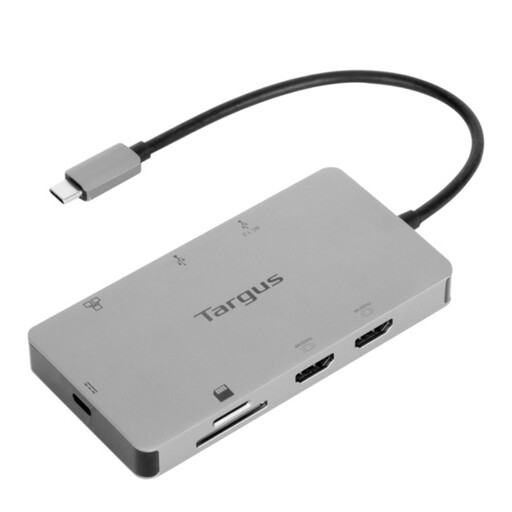
Why This Fits Their Persona: Ideal for the hybrid worker who splits time between home and the office. It's compact, reliable and provides all the essential ports to turn any desk into a full-featured workstation without carrying multiple adapters.
It explicitly supports dual 4K UHD displays at a smooth 60Hz via two HDMI 2.0 ports and offers a full 100W power delivery pass-through, avoiding the common 30Hz and underpowered PD pitfalls.
Features a Gigabit Ethernet port for stable internet and broad compatibility with Windows, macOS and Chrome OS. The plug-and-play setup requires no driver installation.
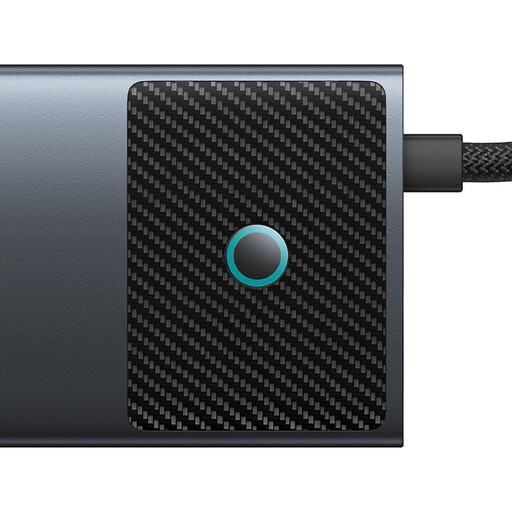
Why This Fits Their Persona: Built for video editors, designers and data analysts who demand high performance. It offers superior video output and high-speed data ports for transferring large files from cameras and external drives without bottlenecks.
This hub goes beyond the standard, offering dual HDMI outputs (one at 4K@120Hz, one at 4K@60Hz) and 10Gbps USB-A and USB-C data ports, ensuring no performance compromises for creative workflows.
Includes fast SD/TF card readers (104MB/s) and 100W PD charging. The metal casing aids heat dissipation during intensive tasks, and a physical button allows you to turn off the screens for privacy.
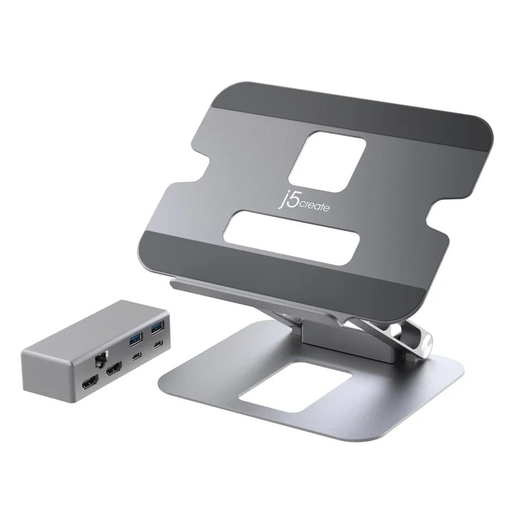
Why This Fits Their Persona: Perfect for those who value a clean, ergonomic desk setup. This device combines a multi-angle laptop stand with a full-featured docking station, reducing clutter and promoting better posture during long work sessions.
It delivers on the core promise of dual 4K@60Hz output, ensuring a high-quality visual experience. By integrating the stand and dock, it solves the compatibility and clutter problem in one elegant solution.
The multi-angle adjustment allows you to find the perfect screen height and typing angle. It supports up to 60W Power Delivery, suitable for many standard laptops and tablets.
We have compiled a complete, real-time list of products that fully satisfy these strict selection criteria and UK safety regulations.
Not necessarily for dual extended displays. Standard USB-C hubs that use DisplayPort MST technology can typically only mirror the displays on macOS. To drive two separate, extended 4K monitors from a MacBook, you generally need a dock that uses Thunderbolt technology. This applies to most Intel-based MacBooks and Apple Silicon models with Pro, Max or Ultra chips. Base M1, M2 or M3 MacBooks natively support only one external display. Always check the dock's compatibility notes for macOS.
It is normal for a high-performance docking station to become warm during use. The internal components are working hard to process 4K video signals, transfer data at high speeds and manage up to 100W of power. Models with aluminium or metal casings are designed to use the body as a heat sink to dissipate this warmth effectively. Ensure the dock has adequate ventilation and is not covered.
The docking station itself consumes a relatively small amount of power, typically between 5 and 15 watts. The main electricity usage comes from the laptop and the peripherals it is powering. Using a single, efficient Power Delivery charger through a dock is often more energy-efficient than using separate chargers for each device.