
24/7 Customer Support

Free returns

Same-day & Next-day Delivery

Quality Guaranteed

Unlock Your Welcome Offers: FREE Delivery | Up to 80% OFF | Free 30-day JoyPlus trial
Download the APP
For years, dedicated gamers have faced a difficult choice: invest in a high-resolution 4K monitor for breathtaking cinematic experiences or opt for a high-refresh-rate panel for the fluid motion needed in competitive esports. Many have resorted to complex and costly dual-monitor setups to get the best of both. Now, a new generation of displays is changing the game. The dual mode 4K gaming monitor offers a single, elegant solution, allowing you to switch between stunning 4K clarity and ultra-fast Full HD performance at the touch of a button.
This guide will walk you through the key features to consider when choosing a dual mode monitor. We will explore the latest panel technologies and connectivity standards to help you find a display that perfectly matches your gaming needs, whether you're exploring vast open worlds or climbing the ranks in an online arena.
Making the right choice comes down to understanding a few key technologies. Here are the essential factors to consider before you buy.
The core innovation of these displays is their ability to operate in two distinct modes. For graphically rich, story-driven games, you can run the monitor at its native 4K (3840x2160) resolution with a very high refresh rate, such as 160Hz or 240Hz. This delivers incredible detail and smooth gameplay.
When you switch to a fast-paced, competitive esports monitor mode, the display changes to Full HD (1920x1080) resolution but doubles the refresh rate to an incredible 320Hz or even 480Hz. This prioritises raw speed and the lowest possible input lag, giving you a crucial edge where every millisecond counts. It effectively gives you two specialised monitors in one.
The panel is the heart of any monitor, and in the premium dual mode space, two technologies dominate:
To unlock the full potential of a dual mode monitor, you need the right connections. An HDMI 2.1 monitor is essential for console gamers, as it’s the only standard that supports 4K gaming at 120Hz on the PlayStation 5 and Xbox Series X. For PC gamers, DisplayPort 1.4 is the minimum requirement, while newer models featuring DisplayPort 2.1 offer even more bandwidth for future graphics cards. Also, look for features like G-Sync Compatible or FreeSync Premium Pro certification to ensure tear-free, smooth gameplay.
Here are a few standout models that deliver on the promise of no-compromise gaming.
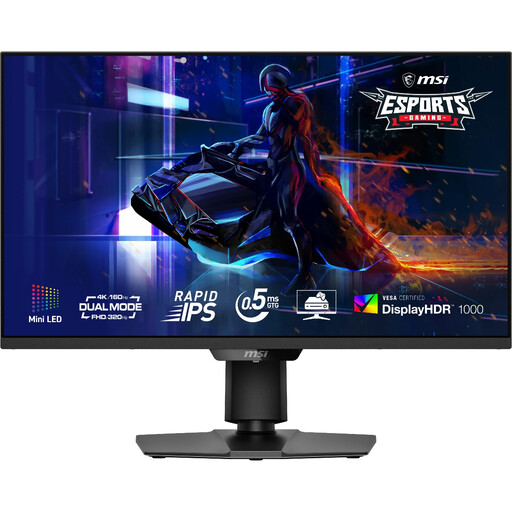
Why It Stands Out: The MSI MAG 274UPDF E16M leverages a powerful Mini-LED backlight with 1,152 local dimming zones. This allows it to achieve a DisplayHDR 1000 certification, producing incredibly bright and impactful HDR visuals. Its Rapid IPS panel ensures excellent colour reproduction and viewing angles, while the dual mode offers a great balance between high-fidelity and high-speed gaming.
Pros:
Who is it for?: Gamers who prioritise stunning HDR performance and brightness in a versatile 27-inch package, making it ideal for both cinematic adventures and competitive play.
View the MSI MAG 274UPDF E16M on Joybuy
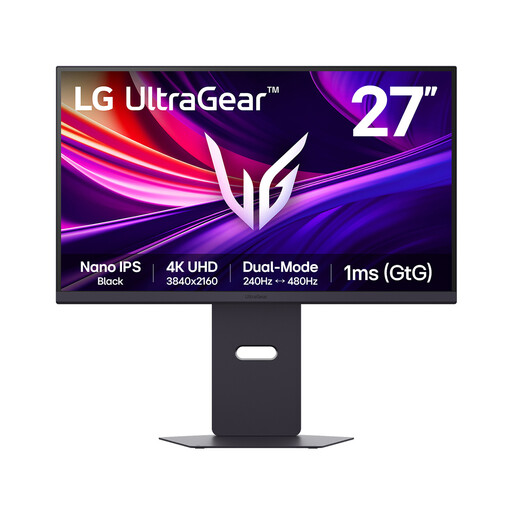
Why It Stands Out: This LG UltraGear model is built for speed. As a 4K 240Hz monitor, it already sits at the pinnacle of performance, but its dual mode pushes that to an astonishing 480Hz at FHD. The Nano IPS Black panel delivers a superior contrast ratio (2000:1) compared to standard IPS displays, offering deeper blacks and vibrant colours. The inclusion of DisplayPort 2.1 makes it a forward-thinking choice for PC enthusiasts with next-generation hardware.
Pros:
Who is it for?: Competitive gamers who demand the highest refresh rates possible without sacrificing the option for high-resolution immersion.
View the LG UltraGear 27G850A on Joybuy
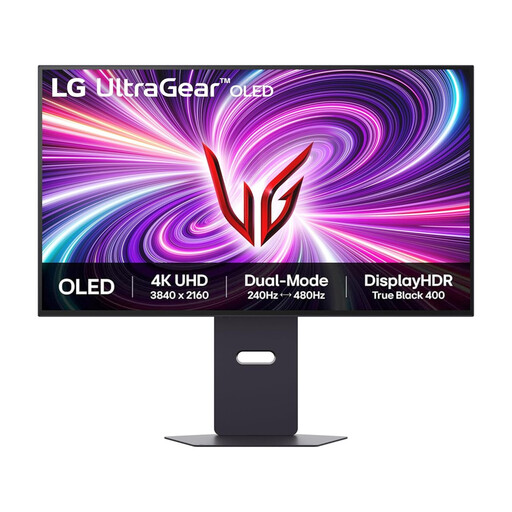
Why It Stands Out: For those seeking the ultimate visual experience, the 32-inch LG UltraGear OLED is a formidable option. The OLED gaming monitor panel provides per-pixel dimming for perfect blacks, infinite contrast and an almost instantaneous 0.03ms response time. This translates to unparalleled motion clarity and breathtaking image quality. Its dual mode capability, switching between 4K @ 240Hz and FHD @ 480Hz, ensures it is just as capable in a competitive shooter as it is in a cinematic RPG.
Pros:
Who is it for?: Gamers who want the absolute pinnacle of image quality and response time on a larger 32-inch screen, making no compromises between cinematic fidelity and esports performance.
View the LG UltraGear 32GS95UV-B on Joybuy
While dual mode monitors represent the cutting edge, they are a premium investment. If these models don't quite fit your needs or budget, there is a wide world of excellent displays to explore.
Discover a broader selection of displays, from entry-level to professional-grade, in our full collection.
Explore All 4K Ultra HD Computer Monitors on Joybuy
1. Is a dual mode monitor worth it? If you frequently switch between visually intensive single-player games and fast-paced competitive multiplayer titles, a dual mode monitor is an excellent investment. It consolidates the functions of two specialised monitors into a single, clutter-free display, offering both top-tier resolution and elite-level speed.
2. Do I need a powerful PC for a dual mode 4K gaming monitor? To take full advantage of the 4K high-refresh-rate mode, a high-end graphics card is recommended. However, the FHD high-refresh-rate mode is significantly less demanding on your hardware. For console players, the included HDMI 2.1 ports ensure you can get the best performance from a PlayStation 5 or Xbox Series X.
3. What is the difference between OLED and Mini LED for gaming?OLED panels provide perfect black levels and extremely fast pixel response times, which is ideal for motion clarity and high-contrast scenes. Mini LED panels can achieve much higher overall brightness, making for a very impactful HDR experience and they do not carry the risk of burn-in that can affect OLED screens over time. The choice depends on whether you prioritise perfect contrast (OLED) or peak brightness (Mini LED).