
24/7 Customer Support

Free returns

Same-day & Next-day Delivery

Quality Guaranteed
Download the APP
Categories
For years, serious gamers have faced a difficult choice: do you prioritise the breathtaking visual fidelity of a high-resolution 4K display, or the lightning-fast refresh rates needed for a competitive edge? Choosing one often meant compromising on the other. Now, a new wave of display technology is here to solve that problem. The dual mode gaming monitor allows you to switch between ultra-high resolution and extreme refresh rates on a single screen, offering a no-compromise solution for every type of game.
As a Joybuy Product Recommendation Officer, my role is to help you navigate these new technologies. This guide will break down what you need to know about dual mode monitors and present some of our top recommendations for 2026 to help you find the right display for your setup.
Making the right choice involves looking beyond the headline features. Here are three key factors to consider when selecting a display that can handle both immersive adventures and fast-paced esports.
The panel is the heart of any monitor, and the technology it uses defines its visual characteristics.
The core feature of a dual mode monitor is its ability to switch between two distinct performance profiles. You will commonly see combinations like:
Switching between these modes is typically handled with a single click in the monitor's on-screen menu.
To unlock the full potential of these displays, you need the right connections.
Here are a few standout models that exemplify the power and flexibility of dual mode technology.
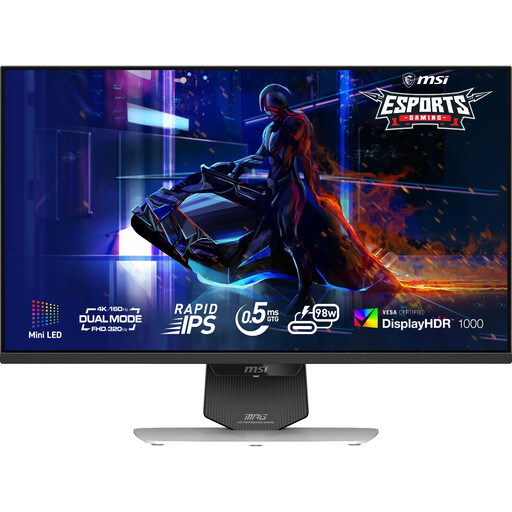
Why It Stands Out: The MSI MPG 274URDFW E16M combines a vibrant Mini-LED backlight with a flexible dual mode feature. Its 1,152-zone local dimming delivers impressive contrast and VESA DisplayHDR 1000 certified brightness, making 4K content truly pop. The ability to switch from 4K at 160Hz to FHD at 320Hz provides a great balance for both immersive and competitive gaming. The inclusion of a USB-C port with 98W Power Delivery also makes it a superb choice for a clean, single-cable laptop setup.
Pros:
Who is it for? Gamers and content creators who want the high brightness and contrast of Mini-LED technology combined with versatile dual-mode performance and excellent connectivity options.
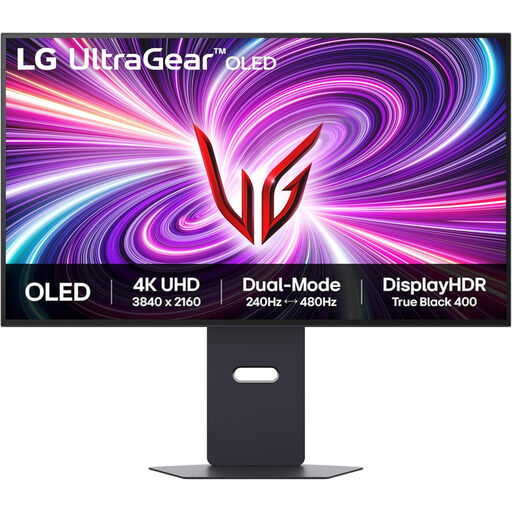
Why It Stands Out: This LG UltraGear model is built for those who demand the absolute pinnacle of speed and visual quality. As an OLED gaming monitor, it delivers perfect blacks and a near-instantaneous 0.03ms GtG response time. It pushes the boundaries of dual mode technology, offering a stunning 4K at 240Hz for unparalleled smoothness in high-fidelity games and an incredible FHD at 480Hz for elite-level competitive play. Support for both NVIDIA G-Sync Compatible and AMD FreeSync Premium Pro ensures a tear-free experience on any system.
Pros:
Who is it for? The hardcore competitive gaming monitor enthusiast and esports professional who needs the fastest response times and highest refresh rates possible, without sacrificing the superior image quality of OLED.
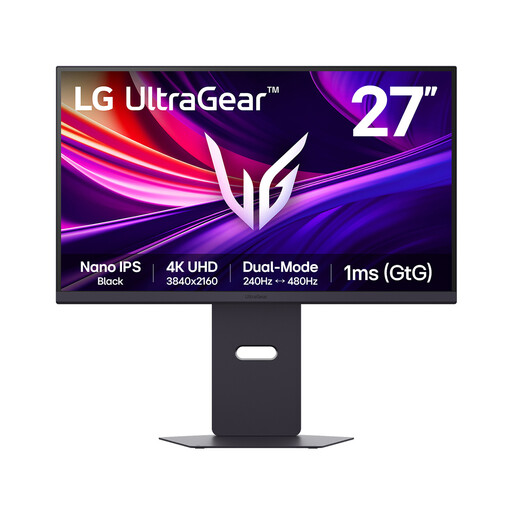
Why It Stands Out: The LG 27G850A brings elite-tier dual mode performance to a 27-inch form factor, which many find ideal for focused competitive gaming. It uses a Nano IPS Black panel, which offers a significantly higher contrast ratio (2000:1) than standard IPS panels, for deeper blacks and more vibrant colours. It matches its larger OLED sibling with a 4K 240Hz / FHD 480Hz dual mode capability and includes future-proof DisplayPort 2.1 connectivity, making it ready for the next generation of graphics cards.
Pros:
Who is it for? Gamers who prefer the 27-inch size for competitive play and want top-tier dual mode speeds, combined with the excellent colour accuracy and improved contrast of a Nano IPS Black panel.
The models highlighted here represent the cutting edge of dual mode technology, but the market is constantly evolving. If you're looking for different sizes, feature sets or price points, there are many other excellent displays to consider.
Explore our full range of UHD monitor gaming displays to find the perfect fit for your setup.
1. What exactly is a dual mode gaming monitor? A dual mode gaming monitor is a display that can operate in two different native resolution and refresh rate combinations. Users can typically switch with one click between a high-resolution mode (like 4K) for immersive visuals and a lower-resolution, high-refresh-rate mode (like 1080p) for maximum fluidity in competitive games.
2. Is a dual mode monitor worth it for console gaming on a PS5 or Xbox Series X? Yes, but with a caveat. The high-resolution 4K mode at 120Hz (or higher) is perfectly suited for next-gen consoles via an HDMI 2.1 connection, providing a smooth and detailed experience. However, the ultra-high refresh rate FHD modes (like 320Hz or 480Hz) are primarily beneficial for high-end PC gaming, as consoles do not currently support such high frame rates.
3. How do I switch between modes on a dual mode monitor? Switching is designed to be simple. On most models, it is a straightforward option within the monitor's on-screen display (OSD) menu, often accessible via a joystick or button on the monitor itself. Some may even offer a dedicated hotkey for instant switching.