Who each layout suits

Side-by-side text comparers

If you move repeatedly between the source and translation, two screens at comparable heights let you keep both pages in view. Independently adjustable arms are worth considering when each display needs its own angle, provided the screens fit beside one another on your desk.

Portrait-source reviewers

A portrait display can give a long source page more vertical space. If desk width is the tighter constraint, a stacked mount is another arrangement to consider, though its upper screen will not share the lower screen’s sightline. Check rotation and clearance with your actual monitors.

Fixed-position desk users

If two lighter displays will usually stay in one position, a pole mount may provide the adjustment you need without long-reach arms. Duronic specifies its DM252 for two 13–27 inch VESA-compatible screens weighing up to 8 kg each; those limits apply to that model, not every pole mount.

What to check before choosing

Decide how you will read the two documents, then check the monitors and desk against the exact mount. A screen’s diagonal alone will not tell you whether both displays can fit in the intended positions.

Concern What to check Who this matters to
Side-by-side positioning Check independent adjustment and whether the screens’ actual widths fit at a usable distance on your desk. When I compare the translation against the source line by line, I want both pages visible without repeatedly moving a screen. Around 36% of consumers put this parallel-viewing need first.
Portrait or stacked reading Check rotation and clearance for a portrait screen, or pole height and per-screen load for a stack. If the source runs over long pages, I want room to read it in portrait; with a narrow desk, I may instead need the screens stacked. Around 29% of consumers prioritise this reading arrangement.
Monitor and desk fit Match each screen’s mounting pattern and weight without its stand to the mount; check the desk edge or grommet against its fitting instructions. Before planning screen positions, I need to know that both displays can attach and the mount can be fixed to my desk. Around 21% of consumers make compatibility their primary concern.
A settled two-screen position Compare the model’s size and per-screen load limits, then check whether its available adjustment suits your usual working height. My two documents stay on the same desk, so I mainly need a stable arrangement rather than frequent reach and height changes. Around 14% of consumers put this simpler setup first.

Common buying mistakes

  • Checking screen size but not mounting and load limits

    A monitor can fall within an arm’s stated diagonal limit yet exceed its per-screen weight limit or lack a compatible rear mounting pattern.

    Check both monitor models, their weights without stands and their mounting-hole patterns against the exact arm. Account for attached accessories where the manufacturer’s load instructions require it.

  • Assuming the supplied clamp fits any desk

    Clamp and grommet requirements differ by mount. Desk thickness, an obstructed underside or the shape of the edge can prevent installation at the position you planned.

    Measure the proposed fixing point and compare it with the chosen model’s installation instructions, including any required underside clearance.

    If that position does not accept the fixing, you may need a different mounting method or a suitable position elsewhere on the desk.

  • Stacking screens needed for continuous side-by-side comparison

    A vertical stack can reduce horizontal spread, but looking between its upper and lower screens is different from scanning two pages at a similar height.

    If you compare both full pages repeatedly, plan their side-by-side clearance first. Consider portrait rotation or stacking when the longer source page or limited desk width drives the layout.

  • Treating the arm as the whole workstation setup

    Screen placement is only part of working comfortably with two displays. The Health and Safety Executive’s display screen equipment guidance also addresses posture and viewing distance; an arm alone does not settle lighting, chair or keyboard position.

    Once the screens are mounted, position them for the task and check the rest of the desk for comfortable viewing and use.

Relevant brands to consider

Ergotron

Ergotron’s LX dual-monitor configurations include side-by-side and stacked arrangements.

  • Ergotron positions the LX Dual Side-by-Side Arm for side-by-side or low-angle viewing and specifies screens up to 27 inches for that model.
  • Check the size, load and attachment details of the exact LX configuration; a specification for one arrangement does not cover the whole range.

StarTech.com

StarTech.com offers distinct articulated side-by-side and vertical dual-monitor mounts.

  • StarTech.com specifies two VESA 75×75 or 100×100 displays up to 32 inches and 8 kg each for its ARMDUAL2, with clamp or grommet mounting.
  • Its vertical ARMDUALV has different display and load limits. Choose by the intended orientation and the specifications of the particular model.

Duronic

Duronic’s DM252 is a pole-mount option for a two-screen desk that needs a mostly settled position.

  • Duronic specifies two 13–27 inch screens, up to 8 kg each, with VESA 75 or 100 mounting for the DM252.
  • Its stated screen-size range does not establish suitability for larger displays or for a setup requiring long-reach repositioning.

Fellowes

Fellowes’ Tallo range includes dynamically adjustable monitor-arm configurations.

  • Fellowes lists 32 cm of dynamic height movement and clamp, grommet or top-mount options across the Tallo range.
  • Single, dual, compact and pole versions need checking separately for their screen loads and desk fixings.

Humanscale

Humanscale’s M8.1 range includes a crossbar configuration for two-monitor workstations.

  • Humanscale lists an M8.1 crossbar configuration accommodating two monitors up to 13 kg.
  • Confirm the load and fixing for the exact configuration; that crossbar figure does not establish the capacity of every M8 arrangement.

Two-monitor stands on Joybuy

These desk stands are options for keeping a source and translation on two displays. Check their fit and adjustment for your screens rather than assuming a stand offers the same placement as independently articulated or stacked arms.

DELL Pro Dual Monitor Stand MDS19

DELL Pro Dual Monitor Stand MDS19

For a source-and-translation desk using two monitors, check each screen’s mounting pattern and weight against this stand before choosing it. Confirm the lift range and the space your particular screens need for the intended layout.

Joybuy
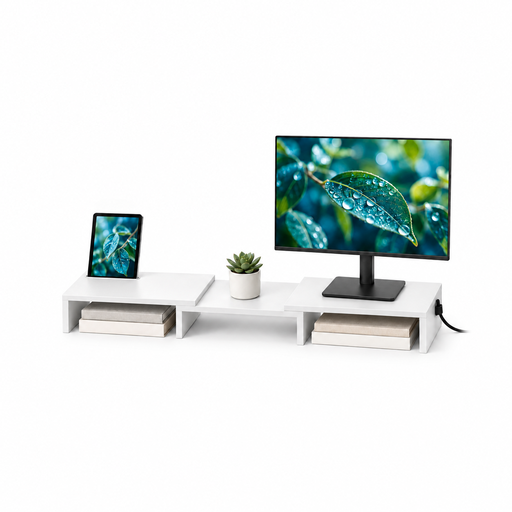
Floordirekt adjustable two-monitor MDF stand, white, 80–108 cm

Floordirekt adjustable two-monitor MDF stand, white, 80–108 cm

This two-monitor stand is worth considering if adjustable width and angle suit the way you place your documents. Its stated 80–108 cm width and white MDF variant distinguish this model; check screen load, the usable adjustment and desk space for your intended arrangement.

Joybuy

Frequently asked questions

Do both monitors need VESA mounting points for a dual arm?

For a dual arm that specifies VESA mounting, each screen needs a compatible mounting interface or a suitable adapter. Compare both rear mounting-hole patterns with the exact arm specification; do not assume an adapter is included or will fit.

Should the source document be on a portrait screen?

Portrait can suit a long source page, while two landscape screens may suit continuous comparison of full pages side by side. Check that a rotated screen clears the desk, the neighbouring display and the mount before settling on portrait.

Can a dual-monitor arm clamp to any desk?

No; the desk must suit the chosen arm’s fixing instructions. Check thickness, edge construction and underside clearance at the intended position, or the requirements for a grommet fixing if that is the method you plan to use.

Is a monitor arm required at a UK work workstation?

The Health and Safety (Display Screen Equipment) Regulations 1992 do not prescribe a monitor arm as the product to buy. For workstations covered by those regulations, the Schedule requires the screen to swivel and tilt easily and freely to suit the user and says a separate base or adjustable table must be possible. An arm may help with adjustment, but its presence alone does not settle the workstation requirements.

Where should I position the two screens after installation?

Start with the screen you use most directly in front of you, then position the other for the comparisons you make. The Health and Safety Executive advises placing the screen top around eye level and the display about an arm’s length away; adjust the arrangement to your vision and task rather than treating those positions as fixed measurements.