What to check before buying
Start with the laptop, then match the monitor plan, desk peripherals and charging requirement to a suitable connection route.
| Priority |
What to check |
Your needs |
| Laptop video capability |
Check the exact model’s supported external-display count, available outputs, and USB-C support for DisplayPort Alt Mode or Thunderbolt. Match the monitor input to a genuine laptop video output. |
I need one or two external monitors to work as planned, rather than assuming that every USB-C socket carries video. |
| DisplayLink route |
Check the dock or adapter’s stated operating-system support, driver requirement, monitor count, resolution and refresh-rate limits. Confirm whether the host connection can be USB-A or must be USB-C. |
My laptop has limited native display outputs, so I need a software-based route that supports my operating system and intended screen arrangement. |
| Desk connections and charging |
Compare video outputs alongside USB ports, Ethernet, card readers and audio. Check Power Delivery pass-through or delivered wattage, plus whether a charger and cable are supplied. |
I want fewer separate desk connections without losing access to peripherals or the charging power my laptop needs. |
| Operating-system limits |
Check the exact product’s Windows, macOS or ChromeOS support. For DisplayLink, review driver guidance and any limitations for protected video playback on the relevant platform. |
I use the same desk for work and streaming, so display expansion must not create an avoidable software or playback problem. |
Joybuy product options
Joybuy product options for a home laptop desk using a USB-C or Thunderbolt-compatible dock or hub. Confirm your laptop’s video capability, monitor plan and charging requirements before choosing.
 No image available
Targus USB-C Universal Dual HDMI 4K Docking Station
For a fixed two-monitor desk where the laptop has verified USB-C video capability.
States two HDMI 2.0 outputs for dual 4K UHD at 60Hz, Gigabit Ethernet, USB-A ports, card readers and 100W Power Delivery pass-through. The pass-through arrangement uses an external 100W+ adapter; check charger inclusion, cable requirements and laptop charging wattage.
Joybuy
 No image available
USB-C Dual HDMI and DisplayPort Dock
For a desk needing several display and peripheral connections from a compatible USB-C laptop.
States dual HDMI, DisplayPort, USB-A, USB-C, Ethernet, card-reader, audio and PD ports. Check the supported display modes, resolution, refresh rate, host USB-C video function and charging conditions for the intended laptop.
Joybuy
 No image available
Mokin USB-C to Thunderbolt Hub with HDMI 4K 60Hz
For a compact desk expansion with one external monitor and common peripheral ports.
States one HDMI output at 4K 60Hz, USB-A and USB-C ports, and SD/TF card readers. Only one HDMI output is stated, so it is not the appropriate choice for two monitors from this hub.
Joybuy
 No image available
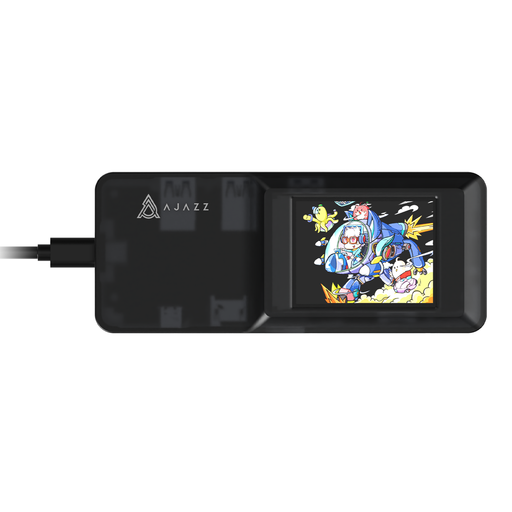
AJAZZ AKP01E 8-in-1 USB-C Hub
For a compact one-monitor desk with USB peripherals, Ethernet, card readers and Power Delivery input.
States one HDMI output up to 3840 × 2160, USB 3.0 ports, Ethernet, TF/SD card slots and 100W PD input. One HDMI output is listed, so it does not provide a two-monitor setup from one hub.
Joybuy
Frequently asked questions
How do I verify whether my laptop can run two external monitors?
Identify the exact laptop model and consult its official manual, technical specification or support page. Check the maximum external-display count, supported resolution and refresh rate, physical outputs, and whether USB-C supports DisplayPort Alt Mode or Thunderbolt. A USB-C socket alone does not prove video output.
Can a USB-A port connect an extra monitor?
A standard USB-A port does not provide native HDMI or DisplayPort output by itself. A USB-A DisplayLink dock or adapter can add display capability through software-based graphics transport when the exact product supports your operating system, intended display arrangement and required driver.
Will a USB-C dock work with every USB-C laptop?
No. Native video output requires the laptop to support the necessary USB-C video function, such as DisplayPort Alt Mode or Thunderbolt. The dock’s display outputs and stated resolution must also be compatible with the laptop, operating system and monitor combination.
Can a DisplayLink dock affect streaming video?
It can on macOS. DisplayLink Support states that some protected content may not play while DisplayLink screens are connected, with video potentially remaining black while audio continues. Check this limitation if the workspace will also be used for protected streaming services.
Are UK home-working workstation rules relevant to a monitor setup?
For employees who work at home permanently, long term, or routinely split time between home and workplace, the Health and Safety Executive says the Display Screen Equipment Regulations can apply. This concerns employment arrangements and workstation assessment; it is not a universal rule for private non-work use.


