For accounts on one screen and invoices on the other, choose a dual stand only after checking each monitor’s mounting pattern and weight against the stand, and the mount against your desk. A fixed-pole stand can suit a largely unchanged side-by-side layout; an articulated arm makes more sense if you regularly reposition either screen, while a freestanding base is worth considering when a desk clamp is unsuitable. Each option still needs enough clearance to place both screens comfortably and leave room for paperwork.
Who needs which setup?
Accounts workers with two fixed office monitors
If accounting software and invoices stay open side by side for most of the day, prioritise a stable arrangement that keeps both displays aligned without taking up more desk space than necessary. Frequent arm movement may matter less than getting the initial position right.
People who adjust or share their workstation
If you change posture, show a screen to a colleague or turn one display to portrait for long documents, look at how independently each monitor can move. Check the adjustment range of the particular dual-arm configuration, not just the product range.
People with an awkward desk or unusual monitors
A heavy, large or non-VESA monitor, or a desk without a usable clamp edge, makes compatibility the first decision. Check both displays and the available mounting methods before choosing between a clamped, grommet-mounted or freestanding design.
What to check before choosing
For side-by-side accounts and invoice work, establish monitor and desk compatibility before deciding how much independent movement you need. A freestanding base avoids a desk clamp but takes up surface space; an articulated arm needs clearance to move.
| Concern |
Buying checks |
Who this matters to |
| Comfortable screen alignment |
Check the available height and angle adjustments, and whether both screens can sit close together at a suitable viewing distance. |
If I spend the day moving between accounts and invoices, I want both screens positioned without repeatedly turning my neck. Around 31% of consumers put comfortable alignment first. |
| Monitor compatibility |
Compare each display’s VESA hole pattern and weight without its original stand with the mount’s per-screen limits, including any minimum weight. |
My two monitors may not weigh the same or have the same mounting holes, so I need to know that each one fits. For around 31% of consumers, monitor compatibility is the primary concern. |
| Desk fit and paperwork space |
Measure the usable desk edge and check for obstructions beneath it; for a freestanding stand, check the base footprint. |
I need space for invoices and notes, but a clamp may not fit my desk. Keeping a usable work surface is the first concern for around 23% of consumers. |
| Movement or heavier displays |
Check independent movement, clearance around the arms and the full supported weight range for each monitor. |
If I regularly share a screen or move a larger display, I need an arm that accommodates that particular monitor and the way I reposition it. Around 15% of consumers prioritise this flexibility. |
Common buying mistakes
-
Choosing by screen size alone
A matching screen diagonal does not establish that the mounting holes or weight will fit the arm. Ergotron identifies VESA hole pattern and monitor weight as key mounting checks.
Check the mounting pattern and weight without the original stand for each monitor, then compare them with the exact mount’s per-screen specifications.
-
Overlooking a minimum monitor weight
Some adjustable arms specify a lower as well as an upper weight limit. Ergotron lists 4.5–15.9 kg per display for its HX Desk Dual Monitor Arm, so that model may not suit a lighter office monitor.
Check both ends of the stated range for each display before choosing a spring-assisted or heavy-duty arm.
-
Assuming a clamp fits any desk
Desk-thickness limits vary, and a drawer or support beneath the edge can obstruct fitting. Duronic specifies a 10–88 mm clamp range for the DM252, while Ergotron specifies 1–6.6 cm for the HX Desk Dual Monitor Arm.
Measure an unobstructed mounting position. If a clamp will not suit the desk, consider a compatible grommet mount or a freestanding base.
-
Expecting the stand to set up the whole workstation
Raising two monitors does not by itself determine their viewing distance or where the keyboard sits. The Health and Safety Executive advises placing the top of a screen around eye level and the screen about an arm’s length away.
Position the displays and keyboard after installation, paying particular attention to whichever screen you use most.
Relevant dual-monitor stand brands
Duronic
Duronic offers fixed-pole, clamp-mounted and freestanding designs for different desk layouts.
- Duronic specifies two 13–27 inch displays up to 8 kg each and VESA 75/100 mounting for its DM252 clamp-mounted stand.
- Those limits apply to the DM252, not every Duronic stand. Its stated clamp range is 10–88 mm, so desk-edge fit needs checking.
Fellowes
The Fellowes Tallo range is relevant when regular screen-height changes or alternative mounting methods matter.
- Fellowes states a 1–9 kg screen-weight range, displays up to 40 inches and 32 cm of dynamic height movement for the Tallo range.
- Clamp, grommet and top-mount options depend on the configuration. Confirm that the chosen dual version provides the movement and mounting method you need.
Ergotron
The HX Desk Dual Monitor Arm is an articulated option to assess for two larger or heavier displays.
- Ergotron specifies two displays up to 32 inches, each weighing 4.5–15.9 kg, with VESA 75/100 mounting for the HX Desk Dual Monitor Arm.
- Its 4.5 kg minimum per display can rule out lighter monitors, and its stated desk-clamp thickness range is 1–6.6 cm.
Joybuy options for two-screen work
These two-monitor stands are options to assess for keeping accounts and invoices visible together. Compare their stated adjustments and dimensions with your monitors and desk before choosing either one.
 Image unavailable
DELL Pro Dual Monitor Stand MDS19
For two accounts-and-invoices screens that need individual angle adjustments. The product description states support for two 19–27 inch monitors up to 6 kg each, VESA compatibility up to 100 × 100 mm, and tilt, swivel and pivot adjustment.
Confirm each monitor’s hole pattern and the stand’s attachment method and footprint. Check the actual height-adjustment range before relying on it for your intended screen position.
View on Joybuy
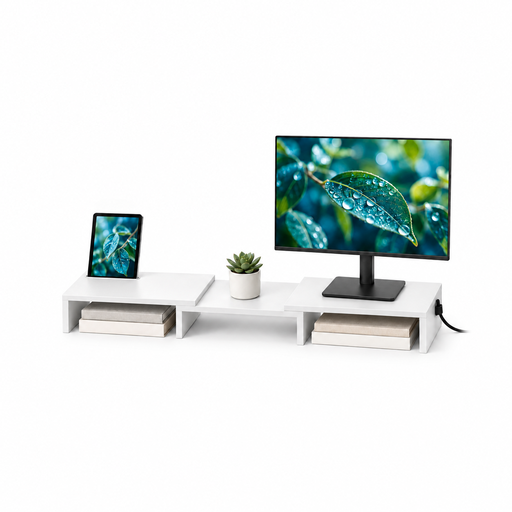 Image unavailable
Floordirekt Two-Monitor Stand, White MDF, 80–108 cm
For placing two displays together in an accounts-and-invoices workspace. The product name specifies adjustable width and angle, an 80–108 cm width range, MDF construction and the white variant.
Check the usable dimensions against your desk and paperwork space, and confirm how your particular monitors are supported before ordering.
View on Joybuy
Questions about dual-monitor stands
Do both monitors need VESA 75 or VESA 100 mounting?
Each monitor’s mounting holes must match the stand or a separately suitable mounting solution. Ergotron identifies 75 × 75 mm and 100 × 100 mm as common VESA patterns for computer monitors, but check the hole spacing on both of your screens rather than assuming it from their size.
How should I position two screens for accounts and invoice work?
Position the screens so you can view your work without sustained twisting, with the screen you use most aligned with your main working position. The Health and Safety Executive advises keeping the top of a screen around eye level and placing it about an arm’s length away; adjust the final layout to the screens and work in front of you.
Will a clamp-mounted dual stand fit my desk?
It will fit only if the chosen clamp suits an unobstructed part of your desk edge. Duronic specifies 10–88 mm desk thickness for its DM252, while Ergotron specifies 1–6.6 cm for its HX Desk Dual Monitor Arm; measure the intended mounting point and check for drawers or supports beneath it.
Should warranty length decide which monitor arm to buy?
Treat warranty length as one consideration after checking monitor capacity, movement and desk fit. Fellowes states a 15-year limited warranty for its Tallo range, while Ergotron lists a 10-year warranty for the HX Desk Dual Monitor Arm; check the terms for the exact product you are considering.


