What matters when choosing
Decide how often the two screens need to move independently, then check whether the chosen format fits both monitors and the study desk. The concerns below distinguish consumers by the need they would put first.
| Concern |
What to check |
Who this matters to |
| Independent positioning |
Check whether each screen can be tilted, raised or rotated separately, and whether the available reach fits the desk. |
When notes need a different angle from the presentation, I want to move one screen without shifting the other. Around 33% of consumers put that flexibility first. |
| Monitor and desk fit |
For an arm, compare each monitor’s weight without its original stand and VESA pattern with its individual load range; check that the supplied mount fits the desk. For a stand that supports screens on a surface, check its stated load and dimensions instead. |
If my desk edge is obstructed or my monitors differ in weight, I need to establish how the setup will fit before choosing a format. Roughly 27% of consumers make compatibility their primary concern. |
| Desk space and cables |
Check the stand’s footprint or an arm’s folded position, the side-by-side width and cable slack through the intended movement range. |
I need room for written notes without placing the screens too close or leaving cables in the way. Preserving usable desk space comes first for around 20% of consumers. |
| Large-screen support |
Check each display against its support’s individual load limit and confirm that both screens fit at the intended viewing distance. |
With larger or heavier monitors, I need support that fits each display, not just a promising screen-size label. Around 20% of consumers prioritise that capacity. |
Joybuy product choices
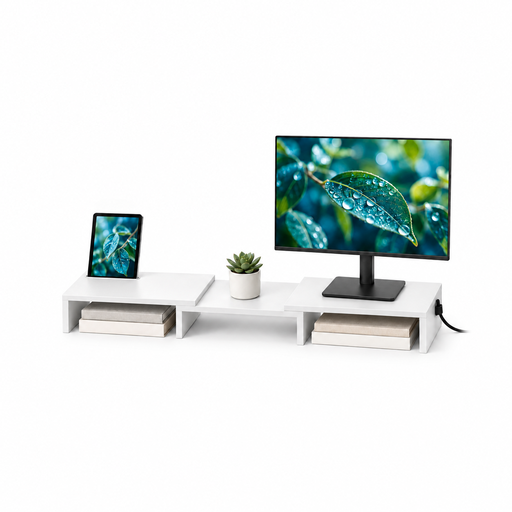
This two-monitor stand has an adjustable width and angle, making it relevant to a side-by-side presentation-and-notes layout. Check how its stated support and dimensions fit your screens before choosing it in place of independently adjustable arms.
 No image available
Floordirekt Two-Monitor Stand, 80–108 cm, White
For a presentation and notes displayed side by side, this stand offers adjustable width and angle. Its stated material is MDF; check the stand’s load limit, screen fit and available adjustment against your two monitors and desk.
View on Joybuy
Common questions
Which screen should sit directly in front of me?
Place the screen you use most continuously directly ahead where practical, with the notes screen beside it. The Health and Safety Executive advises positioning the main screen with its top around eye level and the display about an arm’s length away.
What should I measure before buying a dual monitor arm?
Record each monitor’s weight without its original stand, VESA pattern, screen size and any unusual depth. Compare both displays separately with the exact arm’s load range and mounting specifications, then check its reach and desk-mount requirements.
What if my desk has no accessible rear edge?
A through-desk mounting option may work if the desk has a suitable hole and the exact arm supports that installation. Invision describes through-desk mounting for its cited MX400 and MX900 models, while Fellowes lists grommet options within the Tallo range; check the hardware supplied with the variant you choose.
What should I check when changing a monitor on a gas-spring arm?
Check the replacement monitor’s weight and mounting pattern against that arm before attaching it. Adjust tension according to the arm’s instructions for the attached display, and make sure the cables retain enough slack throughout its movement.


