Side-by-side translation reviewers
If you compare a source and translation throughout a review, you need both documents close enough to read without repeatedly rearranging the screens.


For continuous comparison of a source document and its translation, choose a stand that can place both screens side by side at readable heights and distances. A crossbar helps similar screens stay aligned, while independently adjustable arms give unequal or differently oriented screens more placement options. Either choice still has to fit both monitors and the desk.
If you compare a source and translation throughout a review, you need both documents close enough to read without repeatedly rearranging the screens.
If your monitors differ in size, weight or orientation, you may need to position each screen separately rather than keep them as a matched pair.
If the desk height or person using it changes regularly, adjustable screen positioning matters. Check the capacity of the exact arm configuration you intend to use.
Choose it when: Two similarly sized screens should remain level as you move the pair.
Trade-off: A shared bar offers less freedom to give each screen a different position.
Choose them when: One document screen needs a different angle, height or orientation.
Trade-off: Bringing two separately moving screens back into alignment can take more adjustment.
| Concern | What to check | Who this matters to |
|---|---|---|
| Readable alignment | Check the usable side-by-side positions and your monitors’ outer widths, not just their diagonal sizes. | When I compare both documents continuously, I want them close together without repeatedly resetting their positions. Around 36% of consumers put readable alignment first. |
| Monitor compatibility | Compare each screen’s weight without its stand, VESA pattern, size and depth with the exact mount’s limits. | If either of my screens falls outside the mount’s limits, the layout I prefer will not solve the fitting problem. For around 29% of consumers, compatibility is the primary concern. |
| Separate positioning | Check the specified height, tilt, swivel and rotation adjustments with both screens installed. | I may keep the source document in portrait orientation while viewing the translation differently. Independent positioning comes first for around 21% of consumers. |
| Desk fit | Measure the usable desk edge or grommet position and clearance around the mount. | A frame, cable tray or nearby wall may limit where I can attach and move the screens. Around 14% of consumers prioritise fitting the mount into their desk setup. |
Two monitors can meet a diagonal-size limit but still be too wide, deep or heavy for the intended arrangement. Ergotron states that monitor depth above 8.9 cm may reduce capacity for its LX Dual Side-by-Side Arm.
Check each screen’s weight without its stand, VESA pattern, outer width and depth against the exact configuration.
A bar can keep similar screens aligned, but it gives less independent placement for a portrait source screen or unequal viewing angles.
Choose separately adjustable arms if the documents require different screen heights, angles or orientations.
A desk frame, cable tray or inaccessible underside can obstruct installation or arm movement. Clamp and grommet fittings have different requirements.
Measure the usable edge and clearance below it; for a grommet mount, check the required hole location and dimensions.
Screen placement is only part of a workable setup. The Health and Safety Executive also advises attention to viewing distance, seating, keyboard position and avoiding awkward posture.
Set up the screens, chair, keyboard and mouse together, then reassess their positions if reaching or twisting remains awkward.
Its LX Dual Side-by-Side Arm is specified for side-by-side or low-angle dual-screen placement.
Its M8 Pro range includes a dual-screen configuration for traditional and sit-stand desks.
Its dual-arm models include separate-arm and crossbar layouts for different screen arrangements.
Its DMT252 is a tall-pole desk mount for two conventional office screens.
These two-screen stands offer different ways to arrange a source document and translation on a desk. Check the fitting and positioning details of either stand against your own monitors before choosing.
 No image available
A stand to consider when reviewing a source and translation on two monitors. Check how each screen attaches and whether the available positions suit their sizes and your desk.
 No image available
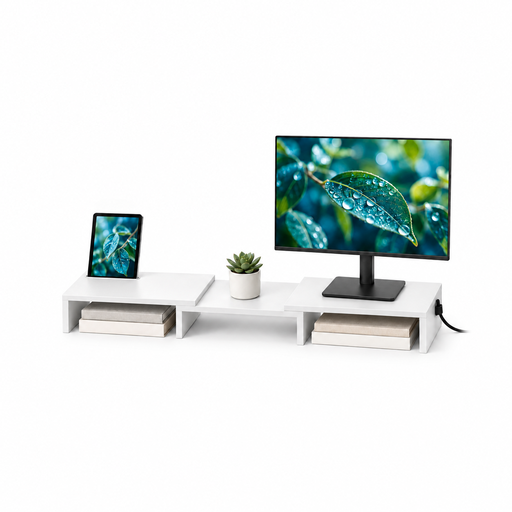
A two-monitor option if adjustable width and angle would help arrange your documents. The title specifies MDF construction and an 80–108 cm width range; confirm what that measurement covers and how your monitors would sit on the stand.
Measure each monitor’s weight without its original stand, VESA pattern, diagonal size, outer width and depth. Check the usable desk edge or grommet position, desk thickness, clearance below and distance to a wall against the exact mount’s requirements.
No single dual-screen geometry suits everyone; start with comparable readable heights and distances, then adjust for the documents and your posture. The Health and Safety Executive’s general screen guidance places the top of a screen around eye level and the screen about an arm’s length away.
Choose a crossbar if similar screens should move together and stay aligned; consider independent arms if their sizes, angles or orientations differ. In either case, compare both monitors with the exact model’s weight, VESA and size limits.
It can if the selected mount and desk are compatible and the screens remain within the configured arm’s limits. Humanscale states that its M8 Pro works with traditional and sit-stand desks, but its optional dual-monitor crossbar has a stated limit of 12 lb per screen; also check desk stability and cable clearance as the height changes.