Choose independently adjustable side-by-side arms if the source and translation need to remain adjacent and colleagues must reposition each screen; consider a compact crossbar or pole mount if keeping the screens aligned on a shallow desk matters more. Before ordering, check each display’s weight and VESA pattern against the exact mount, then confirm that the mount fits the desk. In a UK workplace, a monitor arm does not replace the whole-workstation assessment required for qualifying display screen equipment users, according to the Health and Safety Executive.
Who is this setup for?
Side-by-side translation reviewers
If you compare terminology and revisions against a source document, keeping both documents visible is the starting point. Separately positioned screens let you set different heights or angles where the chosen mount permits it, as Ergotron describes for its LX Dual Stacking Arm.
People sharing an office desk
When colleagues take turns at the same workstation, screen positions may need resetting for each person. The Health and Safety Executive also advises workers who change desks regularly to carry out a basic risk assessment; screen adjustment is only one part of setting up the workstation.
Teams using compact desks
A shallow desk or nearby partition can limit where two screens fit. Kensington describes a dual arm intended for shallow desks and a separate vertical model, but either layout still needs to suit the displays and the way the documents will be compared.
What matters when choosing a stand?
Decide whether the source and translation must stay side by side, then choose a layout that fits the desk and allows the shared workstation to be reset between users.
Independent side-by-side arms
Choose when: Each document needs to stay visible and the screens need separate positioning, as the Ergotron LX Dual Stacking Arm allows.
Allow for: Check the movement and clearance available behind and beside the desk.
Compact crossbar or pole mount
Choose when: Two screens should remain closely aligned and the desk has limited depth.
Allow for: A fixed crossbar may give you less freedom to place each screen separately.
Vertical stacked mount
Choose when: Desk width is the constraint and a top-and-bottom document layout suits the work; Kensington offers a mount for this arrangement.
Allow for: Repeatedly comparing lines across two vertically separated screens may be less convenient than a side-by-side view. Check the model’s limits for each screen orientation.
| Concern |
What to check |
Who this matters to |
| Side-by-side comparison |
Check that both displays can sit close together in the intended orientation and within the mount’s reach. |
If I am checking wording against the source throughout a review, I need both documents in view without repeatedly rearranging screens. Around 36% of consumers put this comparison layout first. |
| Shared-desk adjustment |
Check each screen’s adjustment range and whether colleagues can reset its position without tools. |
When someone else uses the desk after me, I want to move the screens to my viewing position without rebuilding the setup. For around 29% of consumers, easy adjustment is the primary need. |
| Desk space |
Measure usable desk depth and rear clearance; check whether the chosen layout leaves room for the documents and other work. |
On a shallow desk, I need room to work while keeping two displays usable. Saving desk space comes first for around 21% of consumers. |
| Display and desk fit |
Compare each monitor’s weight and VESA pattern with the exact mount; check its clamp or grommet requirements against the desk. |
If my monitors or desk might not suit a mount, I need to establish that it can be installed before choosing its layout. Around 14% of consumers prioritise this fit above the other concerns. |
Buying pitfalls
-
Buying by screen size alone
A screen’s diagonal size does not tell you its weight or mounting-hole pattern. Capacity also varies by model: StarTech.com specifies 8 kg per arm for its ARMDUAL2, while Fellowes gives a 1–9 kg screen range for the cited Tallo range.
Check each monitor’s weight and VESA pattern against the minimum and maximum limits of the exact stand variant.
-
Assuming a clamp fits any desk
A drawer, cable tray or unsuitable mounting area can obstruct a desk clamp even when there appears to be space on top.
Measure desk thickness and inspect the underside at the intended position. Use a grommet installation only if both the desk and the mount’s instructions permit it.
-
Choosing vertical stacking only to save width
A top-and-bottom arrangement changes how you switch between the source and translation. Kensington’s vertical model also has screen-size limits that depend on orientation.
Try the intended document layout before committing to stacking; start with a side-by-side arrangement if continuous horizontal comparison matters more.
-
Treating screen adjustment as a complete workstation setup
Chair position, desk arrangement, lighting and glare still matter at a shared workstation. The Health and Safety Executive requires a workstation assessment for workers who use display screen equipment daily as part of normal work for continuous periods of an hour or more.
After installation, follow the employer’s assessment process and adjust the whole workstation for the person using it.
Relevant brands to consider
Ergotron
Offers dual-arm configurations relevant when the source and translation need separate screen positions.
- Ergotron specifies independent screen positioning and a 1.8–10 kg capacity per display for its UK LX Dual Stacking Arm configuration.
- Check the capacity and height conditions for the exact configuration rather than applying those figures to every Ergotron mount.
Fellowes
Its Tallo range includes dual formats and several desk-mounting options for office workstations.
- Fellowes states that the cited Tallo range accommodates screens weighing 1–9 kg and measuring up to 40 inches.
- Confirm the exact dual variant’s screen limits, VESA plates and mounting method before specifying it for a shared desk.
StarTech.com
Publishes model-specific mounting details useful when display and desk compatibility drive the decision.
- StarTech.com specifies two displays up to 32 inches and 8 kg per arm for its ARMDUAL2, with 75 × 75 mm or 100 × 100 mm VESA mounting and clamp or grommet installation.
- Check whether this pole-style model gives each user the independent movement needed for the intended layout.
Kensington
Offers space-saving and vertically stacked dual-monitor layouts for constrained desks.
- Kensington describes a dual arm for shallow desks and a separate stacked model that places two screens within one footprint.
- A stacked view may not suit continuous side-by-side translation comparison; check orientation-dependent limits on the exact model.
Humanscale
Offers adjustable monitor-arm configurations for workstations where screens are repositioned regularly.
- Humanscale states that the cited M8 Pro dual configuration supports monitors up to 12 lb each and offers an optional crossbar.
- Capacity depends on configuration, so confirm the selected arrangement against each display’s weight.
Joybuy products for a two-monitor setup
These two-monitor stands are options to consider for displaying a source and translation together. Check how each supports and positions the displays before deciding whether it suits a shared desk.
 No image available
DELL Pro Dual Monitor Stand MDS19
Consider this two-monitor stand if you want the source and translation on separate displays. Confirm the usable adjustment range and how the stand fits the intended desk before ordering; check each monitor’s mounting compatibility as well.
View on Joybuy
 No image available
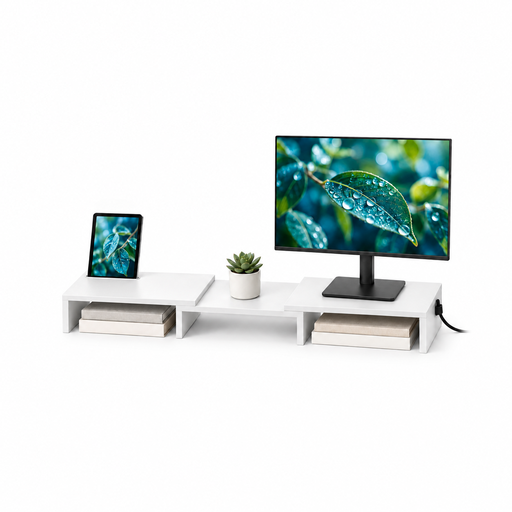
Floordirekt white MDF two-monitor stand, 80–108 cm
Consider this stand if adjustable width and angle would help arrange two displays for document comparison. Confirm what the stated 80–108 cm measurement refers to, how the monitors are supported, and whether their weight and the stand’s footprint suit your desk.
View on Joybuy
Frequently asked questions
Does a shared UK office desk need a DSE assessment if it has a dual monitor stand?
The employer must carry out a workstation assessment when a worker uses display screen equipment daily as part of normal work for continuous periods of an hour or more, according to the Health and Safety Executive. The assessment covers the workstation and working conditions, not just the monitor stand.
Should the source and translation be side by side or stacked?
Start with side-by-side screens when you need both documents visible for continuous comparison. A vertical mount can be considered when desk width is tight and a top-and-bottom arrangement suits the task; check the chosen model’s limits for the intended screen orientation.
What should I measure before ordering a clamp-mounted dual monitor stand?
Check each monitor’s weight and VESA pattern, then measure desk thickness and inspect the underside for obstructions. Compare all of these with the exact mount’s per-screen limits and clamp instructions; a screen-size rating alone does not establish that the setup will fit.
Will an adjustable stand deal with glare or an awkward workstation?
An adjustable stand can help position the screens, but it cannot address the whole workstation on its own. Health and Safety Executive guidance also covers chair and desk arrangement, posture, lighting and reflections, so review those conditions when the shared desk is set up.


