If you regularly rotate or reposition one display while comparing a source document with its translation, look for a dual arm that lets you adjust each screen independently. If both screens will stay level and side by side, a simpler aligned arrangement may suit you, but either choice must fit each monitor’s mounting pattern, weight and depth as well as your desk.
Who needs which layout?
Side-by-side text reviewers
Keep the source and translation visible together, with both screens positioned for comparison rather than one pushed far to the side. The Health and Safety Executive advises keeping the screen and keyboard central to avoid twisting your back.
Portrait-layout document editors
If longer passages or terminology lists are easier to view on a vertical screen, check whether one display can rotate without moving the other. StarTech.com lists individual adjustment and display rotation for its ARMDUAL2 dual arm; check those functions on the model you choose.
Compact-desk home workers
Mounting two screens can leave room for papers and reference material, provided the mount fits the desk. Check the usable edge or grommet area, any obstruction beneath the desktop and the requirements of both monitors before choosing a clamp or grommet design.
What should you check before buying?
Decide how the two texts need to move relative to each other, then check screen compatibility and desk fit before settling on a mount. The Health and Safety Executive advises placing a screen with its top around eye level and roughly an arm’s length away, while keeping the main working position central.
| Concern |
What to check |
Who this matters to |
| Independent positioning |
Check whether each screen has its own height, tilt, swivel and rotation adjustment, and whether both VESA patterns match the mount. |
When I turn the source document into portrait view, I need to move it without shifting the translation; around 42% of consumers put independent positioning first. |
| Viewing position |
Check the available height and reach against your seated position, desk and any shelf or wall behind the screens. |
For a long review session, I need both texts at a usable height without repeatedly turning away from my keyboard; around 33% of consumers chiefly prioritise screen position. |
| Desk fit and screen load |
Check each monitor’s installed weight and depth against the mount’s per-screen limits, then measure the usable desk edge or grommet area. |
I need space for printed references, but the mount still has to fit my desk and carry each display; roughly 25% of consumers make desk fit and load their primary concern. |
Common buying mistakes
-
Treating screen size as proof of compatibility
Two monitors with the same diagonal size can differ in weight and depth. Atdec identifies both as important checks when selecting an arm.
Compare each monitor’s installed weight and depth with the exact mount’s compatibility guidance, not just its maximum screen-size figure.
-
Combining the weights of both screens
A per-arm limit applies to each display. StarTech.com specifies up to 8 kg per arm for ARMDUAL2; a lighter second monitor does not increase the first arm’s stated limit.
Check the installed weight of each monitor separately against the relevant arm’s capacity.
-
Overlooking the desk underside
A drawer, brace or cable tray can obstruct a mount even when there is space on top of the desk.
Inspect underneath, measure the usable edge or grommet area and compare it with the mounting requirements of the exact product.
-
Assuming any dual stand will give a comfortable view
A stand cannot improve screen placement if its adjustment range does not suit your desk and monitors. The Health and Safety Executive advises keeping the screen and keyboard central to avoid twisting your back.
Check that the main screen can sit with its top around eye level and roughly an arm’s length away, then position the second screen without making you turn continually.
Brands to consider for dual-monitor mounts
Ergotron
Its LX range includes side-by-side and stacking configurations, so the exact model matters when choosing a layout.
- Ergotron specifies two screens up to 27 inches, 3.2–9.1 kg per screen and VESA 75 or 100 mounting for the cited LX Dual Side-by-Side model.
- Ergotron labels that model discontinued and says 23- to 27-inch screens cannot be stacked in that configuration. Check the specifications of a current model rather than assuming every LX arrangement has the same limits.
StarTech.com
The ARMDUAL2 provides a documented clamp-or-grommet option for two conventional office monitors.
- StarTech.com specifies VESA 75 × 75 mm and 100 × 100 mm mounting, screens up to 32 inches and 8 kg per arm, plus height, tilt, swivel and rotation adjustment.
- Those limits belong to ARMDUAL2. Check each monitor’s weight, depth and mounting pattern rather than relying on its diagonal size alone.
Humanscale
Its adjustable monitor-arm range is relevant if you expect to reposition screens regularly or use a sit-stand workstation.
- Humanscale describes weight-compensating spring adjustment for its M8.1 arm.
- Humanscale states that the cited dual-monitor arrangement requires an optional crossbar and supports up to 12 lb per monitor. Confirm the configuration and both display weights before ordering.
Joybuy products for two-monitor setups
These two-monitor stands offer different ways to arrange a source and translation at a home desk. Compare their stated features with the movement you need, then check monitor and desk fit for the exact model.
 No image available
DELL Pro Dual Monitor Stand MDS19
Consider this two-monitor stand if you want a separate display for the source and translation. Before buying, confirm that both monitors fit the stand and that its adjustment range and mounting arrangement work on your desk.
View on Joybuy
 No image available
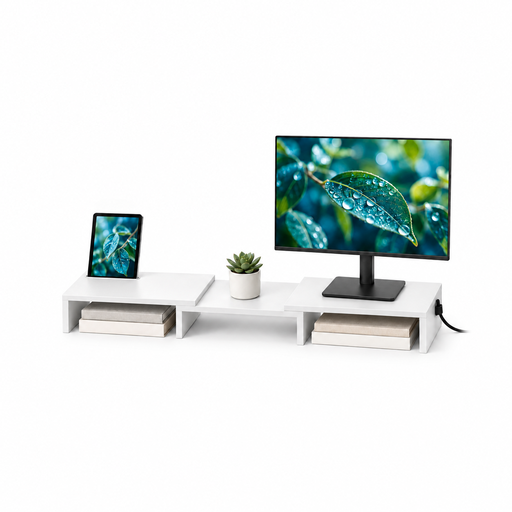
Floordirekt Two-Monitor Stand, 80–108 cm, White
Consider this stand if adjustable width would help you arrange two monitors beside your documents. Its title specifies an 80–108 cm width range, angle adjustment and MDF construction; check how the monitors sit on it and whether its dimensions and load limits suit your setup.
View on Joybuy
Frequently asked questions
Do both monitors need VESA mounting holes?
Both monitors need a compatible mounting pattern if you choose a VESA-mounted arm. For example, StarTech.com specifies VESA 75 × 75 mm or 100 × 100 mm for ARMDUAL2; check each monitor’s manual or rear panel against the exact mount.
Is screen size enough to tell whether a dual arm will fit?
No. Check the installed weight and depth of each monitor alongside the mount’s per-screen limits and mounting pattern. Atdec identifies weight and depth as important compatibility factors, so a matching screen-size headline is not enough on its own.
Where should I position two screens for translation review?
Aim to keep your main working position central and arrange the second screen so you do not continually twist to read it. The Health and Safety Executive advises placing the top of a screen around eye level and roughly an arm’s length away; check that your chosen stand can achieve a workable position on your desk.
Should I choose a desk clamp or a grommet mount?
Choose a method supported by the exact stand and physically suited to your desk. A clamp needs a usable edge, while a grommet mount needs a suitable hole; inspect beneath the desktop for drawers, braces or cable trays before ordering.


